



At Visual Paradigm, we are committed to making diagram-as-code as accessible, seamless, and flexible as possible. Today, we are thrilled to announce a major enhancement to Visual Paradigm VPasCode: official support for JSONC (JSON with Comments) visualization!
Developers and system architects frequently work with configuration files like tsconfig.json, settings.json, or package.json. While standard JSON is ubiquitous, it strictly forbids comments—forcing teams to choose between strict syntax and clear context. JSONC solves this problem by allowing inline and block comments. With our latest update, you can now use VPasCode as a feature-rich, free JSONC editor and an intuitive online JSONC diagram tool to turn complex configuration files into clear, visual diagrams instantly.
What is VPasCode?
If you are new to VPasCode, welcome! VPasCode (short for Visual Paradigm’s diagram-as-code platform) is a unified web-based environment designed to convert text and code scripts into beautiful, professional diagrams. Instead of manually drawing shapes and connecting lines, VPasCode lets you type or paste your code while the engine renders real-time visual representations right alongside it.
VPasCode supports a vast ecosystem of text-to-diagram formats and domain-specific languages, including:
- Diagram & Visualization DSLs: PlantUML, Mermaid, Graphviz, Markmap, ECharts
- Structured Data Formats: JSON, JSONC, YAML, XML, CSV, TOML
- Database Languages: SQL (DDL, ERD creation)
- Programming Languages: Java, TypeScript, Go, Rust, C#, Python, C, C++, PHP, Ruby, Scala, Zig, Kotlin, Swift, Elixir
Whether you need a PlantUML Sequence Diagrams, a Mermaid Flowcharts, a SQL Entity Relationship Diagram, or a visual tree of a complex structured file, VPasCode serves as your all-in-one studio. You can learn more on the official VPasCode Feature & Overview Page.
Why JSONC Visualization Matters
Modern build tools, linters, and compilers rely heavily on JSONC to document configuration flags directly inside the file. However, as configuration trees grow, reading through deeply nested keys and extensive inline commentary can become tedious.
By leveraging VPasCode as your go-to online JSONC diagram tool, you can transform dense configuration structures into clean, interactive hierarchy charts while keeping your inline documentation intact. It combines the power of a modern free JSONC editor with instantaneous visual rendering.
How It Works: A Real-World Example
Working with JSONC in VPasCode follows the same straightforward dual-pane experience as our other supported formats. On the left side of your screen, you can write or paste your annotated JSON syntax inside the free JSONC editor. On the right side, VPasCode immediately renders the corresponding dynamic diagram.
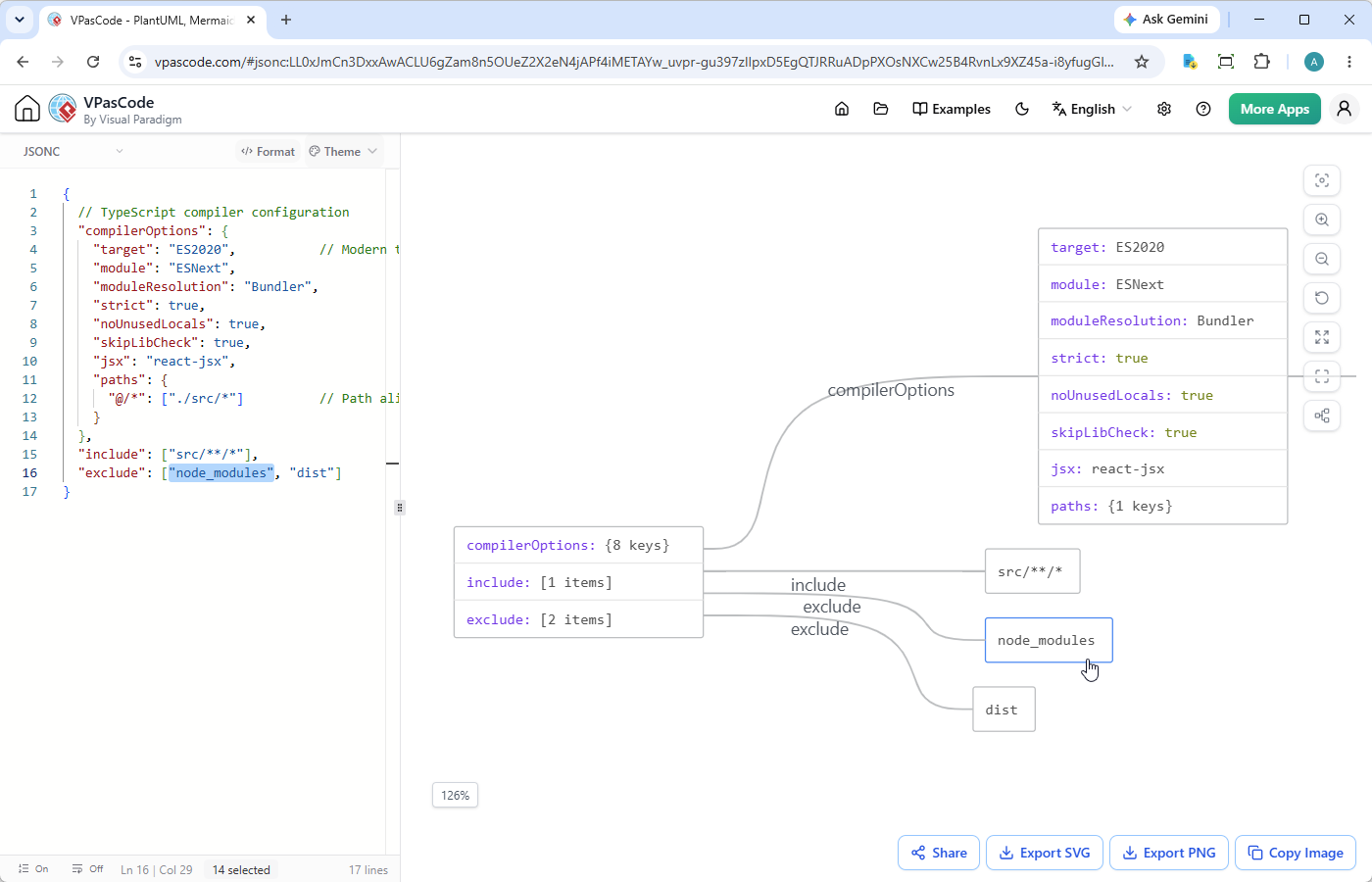
Consider this standard tsconfig.json file, complete with modern compiler flags and single-line comments:
{
  // TypeScript compiler configuration
  "compilerOptions": {
    "target": "ES2020",           // Modern target
    "module": "ESNext",
    "moduleResolution": "Bundler",
    "strict": true,
    "noUnusedLocals": true,
    "skipLibCheck": true,
    "jsx": "react-jsx",
    "paths": {
      "@/*": ["./src/*"]          // Path aliases
    }
  },
  "include": ["src/**/*"],
  "exclude": ["node_modules", "dist"]
}When pasted into our online JSONC diagram tool, VPasCode parses the object hierarchy, strips or preserves context appropriately, and generates a visual representation showing how compilerOptions, include, and exclude properties map out visually. This makes inspecting complex project settings effortless during code reviews or team onboarding.
Key Features of the VPasCode JSONC Experience
Our JSONC support comes fully integrated with the powerful editing and publishing suite that makes VPasCode unique:
- Interactive Code-to-Diagram Navigation: Clicking on any node or shape inside the rendered diagram instantly highlights the corresponding line of code in the editor, allowing you to locate key properties in seconds.
- One-Click Pretty-Formatting: Automatically format messy or unindented JSONC code with a single click to maintain pristine readability.
- Multiple Diagram Themes: Choose from various visual themes to match your presentation preferences, dark mode setups, or documentation styles.
- Flexible Exporting (SVG & PNG): Export your generated JSONC diagrams as high-resolution PNG images or scalable SVG vectors for embedding in documentation platforms.
- Copy Image to Clipboard: Instantly copy diagram visuals to your clipboard for quick pasting into Slack, Microsoft Teams, or email threads.
- No-Login Hyperlink Sharing: Generate lightweight share links and QR codes to share your live JSONC diagrams with teammates or clients instantly—no registration or login required.
Advanced AI & Platform Capabilities
Beyond standard text-to-diagram workflows, VPasCode incorporates industry-exclusive capabilities designed to speed up your workflow:
- Automatic Format Detection: Paste any supported code snippet into the editor, and VPasCode will automatically detect whether it is JSONC, PlantUML, Mermaid, or SQL, instantly choosing the appropriate renderer.
- AI Code Error Fixing: Stumble upon a syntax mistake or a missing bracket? Click Fix by AI to automatically resolve syntax errors. VPasCode even provides side-by-side diff details explaining what was fixed so you can learn in real-time.
- AI Diagram Translation: Natively translate text inside your diagrams into multiple languages with a single click to collaborate across international teams.
- OpenDocs Integration: Seamlessly publish and push your generated diagrams directly into Visual Paradigm OpenDocs for comprehensive project documentation.
Note: Core diagram editing, live rendering, automatic code detection, and image exports are completely free for all users. AI Error Fixing and AI Translation are available to users with Visual Paradigm Online Combo Edition (or higher) or Visual Paradigm Desktop Professional Edition (with active maintenance).
Try the Free JSONC Editor Today!
Ready to visualize your configuration files, inspect complex data structures, and simplify your developer documentation? You can start using our free JSONC editor right now in your web browser—no installation or sign-up needed.
Launch VPasCode Online JSONC Diagram Tool
To explore the complete list of supported DSLs, themes, and platform updates, visit the VPasCode Home Page.