


We are thrilled to announce a major enhancement to Visual Paradigm VPasCode! Our unified platform now officially supports the automatic visualization of various programming languages into UML Class Diagrams. Among the 15 languages we’ve just rolled out, we are especially excited to introduce powerful support for Rust.
If you have been looking for an intuitive online Rust diagram tool to map out your structs, enums, and traits, your workflow is about to get a lot faster.
What is VPasCode?
For those new to the platform, VPasCode (Visual Paradigm’s diagram-as-code platform) is a highly versatile diagram-as-code tool. It empowers developers and architects to generate beautiful, accurate diagrams using popular text-to-diagram formats like PlantUML, Mermaid, Graphviz, ECharts, and more.
Whether you are mapping out structured data (JSON, YAML, SQL) or drawing complex system architectures (C4, Gantt, Sequence, Mind Maps), VPasCode provides a convenient, real-time environment to get the job done.
Introducing Rust to UML Visualization
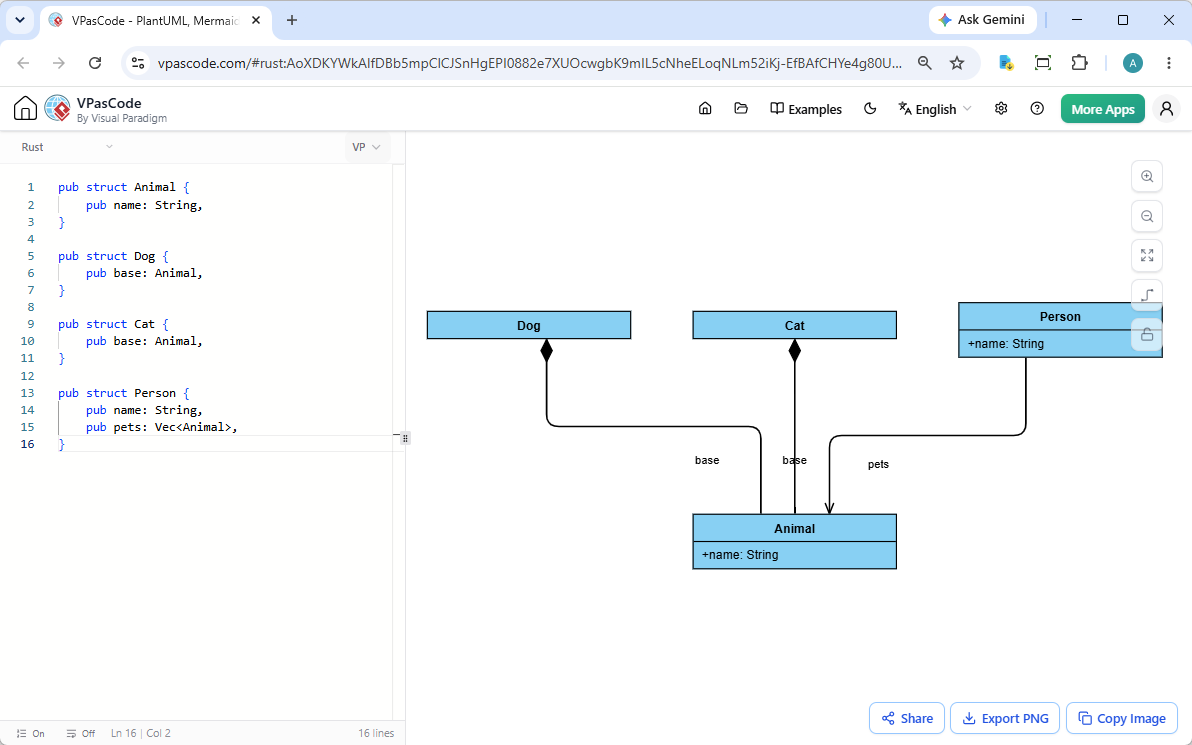
Understanding the architecture of a growing codebase can be challenging. With our latest update, VPasCode acts as a free Rust editor and visualizer. The usage is identical to other as-code formats on our platform:
- Split-Screen Editing: Simply paste or type your Rust code into the code editor on the left side of the GUI. As you edit, a precise UML class diagram is rendered in real-time on the right.
- Drag and Drop: Prefer working with local files? You can drag and drop your source code file directly into VPasCode, instantly populating the editor and generating your diagram.
- Automatic Format Detection: Just paste your code. VPasCode analyzes the syntax and automatically applies the correct visualization rules—no manual configuration required.
See It In Action
To demonstrate how effortlessly VPasCode handles programming architectures, let’s look at an example. While this announcement celebrates our new Rust capabilities, our engine is universally designed for 15 different languages. Here is a structural example using Go to show you exactly how the rendering logic maps out relationships:
pub struct Animal {
    pub name: String,
}

pub struct Dog {
    pub base: Animal,
}

pub struct Cat {
    pub base: Animal,
}

pub struct Person {
    pub name: String,
    pub pets: Vec,
}You can experience this live! Open and edit the above example in VPasCode by visiting this direct link: View Example in VPasCode.
Core Functionality Designed for Collaboration
VPasCode isn’t just about viewing your code; it is about sharing and documenting it effectively. Every user has access to these built-in diagramming features completely free of charge:
- Export Options: Download your generated UML diagrams as high-quality SVG vector images or standard PNG files.
- Quick Copy: Copy the rendered image directly to your clipboard for instant pasting into emails, chats, or documentation.
- Frictionless Sharing: Generate a unique hyperlink to share your live diagram with colleagues. No login or registration is required for you or your team to view and edit the shared link.
Unlocking Advanced AI & Documentation Features
As a premier diagram-as-code tool, VPasCode also includes industry-unique advanced features designed to streamline your workflow (available with Visual Paradigm Online Combo Edition or Desktop Professional Edition active maintenance):
- AI Code Error Fixing: If you make a syntax error, simply click ‘Fix by AI’. The AI will not only correct the error but also provide a side-by-side diff explaining the solution so you can learn from it.
- AI Diagram Translation: Instantly break language barriers by natively translating your diagram’s text content (e.g., from English to Chinese) with a single click.
- OpenDocs Integration: Seamlessly push your generated diagrams directly to Visual Paradigm OpenDocs for comprehensive enterprise documentation.
Try VPasCode Today
Ready to see your codebase from a new perspective? Whether you need a free Rust editor to visualize your latest module, or an online Rust diagram tool to document your legacy systems, VPasCode has you covered.