


 We are thrilled to announce a major update to Visual Paradigm VPasCode! Visual Paradigm’s unified diagram-as-code platform now supports full visualization for Zig source code as UML Class Diagrams. Whether you are building high-performance systems or exploring modern systems programming languages, understanding complex codebases can be challenging. With our newest feature release, you can instantly convert your Zig code structures into clean, interactive UML class diagrams without touching a manual drawing tool.While VPasCode now supports seamless visualization for an extensive list of programming languages—including Java, TypeScript, Go, Rust, C#, Python, C, C++, PHP, Ruby, Scala, Kotlin, Swift, and Elixir—this announcement focuses specifically on our powerful new support for Zig.
What is VPasCode?
VPasCode (Visual Paradigm’s diagram-as-code platform) is an all-in-one solution designed to eliminate the friction between writing code and visualizing architecture. Acting as both a free Zig editor and a versatile diagram-as-code tool, VPasCode enables developers, system architects, and technical writers to generate diagrams automatically from simple text scripts and code files.
Instead of manually dragging shapes and wiring connections in legacy drawing apps, VPasCode parses your source code and generates live visual representations in real time. It unifies dozens of popular diagramming DSLs, structured data formats, database languages, and modern programming languages under a single intuitive web interface.
How Zig UML Visualization Works
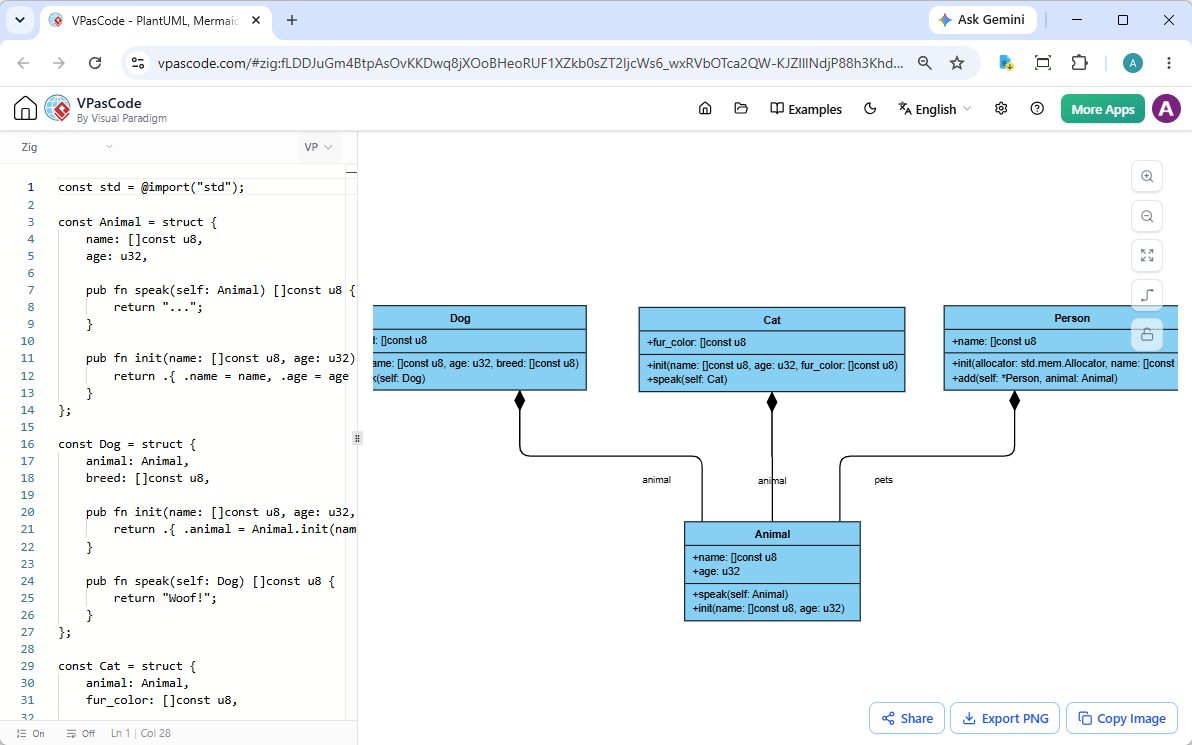
Visualizing your Zig codebase in VPasCode is fast, responsive, and completely friction-free. The workspace features a side-by-side view designed for rapid workflow:
- Left Pane (Code Editor): Paste, type, or edit your code directly in a high-performance code editor featuring syntax recognition.
- Right Pane (Live Preview): Watch as your code instantly translates into a rendered UML Class Diagram side-by-side as you type.
- Drag-and-Drop Source Files: Skip copying and pasting entirely! Drag a
.zigsource file directly into the editor pane, and VPasCode will read the file and build your class diagram immediately.
Interactive Zig Example
To see this feature in action right now, consider the following example demonstrating custom structs, methods, initialization methods, and slice references in Zig:
const std = @import("std");

const Animal = struct {
    name: []const u8,
    age: u32,

    pub fn speak(self: Animal) []const u8 {
        return "...";
    }

    pub fn init(name: []const u8, age: u32) Animal {
        return .{ .name = name, .age = age };
    }
};

const Dog = struct {
    animal: Animal,
    breed: []const u8,

    pub fn init(name: []const u8, age: u32, breed: []const u8) Dog {
        return .{ .animal = Animal.init(name, age), .breed = breed };
    }

    pub fn speak(self: Dog) []const u8 {
        return "Woof!";
    }
};

const Cat = struct {
    animal: Animal,
    fur_color: []const u8,

    pub fn init(name: []const u8, age: u32, fur_color: []const u8) Cat {
        return .{ .animal = Animal.init(name, age), .fur_color = fur_color };
    }

    pub fn speak(self: Cat) []const u8 {
        return "Meow!";
    }
};

const Person = struct {
    name: []const u8,
    pets: std.ArrayList(Animal),

    pub fn init(allocator: std.mem.Allocator, name: []const u8) Person {
        return .{ .name = name, .pets = std.ArrayList(Animal).init(allocator) };
    }

    pub fn add(self: *Person, animal: Animal) !void {
        try self.pets.append(animal);
    }
};
You can instantly view, edit, and experiment with this exact example inside our online Zig diagram tool without setting up any local environment:
Click here to launch this live Zig UML Diagram in VPasCode
Key Functionalities & Productivity Features
Whether you need an effective free Zig editor for rapid design reviews or a versatile platform for engineering documentation, VPasCode includes comprehensive toolsets out of the box:
1. Instant Export Options
Once your diagram is rendered, you can quickly export vector-quality visuals to use in technical specs, engineering blogs, slide decks, or pull requests:
- Export to SVG: Clean, scalable vector graphic output ideal for web embedding and high-resolution printing.
- Export to PNG: Standard image output perfect for documentation, team chat platforms, and presentations.
- Copy to Clipboard: Copy visual diagrams directly to your clipboard for quick pasting into messaging apps or document editors.
2. Seamless Sharing via Link (No Login Required)
Collaboration shouldn’t be blocked by accounts or paywalls. VPasCode allows you to encode your source code and diagram state directly into a shareable hyperlink. Receivers can open your shared URL and immediately view and edit the diagram—no sign-up or login required.
3. Automatic Code Detection
Unsure which syntax setting to pick? Simply paste your code or data into the editor pane. VPasCode intelligently analyzes your code syntax and automatically applies the appropriate parser to render your diagram instantly.
4. Advanced AI Capabilities (Paid Editions)
For users looking to supercharge their workflows, VPasCode integrates intelligent AI assistance:
- AI Code Error Fixing: Stasis or syntax bugs blocking your render? Click “Fix by AI” to fix errors automatically. VPasCode displays side-by-side code diffs and clear explanations so you learn while you fix.
- AI Diagram Translation: Seamlessly translate labels and diagram text into foreign languages with a single click.
- Visual Paradigm OpenDocs Integration: Connect your rendered diagrams directly to Visual Paradigm OpenDocs to compile production-ready project documentation effortlessly.
Note: Core diagram editing, live rendering, image export, and URL sharing are 100% free. Advanced AI functionality and OpenDocs integration are available in Visual Paradigm Online Combo Edition (or higher) and Visual Paradigm Desktop Professional Edition (with active maintenance).
Try VPasCode Today
Ready to streamline your systems architecture and turn your code into clean, expressive visuals? Start using our premier online Zig diagram tool today—it’s fast, browser-based, and completely free to start.
Open VPasCode App & Start Diagramming Now
Unified Platform entrance of VPasCode: Under the “Developer” category of the app hub.