


Database design and documentation just got a whole lot smoother. If you have ever spent hours manually dragging, dropping, and aligning boxes to create an Entity Relationship Diagram (ERD), Visual Paradigm has some fantastic news for you. We have officially supercharged our unified text-to-diagram platform, Visual Paradigm VPasCode, by introducing robust support for native SQL code.
With this latest enhancement, VPasCode now functions as a highly intuitive free SQL to ERD tool. You can simply paste your raw SQL DDL scripts into our environment and watch your complete entity relationship diagrams render instantly right before your eyes.
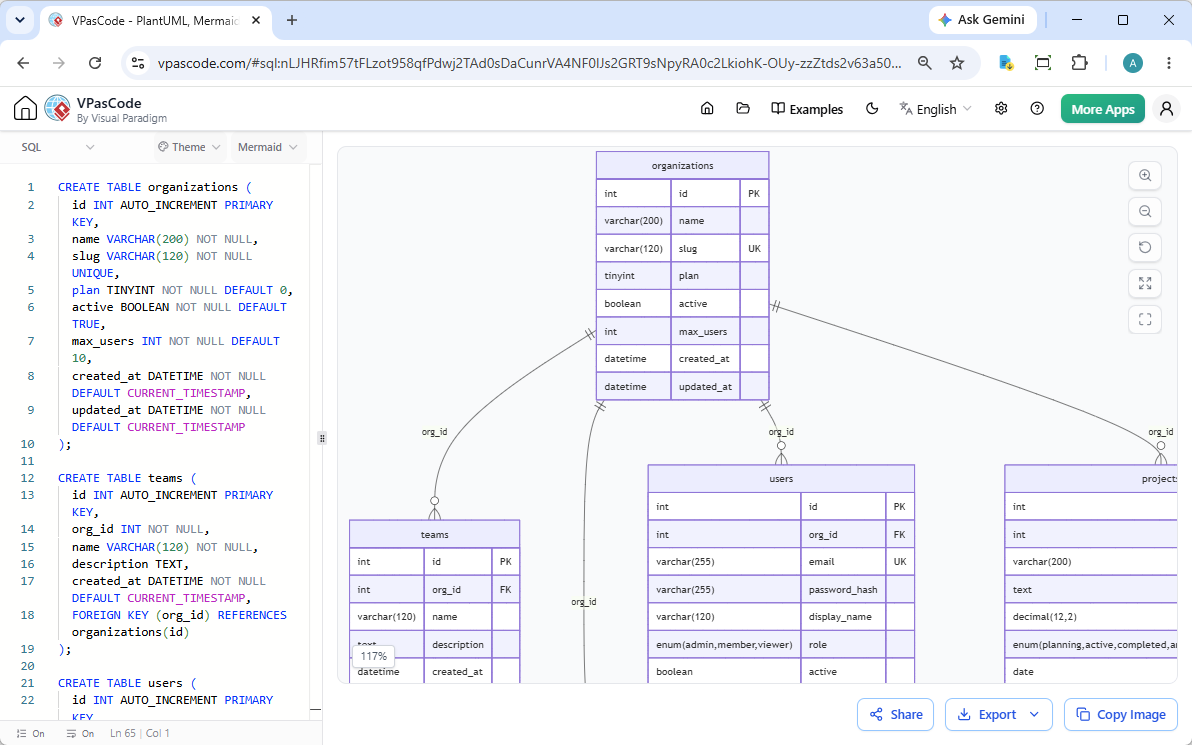
Whether you are a data architect designing an enterprise ecosystem, a full-stack developer prototyping a new feature, or a student learning relational database management systems, this powerful online SQL ERD tool is designed to save you time and eliminate manual diagramming bottlenecks.
What is VPasCode? The Ultimate Diagram-as-Code Platform
If you are new to the platform, here is a quick refresher: VPasCode is Visual Paradigm’s unified text-to-diagram hub. Instead of traditional click-and-drag drawing tools, VPasCode adopts a “Diagram-as-Code” (DaC) philosophy. It allows you to build, maintain, and version-control complex system architectures, flowcharts, and sequence diagrams using simple, human-readable text syntax.
The platform comes equipped with a lightning-fast, free code editor on the left and a real-time diagram renderer on the right. Because it is built as a truly integrated environment, VPasCode theoretically supports all popular text-to-diagram standards, including full PlantUML and Mermaid syntaxes. It gives you the best of open-source rendering engines combined with Visual Paradigm’s sleek web ecosystem.
Dual Engine Flexibility: The Ultimate SQL ERD Editor
While standard code-to-diagram utilities lock you into a single layout engine, VPasCode gives you complete creative and architectural control. Unlike other languages we support, our new SQL ERD editor introduces a unique dual-rendering toggle.
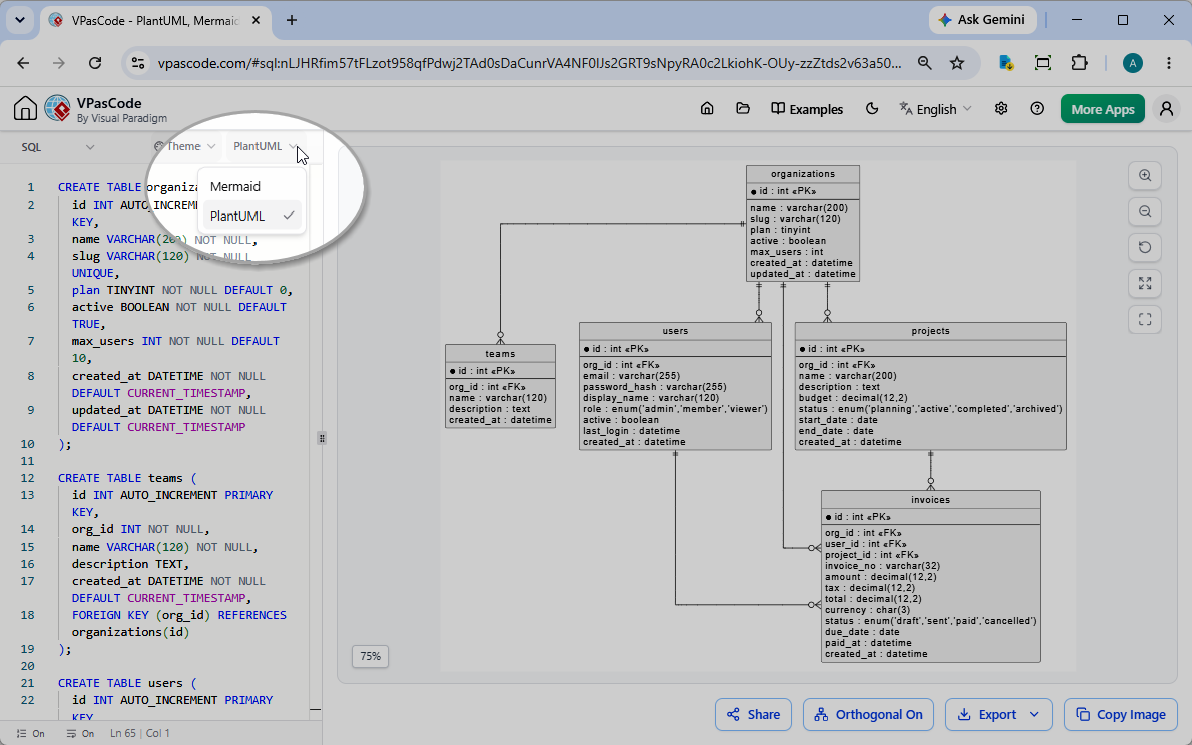
On top of the SQL code editor on the left pane, you will find a drop-down menu that defaults to “Mermaid”. If you want to view or export your database design using PlantUML syntax rules instead, you can simply click the drop-down menu and switch it to “PlantUML”. The system automatically processes your SQL script and transforms it using your chosen engine instantly.
See It in Action: 4 Real-World Interactive Examples
To prove how versatile this new feature is across different database dialects and software architectures, we have prepared four interactive examples. You can click the links below each sample to open them directly in the live online SQL ERD tool environment.
1. E-Commerce Schema (Standard SQL)
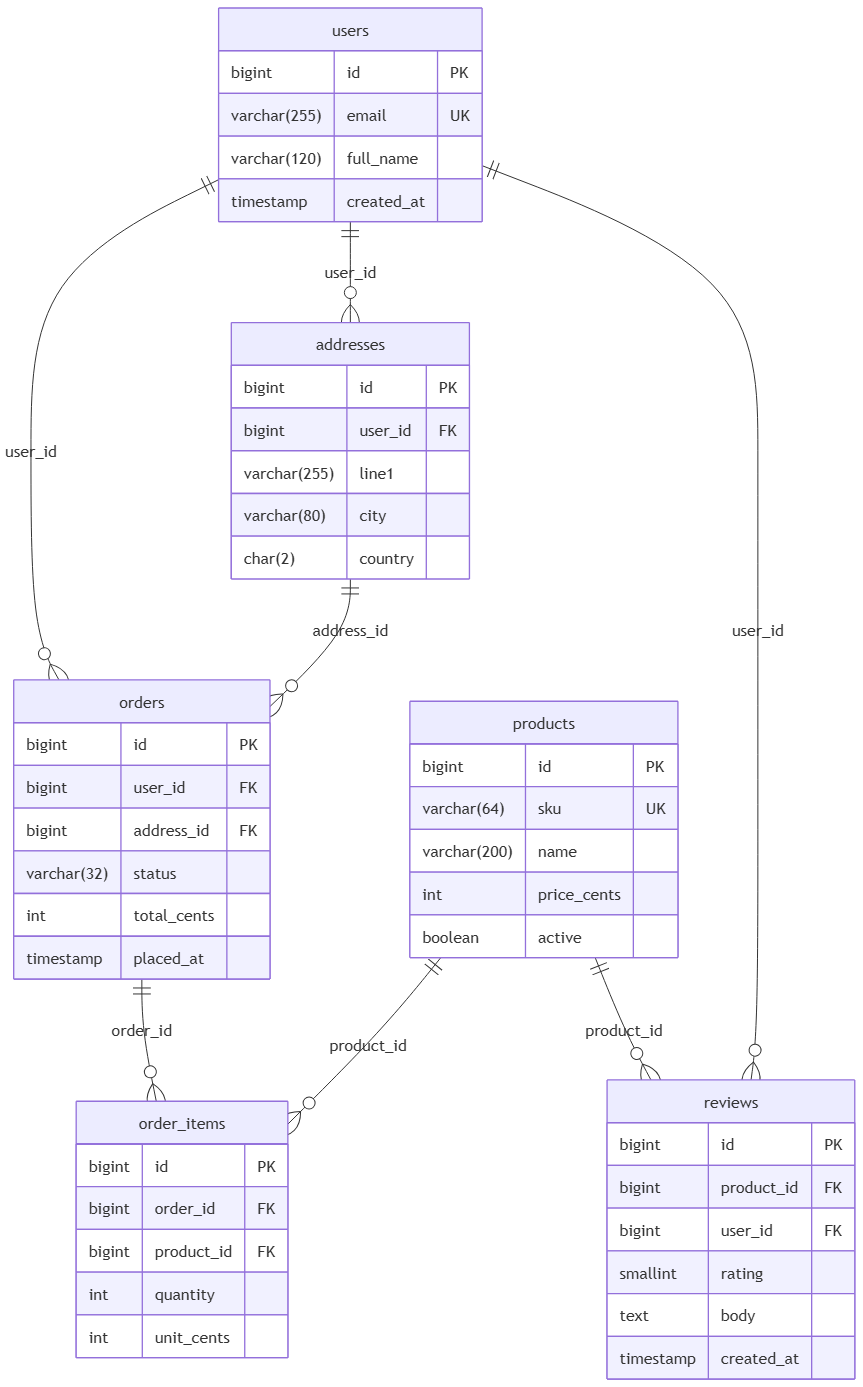
This standard relational schema demonstrates classic e-commerce relationships: users, addresses, products, orders, order line items, and product reviews, featuring standard primary and foreign key references.
CREATE TABLE users (
  id BIGINT PRIMARY KEY,
  email VARCHAR(255) NOT NULL UNIQUE,
  full_name VARCHAR(120),
  created_at TIMESTAMP NOT NULL
);

CREATE TABLE addresses (
  id BIGINT PRIMARY KEY,
  user_id BIGINT NOT NULL REFERENCES users(id),
  line1 VARCHAR(255) NOT NULL,
  city VARCHAR(80),
  country CHAR(2) NOT NULL
);

CREATE TABLE products (
  id BIGINT PRIMARY KEY,
  sku VARCHAR(64) NOT NULL UNIQUE,
  name VARCHAR(200) NOT NULL,
  price_cents INT NOT NULL,
  active BOOLEAN NOT NULL
);

CREATE TABLE orders (
  id BIGINT PRIMARY KEY,
  user_id BIGINT NOT NULL,
  address_id BIGINT,
  status VARCHAR(32) NOT NULL,
  total_cents INT NOT NULL,
  placed_at TIMESTAMP NOT NULL,
  FOREIGN KEY (user_id) REFERENCES users(id),
  FOREIGN KEY (address_id) REFERENCES addresses(id)
);

CREATE TABLE order_items (
  id BIGINT PRIMARY KEY,
  order_id BIGINT NOT NULL,
  product_id BIGINT NOT NULL,
  quantity INT NOT NULL,
  unit_cents INT NOT NULL,
  CONSTRAINT fk_oi_order FOREIGN KEY (order_id) REFERENCES orders(id),
  CONSTRAINT fk_oi_product FOREIGN KEY (product_id) REFERENCES products(id)
);

CREATE TABLE reviews (
  id BIGINT PRIMARY KEY,
  product_id BIGINT NOT NULL REFERENCES products(id),
  user_id BIGINT NOT NULL REFERENCES users(id),
  rating SMALLINT NOT NULL,
  body TEXT,
  created_at TIMESTAMP NOT NULL
);
2. Content Management Blog Schema (PostgreSQL Dialect)
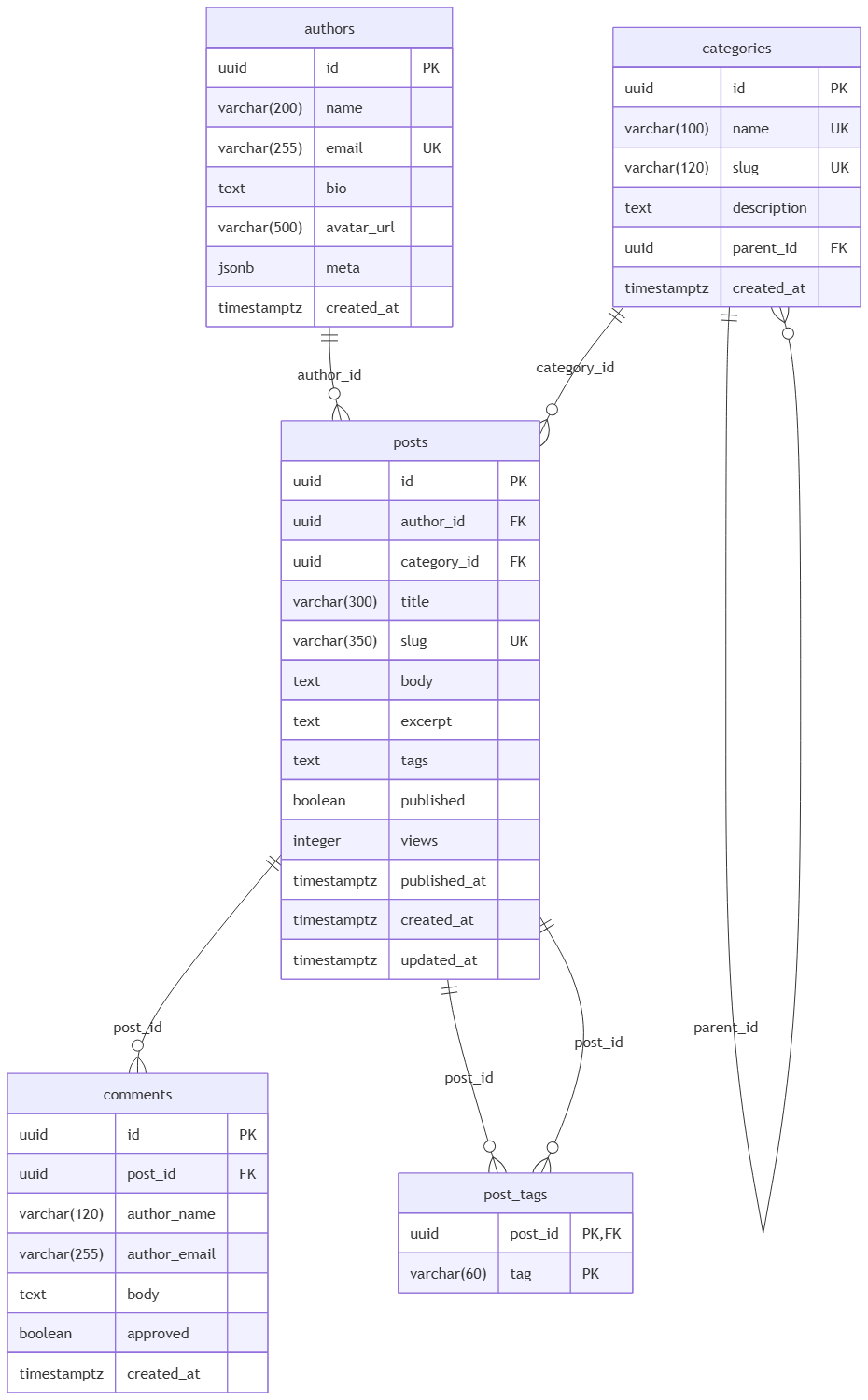
Modern applications require advanced data structures. This PostgreSQL-oriented schema features advanced configurations including complex arrays (TEXT[]), modern JSON objects (JSONB), and UUID data types for primary keys.
CREATE TABLE authors (
  id UUID PRIMARY KEY,
  name VARCHAR(200) NOT NULL,
  email VARCHAR(255) NOT NULL UNIQUE,
  bio TEXT,
  avatar_url VARCHAR(500),
  meta JSONB DEFAULT '{}',
  created_at TIMESTAMPTZ NOT NULL DEFAULT NOW()
);

CREATE TABLE categories (
  id UUID PRIMARY KEY,
  name VARCHAR(100) NOT NULL UNIQUE,
  slug VARCHAR(120) NOT NULL UNIQUE,
  description TEXT,
  parent_id UUID REFERENCES categories(id),
  created_at TIMESTAMPTZ NOT NULL DEFAULT NOW()
);

CREATE TABLE posts (
  id UUID PRIMARY KEY,
  author_id UUID NOT NULL REFERENCES authors(id),
  category_id UUID REFERENCES categories(id),
  title VARCHAR(300) NOT NULL,
  slug VARCHAR(350) NOT NULL UNIQUE,
  body TEXT NOT NULL,
  excerpt TEXT,
  tags TEXT[],
  published BOOLEAN NOT NULL DEFAULT FALSE,
  views INTEGER NOT NULL DEFAULT 0,
  published_at TIMESTAMPTZ,
  created_at TIMESTAMPTZ NOT NULL DEFAULT NOW(),
  updated_at TIMESTAMPTZ NOT NULL DEFAULT NOW()
);

CREATE TABLE comments (
  id UUID PRIMARY KEY,
  post_id UUID NOT NULL REFERENCES posts(id),
  author_name VARCHAR(120) NOT NULL,
  author_email VARCHAR(255) NOT NULL,
  body TEXT NOT NULL,
  approved BOOLEAN NOT NULL DEFAULT FALSE,
  created_at TIMESTAMPTZ NOT NULL DEFAULT NOW()
);

CREATE TABLE post_tags (
  post_id UUID NOT NULL REFERENCES posts(id),
  tag VARCHAR(60) NOT NULL,
  PRIMARY KEY (post_id, tag),
  CONSTRAINT fk_tags_post FOREIGN KEY (post_id) REFERENCES posts(id)
);
3. Multi-Tenant SaaS Engine (MySQL Dialect)
This MySQL DDL sample outlines a multi-tenant business system tracking organizations, team hierarchies, user permissions, project allocations, and billing invoices using native AUTO_INCREMENT, ENUM fields, and explicit decimals.
CREATE TABLE organizations (
  id INT AUTO_INCREMENT PRIMARY KEY,
  name VARCHAR(200) NOT NULL,
  slug VARCHAR(120) NOT NULL UNIQUE,
  plan TINYINT NOT NULL DEFAULT 0,
  active BOOLEAN NOT NULL DEFAULT TRUE,
  max_users INT NOT NULL DEFAULT 10,
  created_at DATETIME NOT NULL DEFAULT CURRENT_TIMESTAMP,
  updated_at DATETIME NOT NULL DEFAULT CURRENT_TIMESTAMP
);

CREATE TABLE teams (
  id INT AUTO_INCREMENT PRIMARY KEY,
  org_id INT NOT NULL,
  name VARCHAR(120) NOT NULL,
  description TEXT,
  created_at DATETIME NOT NULL DEFAULT CURRENT_TIMESTAMP,
  FOREIGN KEY (org_id) REFERENCES organizations(id)
);

CREATE TABLE users (
  id INT AUTO_INCREMENT PRIMARY KEY,
  org_id INT NOT NULL,
  email VARCHAR(255) NOT NULL UNIQUE,
  password_hash VARCHAR(255) NOT NULL,
  display_name VARCHAR(120) NOT NULL,
  role ENUM('admin', 'member', 'viewer') NOT NULL DEFAULT 'member',
  active BOOLEAN NOT NULL DEFAULT TRUE,
  last_login DATETIME,
  created_at DATETIME NOT NULL DEFAULT CURRENT_TIMESTAMP,
  FOREIGN KEY (org_id) REFERENCES organizations(id)
);

CREATE TABLE projects (
  id INT AUTO_INCREMENT PRIMARY KEY,
  org_id INT NOT NULL,
  name VARCHAR(200) NOT NULL,
  description TEXT,
  budget DECIMAL(12, 2) NOT NULL DEFAULT 0.00,
  status ENUM('planning', 'active', 'completed', 'archived') NOT NULL DEFAULT 'planning',
  start_date DATE,
  end_date DATE,
  created_at DATETIME NOT NULL DEFAULT CURRENT_TIMESTAMP,
  FOREIGN KEY (org_id) REFERENCES organizations(id)
);

CREATE TABLE invoices (
  id INT AUTO_INCREMENT PRIMARY KEY,
  org_id INT NOT NULL,
  user_id INT NOT NULL,
  project_id INT,
  invoice_no VARCHAR(32) NOT NULL UNIQUE,
  amount DECIMAL(12, 2) NOT NULL,
  tax DECIMAL(12, 2) NOT NULL DEFAULT 0.00,
  total DECIMAL(12, 2) NOT NULL,
  currency CHAR(3) NOT NULL DEFAULT 'USD',
  status ENUM('draft', 'sent', 'paid', 'cancelled') NOT NULL DEFAULT 'draft',
  due_date DATE NOT NULL,
  paid_at DATETIME,
  created_at DATETIME NOT NULL DEFAULT CURRENT_TIMESTAMP,
  FOREIGN KEY (org_id) REFERENCES organizations(id),
  FOREIGN KEY (user_id) REFERENCES users(id),
  FOREIGN KEY (project_id) REFERENCES projects(id)
);
4. Library Management Catalog (SQLite Dialect)
Perfect for localized application structures, this SQLite dataset includes comprehensive configurations for publisher directories, catalog inventories with structural cross-reference constraints, member databases, physical loans, and waiting list holds.
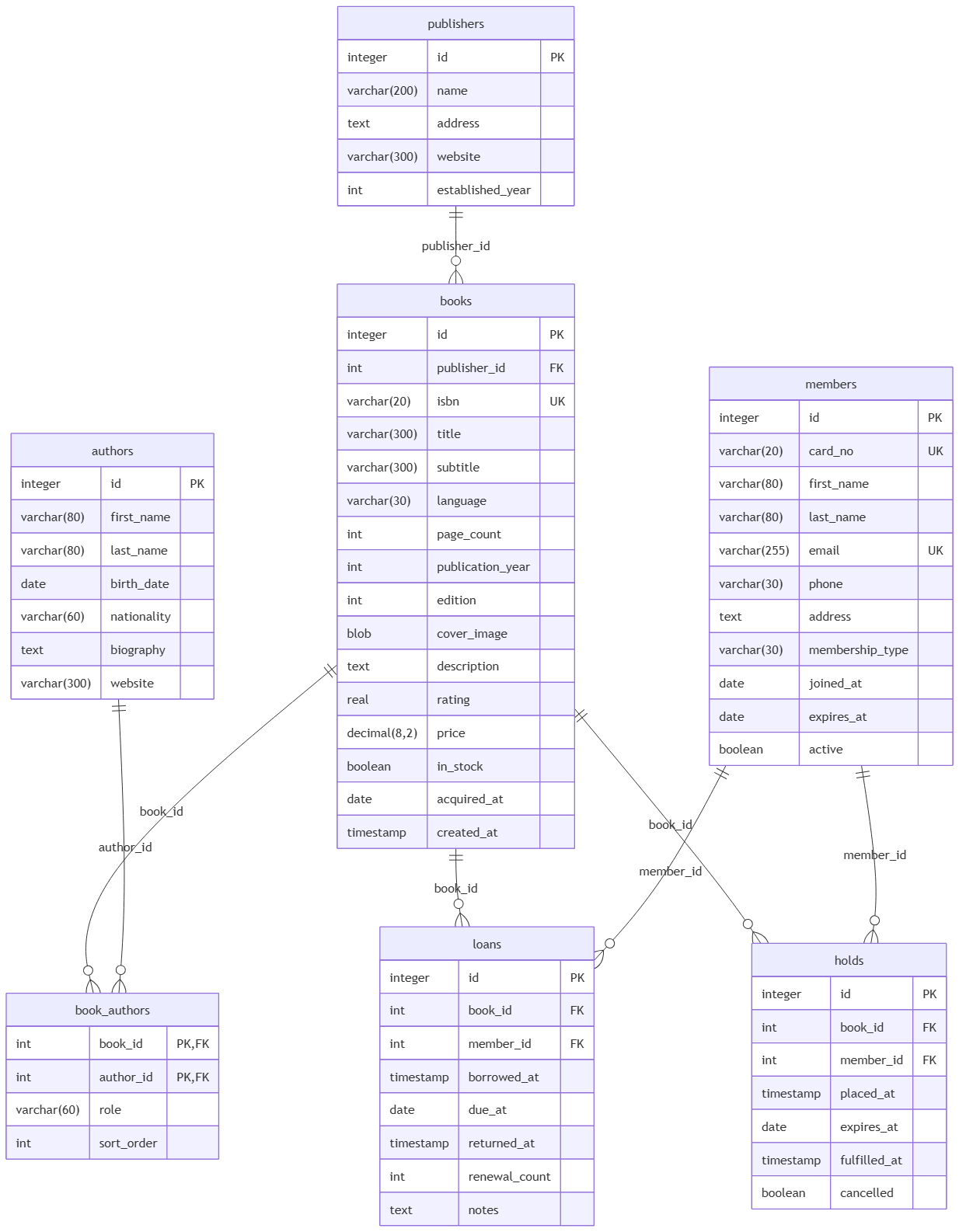
CREATE TABLE publishers (
  id INTEGER PRIMARY KEY,
  name VARCHAR(200) NOT NULL,
  address TEXT,
  website VARCHAR(300),
  established_year INT
);

CREATE TABLE books (
  id INTEGER PRIMARY KEY,
  publisher_id INT,
  isbn VARCHAR(20) NOT NULL UNIQUE,
  title VARCHAR(300) NOT NULL,
  subtitle VARCHAR(300),
  language VARCHAR(30) NOT NULL DEFAULT 'English',
  page_count INT,
  publication_year INT,
  edition INT DEFAULT 1,
  cover_image BLOB,
  description TEXT,
  rating REAL DEFAULT 0.0,
  price DECIMAL(8, 2),
  in_stock BOOLEAN NOT NULL DEFAULT TRUE,
  acquired_at DATE,
  created_at TIMESTAMP NOT NULL,
  FOREIGN KEY (publisher_id) REFERENCES publishers(id)
);

CREATE TABLE authors (
  id INTEGER PRIMARY KEY,
  first_name VARCHAR(80) NOT NULL,
  last_name VARCHAR(80) NOT NULL,
  birth_date DATE,
  nationality VARCHAR(60),
  biography TEXT,
  website VARCHAR(300)
);

CREATE TABLE book_authors (
  book_id INT NOT NULL,
  author_id INT NOT NULL,
  role VARCHAR(60) DEFAULT 'Author',
  sort_order INT NOT NULL DEFAULT 0,
  PRIMARY KEY (book_id, author_id),
  CONSTRAINT fk_ba_book FOREIGN KEY (book_id) REFERENCES books(id),
  CONSTRAINT fk_ba_author FOREIGN KEY (author_id) REFERENCES authors(id)
);

CREATE TABLE members (
  id INTEGER PRIMARY KEY,
  card_no VARCHAR(20) NOT NULL UNIQUE,
  first_name VARCHAR(80) NOT NULL,
  last_name VARCHAR(80) NOT NULL,
  email VARCHAR(255) NOT NULL UNIQUE,
  phone VARCHAR(30),
  address TEXT,
  membership_type VARCHAR(30) NOT NULL DEFAULT 'Standard',
  joined_at DATE NOT NULL,
  expires_at DATE NOT NULL,
  active BOOLEAN NOT NULL DEFAULT TRUE
);

CREATE TABLE loans (
  id INTEGER PRIMARY KEY,
  book_id INT NOT NULL,
  member_id INT NOT NULL,
  borrowed_at TIMESTAMP NOT NULL,
  due_at DATE NOT NULL,
  returned_at TIMESTAMP,
  renewal_count INT NOT NULL DEFAULT 0,
  notes TEXT,
  FOREIGN KEY (book_id) REFERENCES books(id),
  FOREIGN KEY (member_id) REFERENCES members(id)
);

CREATE TABLE holds (
  id INTEGER PRIMARY KEY,
  book_id INT NOT NULL,
  member_id INT NOT NULL,
  placed_at TIMESTAMP NOT NULL,
  expires_at DATE,
  fulfilled_at TIMESTAMP,
  cancelled BOOLEAN NOT NULL DEFAULT FALSE,
  FOREIGN KEY (book_id) REFERENCES books(id),
  FOREIGN KEY (member_id) REFERENCES members(id)
);
Why Use an Online SQL ERD Tool?
Maintaining accurate documentation can be a chore as schemas iterate over code reviews and sprints. VPasCode shifts data modeling into a code-first paradigm:
- Zero Installation Required: It runs natively inside your browser without any configuration setup hurdles.
- Instant Visualization: Drop your text schema directly into the interface and instantly view structured relational visual pathways.
- Flexible Output Standards: Work effortlessly with both PlantUML and Mermaid standards dynamically on a single, responsive dashboard.
Ready to transform your workflow?
Stop drawing lines manually. Experience the power of our zero-friction text-to-diagram workspace today!