



Working with deeply nested JSON structures can often feel like searching for a needle in a haystack. Whether you are debugging API payloads, documenting software architecture, or presenting data structures to team members, staring at hundreds of lines of raw text slows down productivity. Today, we are thrilled to announce a major addition to the Visual Paradigm VPasCode platform: full native support for JSON data visualization and interactive editing.
With this expansion, developers, data engineers, and designers can now edit, format, and instantly transform raw JSON into clean, intuitive diagrams within a powerful, completely free online JSON editor.
What is VPasCode?
VPasCode (short for Visual Paradigm’s diagram-as-code platform) is a unified text-to-diagram environment designed to make visual creation fast, frictionless, and accessible. Instead of manually dragging and dropping shapes, VPasCode allows you to generate professional diagrams using plain text and popular code formats—including PlantUML, Mermaid, Graphviz, and now JSON.
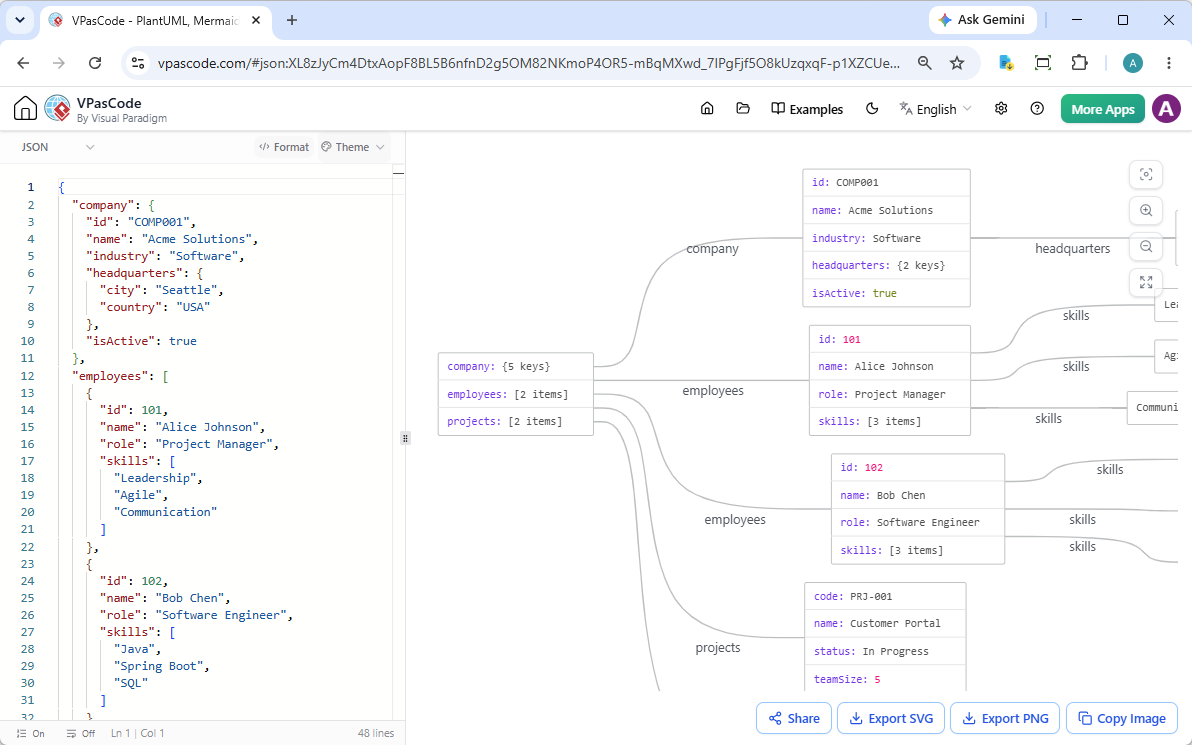
By combining a real-time web code editor with an integrated visual renderer, VPasCode eliminates setup overhead and lets you focus on your data structure. Whether you need a plantUML sequence diagram or a clean structural view of a database payload, VPasCode provides a single, high-performance workspace in your browser.
Ready to jump straight in? You can start visualizing your data immediately with our free online JSON editor—no registration or installation required.
How JSON Visualization Works in VPasCode
The experience is designed for seamless, dual-pane productivity. On the left pane, you paste or write your JSON payload. On the right, VPasCode automatically parses the syntax and generates a visual tree diagram representing objects, keys, values, arrays, and nested relationships in real time.
To give you a better idea, consider a typical user profile payload containing nested configuration settings, addresses, roles, and statistics:
{
  "userId": "usr_8a3f4b2c1d",
  "username": "jdoe_creative",
  "email": "[email protected]",
  "displayName": "Jane Doe",
  "bio": "Graphic designer & amateur photographer. Coffee enthusiast.",
  "avatarUrl": "https://api.example.com/avatars/jdoe_creative.png",
  "accountCreated": "2021-09-15T08:30:00Z",
  "lastLogin": "2025-03-28T14:12:37Z",
  "isVerified": true,
  "preferences": {
    "theme": "dark",
    "language": "en-US",
    "notifications": {
      "email": true,
      "push": false,
      "sms": false
    }
  },
  "address": {
    "street": "742 Maple Avenue",
    "city": "Portland",
    "state": "OR",
    "zipCode": "97201",
    "country": "US"
  },
  "socialLinks": {
    "twitter": "@jdoe_creative",
    "instagram": "@janedoe_photo",
    "linkedin": "https://linkedin.com/in/janedoe"
  },
  "roles": ["member", "contributor"],
  "stats": {
    "posts": 47,
    "followers": 1253,
    "following": 340
  },
  "tags": ["design", "photography", "travel", "coffee"]
}Instead of scanning line by line to understand how preferences.notifications relates to the main user object, VPasCode lays out the hierarchy visually. You can open and interact with this exact live example right now in our interactive JSON workspace demo.
Key Features of the VPasCode JSON Tool
VPasCode goes far beyond simple passive rendering. It includes powerful utility features built specifically for daily engineering workflows:
- Bidirectional Diagram-to-Code Navigation: Click on any node or shape in the generated diagram, and the editor will automatically jump to the exact line of JSON code and highlight it for quick editing.
- One-Click Code Formatter: Paste unformatted or minified JSON directly into the editor and hit format to clean up indentation instantly. It serves as both a high-speed beautifier and a visual tool.
- Multiple Diagram Themes: Choose from distinct color palettes and visual styles to match your presentation needs, documentation standard, or personal workspace taste.
- Vector and Image Exports: Download high-resolution diagrams in SVG (scalable vector graphics) or PNG formats for inclusion in documentation, slide decks, or pull requests.
- Quick Copy to Clipboard: Instantly copy rendered diagrams directly to your clipboard for seamless pasting into Slack, Microsoft Teams, or Notion documents.
- Frictionless Hyperlink Sharing (No Login Required): Share your JSON models and diagrams with collaborators instantly via shareable URL parameters. Recipients can view and edit the data immediately without creating an account or signing in.
Why Choose VPasCode as Your Go-To Online JSON Tool?
Most JSON utilities online offer either plain string formatting or basic tree view dropdowns. VPasCode bridges the gap between text editing and graphical representation. By functioning as a comprehensive free online JSON editor and visualizer combined, it streamlines several common developer workflows:
- API Documentation & Onboarding: Explain complex response payloads to frontend teams or third-party developers visually rather than sending raw text files.
- Configuration Verification: Quickly spot missing fields or incorrect nesting in application configuration files like
appsettings.jsonor package manifests. - Educational Use & Code Reviews: Walk teammates through data models during planning sessions or architectural reviews without distraction.
Get Started with Free JSON Editing in VPasCode
Whether you need to format an API payload, inspect deep data hierarchies, or export clean visual assets for documentation, VPasCode delivers an all-in-one web platform designed for speed and convenience.
Explore the full platform capabilities on the VPasCode home Page, or dive right into the code environment and start creating diagrams now on the VPasCode.