



We are excited to announce a major addition to our unified diagram-as-code platform, Visual Paradigm VPasCode! Today, we are officially expanding our supported diagram and visualization formats to include JSON5. Whether you need a quick way to clean up complex configurations, inspect data structures visually, or share rendered graphs with your team, VPasCode now functions as a feature-rich, free JSON5 editor and interactive online JSON5 diagram tool.
What is VPasCode?
For those new to the app, VPasCode (Visual Paradigm’s diagram-as-code platform) is designed to streamline how developers, architects, and technical writers work with text-driven visual models. Rather than jumping between separate software applications for different DSLs, VPasCode delivers an all-in-one browser workspace that instantly transforms text and code into clear visual diagrams.
Our platform natively supports a wide variety of scripting formats, structured data, and programming languages, including:
Beyond traditional diagramming, VPasCode includes built-in AI features—such as AI Code Error Fixing with detailed diff breakdowns and AI Diagram Translation—making it easy to build, fix, and localize diagrams effortlessly.
Why JSON5?
Standard JSON is an essential data format across modern development, but it can be rigid. Strict syntax rules prohibit trailing commas, demand double quotes around all keys, and forbid inline comments. JSON5 solves these pain points by extending standard JSON syntax to match the flexibility of ECMAScript 5. With JSON5, developers can write cleaner, human-readable configuration files with comments, unquoted keys, and single-quoted strings.
By integrating JSON5 into VPasCode, you can now paste, edit, and instantly convert these flexible data structures into dynamic visual graphs without stripping out your comments or reformatting your code first.
Key Features of the JSON5 Visualizer
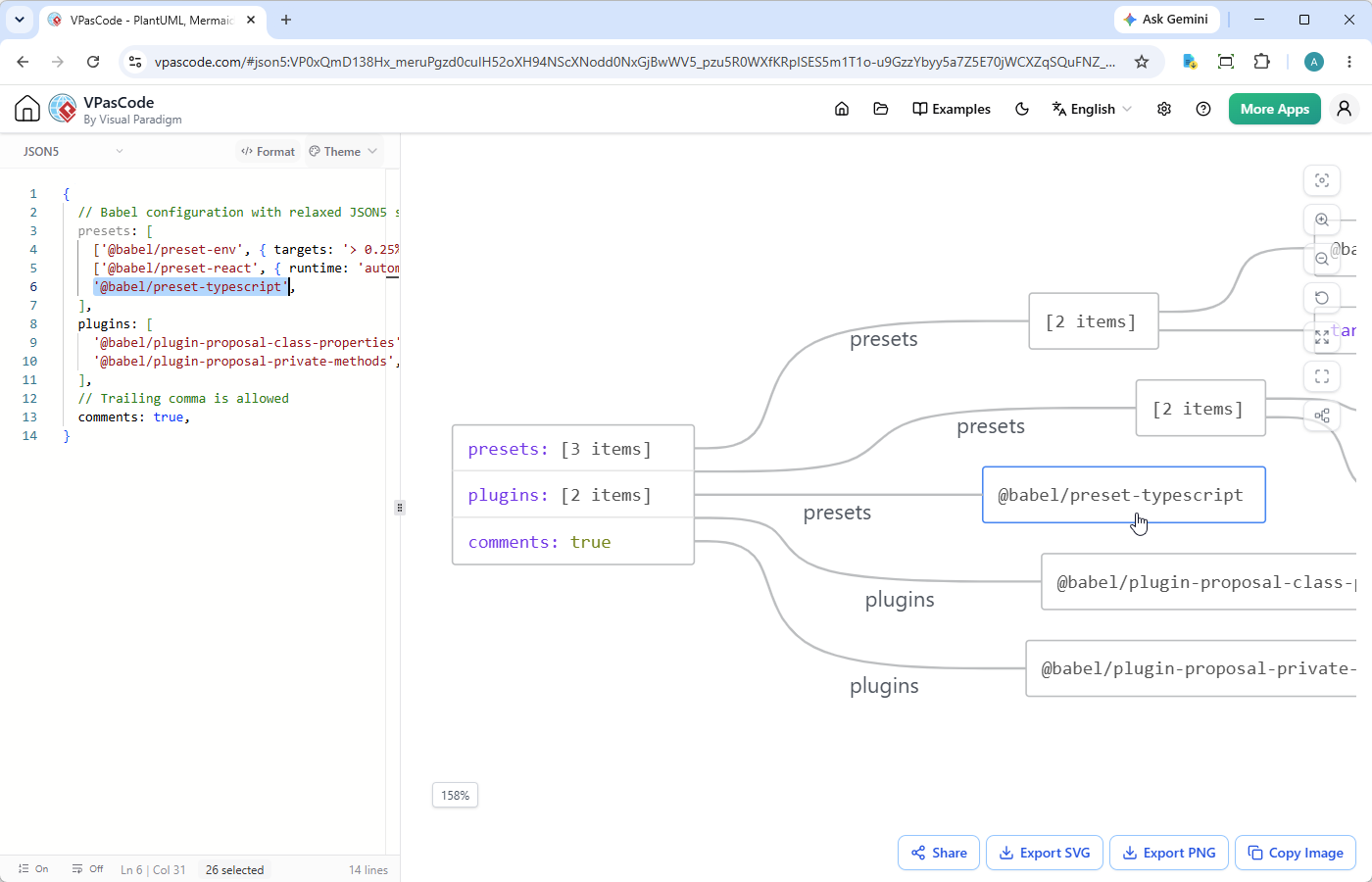
Our goal with this release is to provide an intuitive workspace that accelerates your workflow. When you work with JSON5 inside VPasCode, you gain access to a powerful set of interactive utilities:
- Bidirectional Code-to-Diagram Navigation: Click any node or shape in the generated diagram on the right, and the workspace automatically jumps directly to the matching line of code on the left with instant highlighting.
- One-Click Pretty Formatting: Instantly clean up and format your raw JSON5 code to restore indentation and readability.
- Multiple Visual Themes: Customize the aesthetic of your visual diagrams to fit dark mode, light mode, or presentation standards.
- Vector & Image Exports: Export high-resolution diagrams to SVG vector files or standard PNG images for your technical documentation.
- Copy Image to Clipboard: Instantly copy your visual rendering into your system clipboard to paste directly into Slack, Teams, or presentation slides.
- Zero-Login Hyperlink Sharing: Generate shareable URL links to instantly send your rendered diagrams and code to teammates—no login required.
See It in Action: Babel Configuration Example
Because JSON5 accommodates comments and trailing commas natively, it is widely used in JavaScript tooling like Babel and ESLint configurations. Here is a look at how VPasCode handles a real-world Babel configuration:
{
  // Babel configuration with relaxed JSON5 syntax
  presets: [
    ['@babel/preset-env', { targets: '> 0.25%, not dead' }],
    ['@babel/preset-react', { runtime: 'automatic' }],
    '@babel/preset-typescript',
  ],
  plugins: [
    '@babel/plugin-proposal-class-properties',
    '@babel/plugin-proposal-private-methods',
  ],
  // Trailing comma is allowed
  comments: true,
}When you paste this code into our free JSON5 editor, VPasCode’s automatic format detection kicks in. On the right panel, you immediately see an organized object map showing the nested presets array, configuration target objects, and plugins structure. If you want to jump directly to where @babel/preset-typescript is defined in the source, simply click the corresponding node in the visual diagram!
How to Use the JSON5 Diagram Visualizer
- Open the VPasCode Editor in your web browser.
- Paste your JSON5 data or configuration block into the editor panel on the left.
- VPasCode automatically identifies the code and renders the interactive data diagram on the right panel.
- Click on diagram nodes to highlight the corresponding lines in the code editor, adjust your theme settings, or click share to send a live link to your team!
Start Visualizing Your Data Today
Whether you need a quick free JSON5 editor to spot nested structural errors or a flexible online JSON5 diagram tool to prepare visuals for your docs, VPasCode makes code visualization simple, fast, and accessible from any web browser.
Try the Free VPasCode Editor Now and explore the power of unified diagram-as-code visualization!