


At Visual Paradigm, we are excited to introduce a powerful new update to our diagram-as-code platform, Visual Paradigm VPasCode. Engineers, developers, and software architects can now turn C source code into clean, well-structured UML class diagrams automatically in real time.
Understanding structural relationships in C—especially across legacy codebases, complex struct definitions, and nested pointer structures—can be challenging. VPasCode bridges the gap between written source code and architectural clarity. By acting as a free C editor and modern online C diagram tool, VPasCode transforms structural code directly into interactive diagrams without requiring complicated manual setup.
What is VPasCode?
VPasCode is a unified diagram-as-code tool that simplifies visually mapping architectures, systems, and logic. Instead of managing dozens of standalone visualization utilities, VPasCode consolidates popular text-to-diagram engines and structured formats into one web-based workspace.
VPasCode natively supports:
- Diagramming Languages: PlantUML, Mermaid, Graphviz, Markmap, ECharts
- Structured Data: JSON, YAML, XML, CSV, TOML
- Database Languages: SQL
- Programming Languages: Java, TypeScript, Go, Rust, C#, Python, C, C++, PHP, Ruby, Scala, Zig, Kotlin, Swift, and Elixir
Whether you need sequence diagrams, flowcharts, entity-relationship models, or UML class diagrams, VPasCode provides a seamless interactive workspace with live preview capabilities.
How C Code Visualization Works in VPasCode
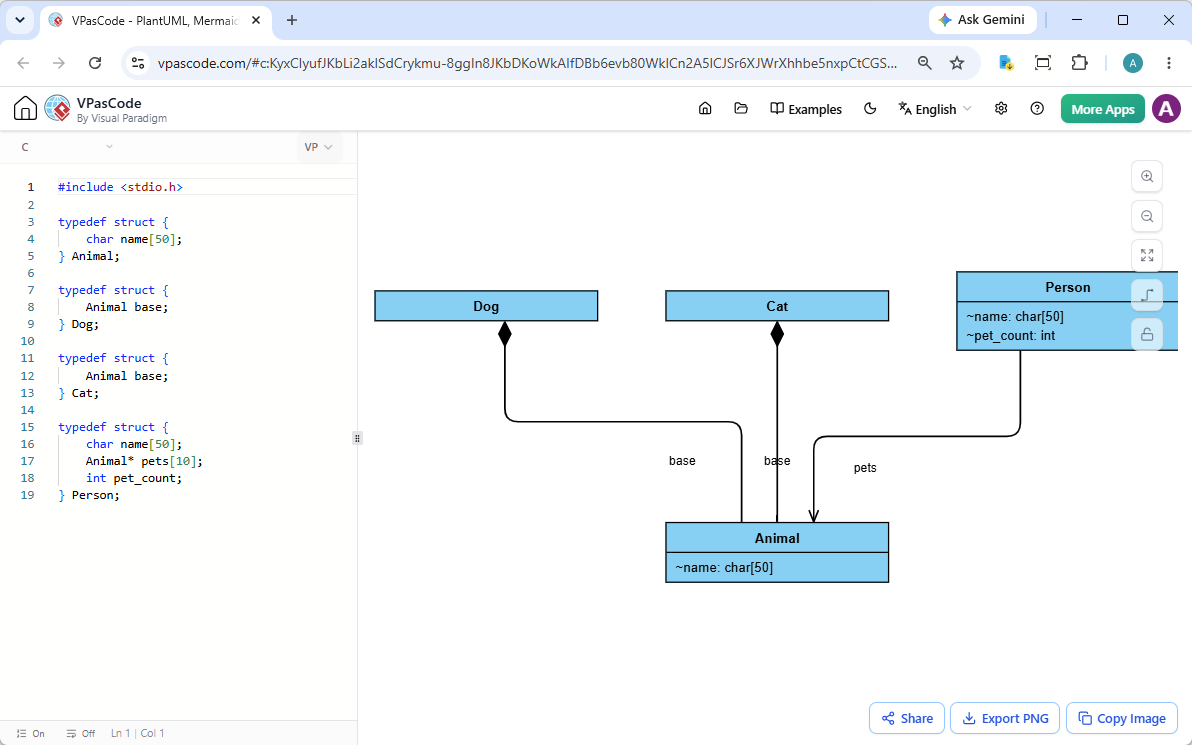
Visualizing C structures in VPasCode is fast and straightforward. The web application features a split-screen design with a code editor on the left and a live-rendering diagram viewport on the right.
- Write or Paste Code: Enter your C code directly into the editor on the left side.
- Drag and Drop Source Files: Drag a C source file (
.cor.h) directly into the browser window to automatically import and render the file. - Live UML Rendering: As you type, modify, or add structures, your UML class diagram updates instantaneously on the right.
Because VPasCode features automatic code detection, it analyzes your input automatically and picks the right parser without requiring manual configuration.
See It in Action: Visualizing C Struct Relationships
To demonstrate how simple it is to turn C structures into actionable UML diagrams, take a look at the following snippet featuring nested structures and pointer arrays:
#include <stdio.h>

typedef struct {
    char name[50];
} Animal;

typedef struct {
    Animal base;
} Dog;

typedef struct {
    Animal base;
} Cat;

typedef struct {
    char name[50];
    Animal* pets[10];
    int pet_count;
} Person;
When parsed in VPasCode, this snippet renders a comprehensive UML class diagram detailing attributes, pointer arrays, and structural associations clearly.
Click here to open, edit, and experiment with this C code example directly in VPasCode.
Key Export and Sharing Features
VPasCode is built for team collaboration and seamless documentation workflows:
- Share via Hyperlink: Instantly share diagrams with teammates via standard URLs—no account creation or login required for recipients.
- Copy Image to Clipboard: Easily copy rendered diagrams directly to your clipboard for quick insertion into presentation slides, chat threads, or project boards.
- Export Options: Download high-resolution vector SVG files or high-quality PNG images for documentation publishing.
Advanced AI Features for Diagramming
In addition to core rendering capabilities, VPasCode includes AI productivity features to accelerate diagram creation:
- AI Code Error Fixing: Encountered a syntax error in your diagram script? Click “Fix by AI” to automatically diagnose and correct syntax issues. VPasCode displays a side-by-side code diff and explains the fix so you can learn in real time.
- AI Diagram Translation: Translate labels, text, and annotations within your diagrams into different languages instantly with native AI translation tools.
- OpenDocs Integration: Send completed diagrams directly to Visual Paradigm OpenDocs to streamline software design documentation.
Note: Diagram editing, live rendering, link sharing, and exporting are 100% free. AI features are available through Visual Paradigm Online Combo Edition (or higher) and Visual Paradigm Desktop Professional Edition (or higher) with active maintenance.
Start Visualizing Your C Code Today
Whether you need a flexible free C editor for quick edits, a reliable online C diagram tool for mapping dependencies, or a multi-language diagram-as-code tool for your team, VPasCode delivers a complete browser-based solution.
Unified Platform entrance of VPasCode: Under the “Developer” category of the app hub.