


 As modern architectures grow in complexity, working raw code line by line can slow down your workflow. With VPasCode’s new capabilities as a free JSON Schema editor and online JSON Schema diagram tool, you can bridge the gap between technical data modeling and visual clarity effortlessly.
What is VPasCode?
VPasCode (short for Visual Paradigm’s diagram-as-code platform) is a unified text-to-diagram suite designed to make visual modeling fast, open, and efficient. Instead of manually dragging and dropping shapes, developer teams can write or paste standard text definitions and watch high-quality diagrams render in real time.
VPasCode brings together an extensive list of supported formats under one roof, including:
- Diagramming & DSL Tools: PlantUML (ArchiMate, C4, Class, Sequence, State, ERD, WBS, Mind Map, etc.), Mermaid (Flowchart, Sequence, Git Graph, User Journey, Ishikawa, etc.), Graphviz, Markmap, and ECharts.
- Structured Data: JSON Schema, JSON, YAML, XML, CSV, and TOML.
- Database Languages: SQL.
- Programming Languages: Java, TypeScript, Go, Rust, C#, Python, C, C++, PHP, Ruby, Scala, Zig, Kotlin, Swift, and Elixir.
In addition to rendering diagrams, VPasCode provides powerful industry-unique capabilities, such as Automatic Code Detection (which automatically recognizes your input syntax), AI Code Error Fixing with side-by-side diffs, native AI Diagram Translation, and seamless integration with Visual Paradigm OpenDocs.
What’s New: Interactive JSON Schema Visualization
With our latest release, VPasCode expands its structured data visualization ecosystem to natively support JSON Schema. Using this new functionality in our free JSON Schema editor is completely seamless: paste your JSON Schema definition into the left editor pane, and your structural data model immediately populates on the right pane as a clear, interactive diagram.
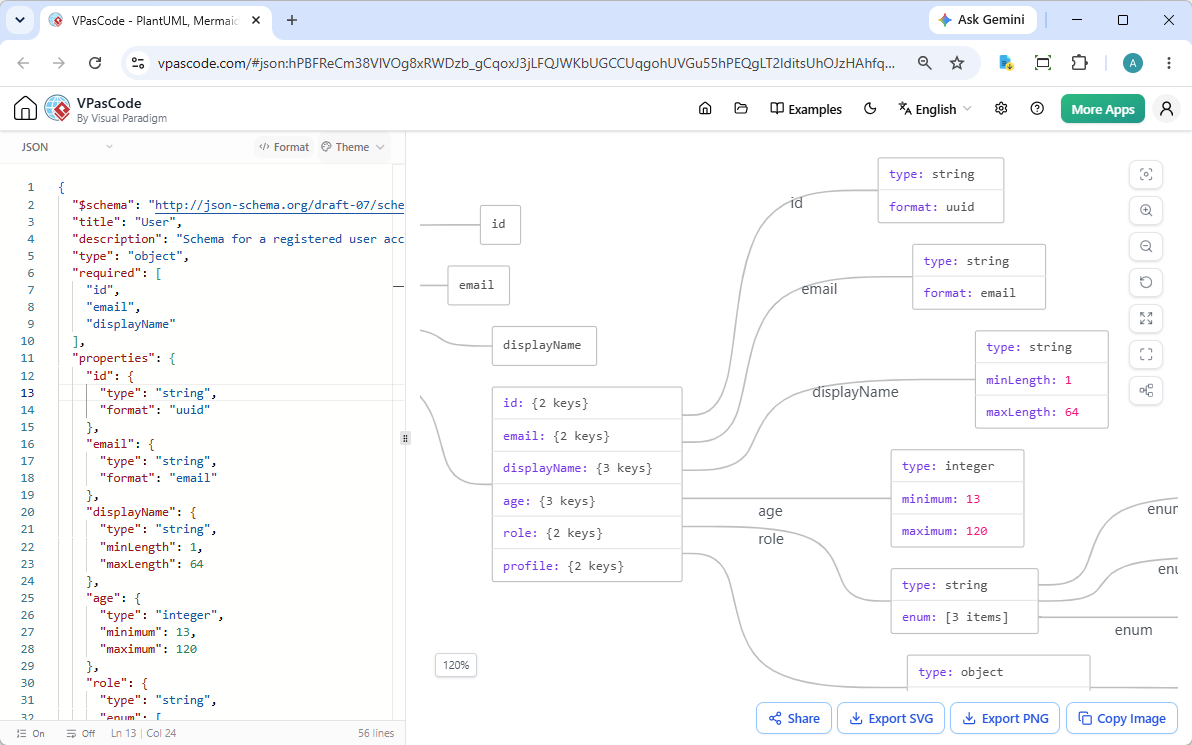
This update includes an array of productivity-focused features designed to make reading and presenting schemas effortless:
- Code-to-Diagram Jump & Highlight: Click any object, property, or array node on the diagram to immediately focus on and highlight the corresponding line of code in the editor.
- One-Click Pretty Formatting: Instantly beautify messy or minified JSON Schema code with a single click.
- Multiple Visual Themes: Switch between clean visual styles and color palettes to suit your preferred presentation or documentation style.
- Flexible Export Options: Export high-resolution diagrams as vector SVG files or scalable PNG images.
- Clipboard Copying: Copy rendered images straight to your clipboard for quick pasting into Slack, Teams, or presentation slides.
- Zero-Login Hyperlink Sharing: Share full interactive schema views with team members using lightweight, encoded URLs—no account creation required!
See It in Action: User Schema Example
Below is a typical JSON Schema definition for a registered user account. It includes required fields, nested objects, data formats, and constrained enumerations:
{
  "$schema": "http://json-schema.org/draft-07/schema#",
  "title": "User",
  "description": "Schema for a registered user account",
  "type": "object",
  "required": [
    "id",
    "email",
    "displayName"
  ],
  "properties": {
    "id": {
      "type": "string",
      "format": "uuid"
    },
    "email": {
      "type": "string",
      "format": "email"
    },
    "displayName": {
      "type": "string",
      "minLength": 1,
      "maxLength": 64
    },
    "age": {
      "type": "integer",
      "minimum": 13,
      "maximum": 120
    },
    "role": {
      "type": "string",
      "enum": [
        "admin",
        "editor",
        "viewer"
      ]
    },
    "profile": {
      "type": "object",
      "properties": {
        "bio": {
          "type": "string",
          "maxLength": 500
        },
        "avatar": {
          "type": "string",
          "format": "uri"
        },
        "website": {
          "type": "string",
          "format": "uri"
        }
      }
    }
  }
}Instead of manually parsing nested properties, required arrays, and field restrictions inside your head, VPasCode transforms this specification into a clear graphical model. You can see how the top-level User schema links to nested sub-objects like profile and cleanly lists property constraints like string formats, minimum/maximum integers, and enum variants.
👉 Click here to open and interact with this live example in VPasCode
Why Use an Online JSON Schema Diagram Tool?
JSON Schema is powerful for machine validation, but plain code can be difficult for human stakeholders to review. By turning to an online JSON Schema diagram tool like VPasCode, development teams achieve several benefits:
- Faster Data Modeling Reviews: Product managers, backend developers, and frontend engineers can review API contracts visually without deciphering raw brace hierarchies.
- Fewer Syntax Bottlenecks: With real-time rendering and integrated code formatting, syntax mistakes become instantly noticeable.
- Seamless Documentation: Export SVG or PNG diagrams into your system architecture docs, developer portals, or OpenDocs for clean, up-to-date visual guides.
Get Started Free Today
Diagram editing, real-time previewing, and high-resolution exports in VPasCode are completely free to use without signing up. Advanced AI assistance features (like AI syntax error fixing and multi-language translation) are available to Visual Paradigm Online Combo Edition users and Visual Paradigm Desktop Professional Edition subscribers with active maintenance.
Ready to try our free JSON Schema editor?