



We are excited to announce a major enhancement to Visual Paradigm VPasCode! Visual Paradigm’s flagship diagram-as-code tool now officially supports automatic UML class diagram visualization for Scala source code, joining our growing lineup of supported programming languages including Java, TypeScript, Go, Rust, C#, Python, C, C++, PHP, Ruby, Zig, Kotlin, Swift, and Elixir.
Whether you are architecting complex object-oriented systems, conducting code reviews, or creating technical documentation, VPasCode makes it effortless to bridge the gap between Scala code and visual system design.
What is VPasCode?
VPasCode (Visual Paradigm’s diagram-as-code platform) is an all-in-one web solution designed to turn text and source code into clean, professional visual models instantly. Built to streamline developer workflows, VPasCode eliminates the tedious manual effort involved in drawing software architecture diagrams.
As a comprehensive diagram-as-code tool, VPasCode supports a vast array of modeling languages, structured formats, and programming DSLs:
- Diagramming & Visualization DSLs: PlantUML, Mermaid, Graphviz, Markmap, ECharts
- Structured Data Formats: JSON, YAML, XML, CSV, TOML
- Database Languages: SQL
- Programming Languages: Java, TypeScript, Go, Rust, C#, Python, C, C++, PHP, Ruby, Scala, Zig, Kotlin, Swift, Elixir
From sequence and activity diagrams to ERDs, C4 models, mind maps, and class diagrams, VPasCode provides a single workspace to render your entire system visual stack.
Effortless Scala to UML Class Diagram Conversion
Understanding class relationships, traits, inheritance, and generic parameters in Scala can become complex quickly. VPasCode serves as an intuitive free Scala editor and real-time visualization environment designed to keep your visuals perfectly synchronized with your implementation.
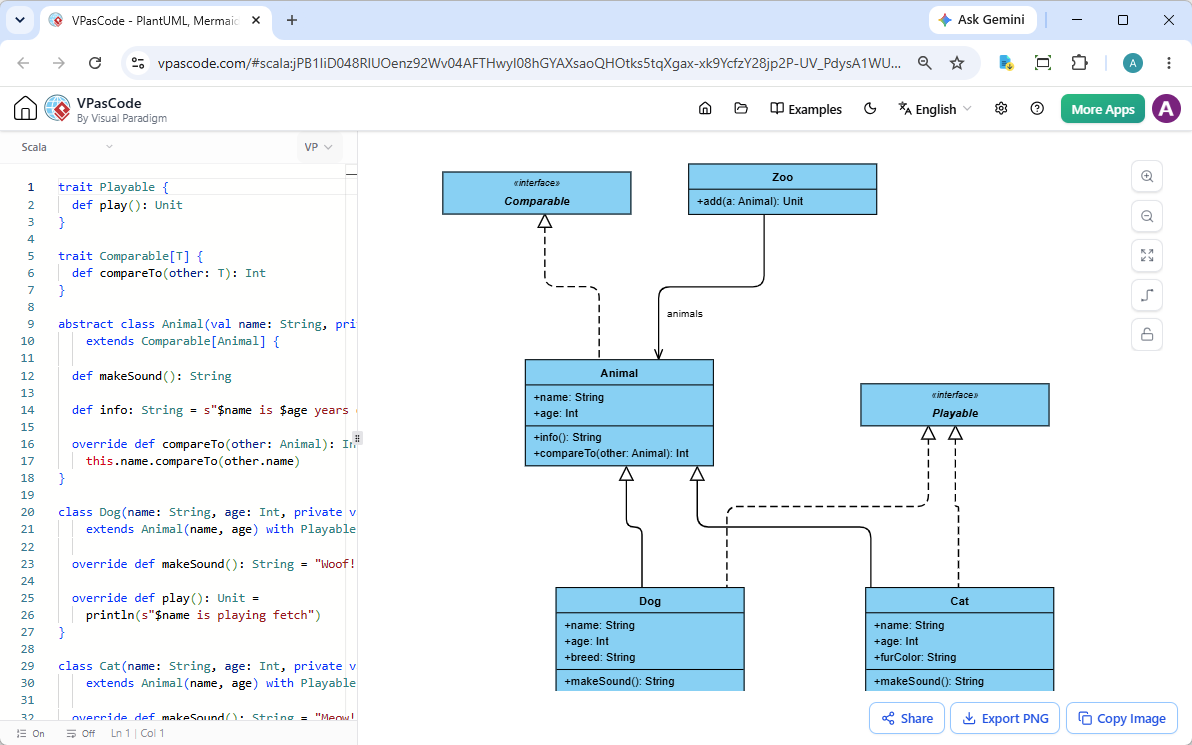
How It Works
- Live Code Editing: Paste or write your code directly into the code editor on the left pane. As you type, VPasCode automatically parses your code structure and updates the UML class diagram in real time on the right pane.
- Drag-and-Drop File Support: Skip manual copy-pasting entirely. Drag your
.scalasource file directly into the workspace to inspect its architecture instantly. - Automatic Format Detection: Simply paste your snippet into the workspace. VPasCode intelligently detects the input language and renders the appropriate diagram format automatically without requiring manual configuration.
Hands-On Example: Scala Traits and Inheritance
To see how seamlessly VPasCode translates Scala constructs into UML notation, consider the following Scala example incorporating traits, generic interfaces, abstract classes, multi-trait inheritance, and collection aggregation:
trait Playable {
  def play(): Unit
}

trait Comparable[T] {
  def compareTo(other: T): Int
}

abstract class Animal(val name: String, private val age: Int)
    extends Comparable[Animal] {

  def makeSound(): String

  def info: String = s"$name is $age years old"

  override def compareTo(other: Animal): Int =
    this.name.compareTo(other.name)
}

class Dog(name: String, age: Int, private val breed: String)
    extends Animal(name, age) with Playable {

  override def makeSound(): String = "Woof!"

  override def play(): Unit =
    println(s"$name is playing fetch")
}

class Cat(name: String, age: Int, private val furColor: String)
    extends Animal(name, age) with Playable {

  override def makeSound(): String = "Meow!"

  override def play(): Unit =
    println(s"$name is playing with yarn")
}

class Zoo {
  private val animals =
    scala.collection.mutable.ArrayBuffer.empty[Animal]

  def add(a: Animal): Unit = animals += a
}
When loaded into our online Scala diagram tool, VPasCode automatically identifies:
- The
PlayableandComparable[T]traits as interfaces. - The abstract
Animalclass and its member variables and methods. - The concrete
DogandCatimplementations extendingAnimaland implementingPlayable. - The aggregation relationship between
ZooandAnimal.
👉 Click here to open and edit this exact Scala example directly in VPasCode.
Built for Seamless Developer Collaboration
VPasCode isn’t just a basic free Scala editor; it is designed to integrate cleanly into software development and documentation workflows. Once your diagram is rendered, you can leverage several productivity features:
- Instant Export Options: Download high-resolution vector SVG files for documentation and presentations, or crisp PNG image files for quick sharing.
- Copy to Clipboard: Copy your generated diagram image with a single click to paste straight into team chats or pull requests.
- Zero-Login Hyperlink Sharing: Share your work instantly via encoded links. Recipients can view and interact with your diagrams immediately in their browsers without needing to register or log in.
Next-Gen Features: AI Power & OpenDocs Integration
For teams looking to accelerate their visual workflow even further, VPasCode offers powerful AI and documentation tools:
- AI Code Error Fixing: Stuck on a syntax error? Hit the Fix by AI button to have AI resolve your code mistakes automatically while explaining the fix so you can learn in real time.
- AI Diagram Translation: Seamlessly translate diagram text into multiple languages (e.g., converting method labels or comments natively for international teams).
- Visual Paradigm OpenDocs Integration: Send your diagrams directly to Visual Paradigm OpenDocs to assemble comprehensive software specification documents.
Note on Access: Diagram editing, real-time rendering, file imports, and SVG/PNG exports are completely free. Advanced AI features (AI Fix and AI Translation) are available to subscribers of Visual Paradigm Online Combo Edition (or higher) and Visual Paradigm Desktop Professional Edition (or higher) with active maintenance.
Try the Ultimate Online Scala Diagram Tool Today
Start visualizing your Scala software architecture in seconds. Explore how our feature-rich diagram-as-code tool can simplify your developer documentation and codebase exploration.
👉 Launch the VPasCode Free Scala Editor Now
To learn more about all supported formats and platform updates, visit VPasCode Home.
Unified Platform entrance of VPasCode: Under the “Developer” category of the app hub.