


Transform Raw Data into Clear Visuals Effortlessly
We are thrilled to announce a major update to Visual Paradigm VPasCode: official support for CSV visualization! If you have been looking for an intuitive free CSV editor and a versatile online CSV diagram tool, VPasCode now lets you turn plain structured text into visual representations in just a few clicks.
Data stored in tabular formats like CSV is great for machine reading, but understanding relationships, hierarchies, and active statuses across rows can be overwhelming. With this update, VPasCode bridges the gap between text data and visual insights, allowing developers, analysts, and project managers to instantly visualize CSV files right inside their browser.
What is VPasCode?
VPasCode (Visual Paradigm’s diagram-as-code platform) is a unified, web-based platform designed to make diagramming fast, flexible, and fully text-driven. Instead of dragging and dropping shapes manually, VPasCode allows you to write or paste code on the left pane and watch real-time visual diagrams render on the right pane.
VPasCode supports a vast array of popular diagram scripting languages and structured data formats, including:
- Diagram & Visualization Tools: PlantUML, Mermaid, Graphviz, Markmap, ECharts
- Structured Data: CSV, JSON, YAML, XML, TOML
- Database Languages: SQL
- Programming Languages: Java, TypeScript, Go, Rust, C#, Python, C, C++, PHP, Ruby, Scala, Zig, Kotlin, Swift, Elixir
Whether you need a quick sequence diagram, a flow chart, an ERD, or a clear view of tabular data, VPasCode serves as a complete, lightweight workspace equipped with standard features like real-time rendering, automatic format detection, instant hyperlink sharing, and vector exports (SVG/PNG).
Key Features of the New Online CSV Diagram Tool
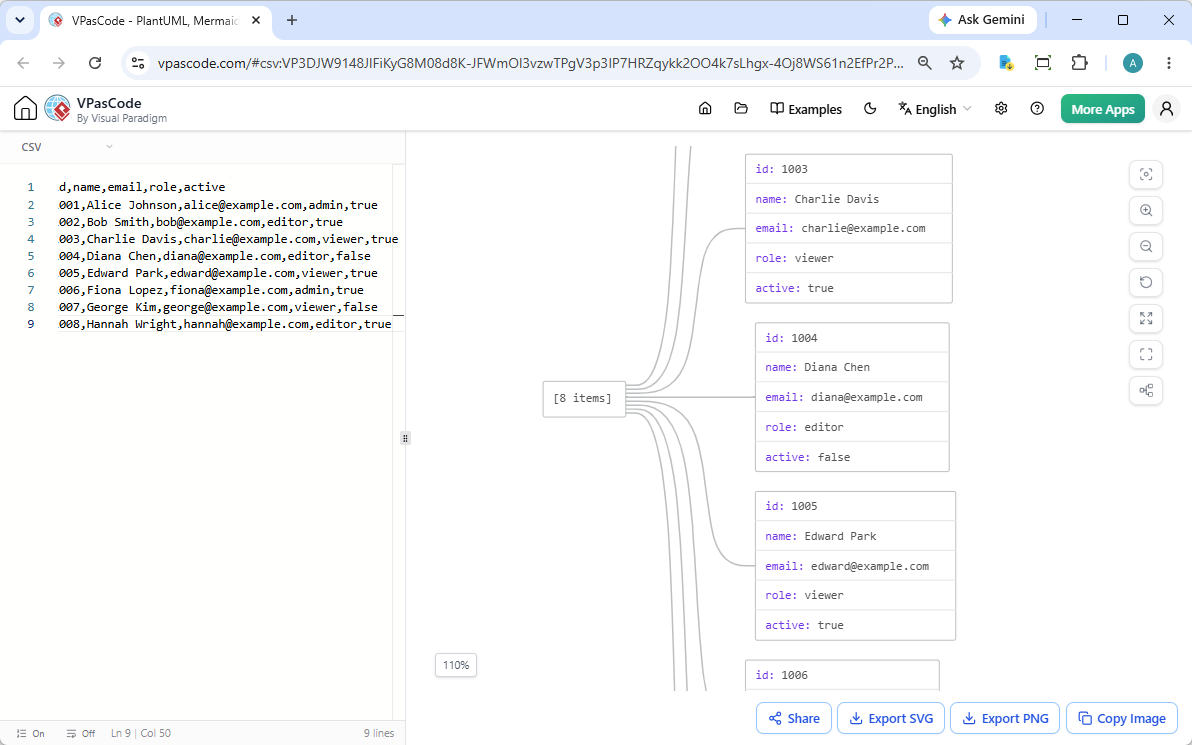
Using our free CSV editor and rendering engine is as simple as pasting your raw text into the workspace. Here is a look at what you can do with CSV files in VPasCode:
- Bi-Directional Code & Shape Highlighting: Click on any element or shape in the rendered diagram, and the editor instantly jumps to the corresponding line in your CSV source code while highlighting it.
- Multiple Diagram Themes: Switch between clean visual styles to match your presentation, dark mode preferences, or documentation standards.
- Export to SVG & PNG: Download high-resolution vector images (SVG) for documentation or crisp PNG images for quick reports.
- Copy Image to Clipboard: Move visual assets directly into your presentation slides or chat applications without cluttering your local storage.
- Zero-Login Hyperlink Sharing: Share your complete data-and-diagram session with teammates instantly using a custom URL. No registration or login required for recipients!
See It in Action: Interactive CSV Example
To demonstrate how this feature works, consider the following CSV dataset representing user roles and account statuses:
id,name,email,role,active
1001,Alice Johnson,[email protected],admin,true
1002,Bob Smith,[email protected],editor,true
1003,Charlie Davis,[email protected],viewer,true
1004,Diana Chen,[email protected],editor,false
1005,Edward Park,[email protected],viewer,true
1006,Fiona Lopez,[email protected],admin,true
1007,George Kim,[email protected],viewer,false
1008,Hannah Wright,[email protected],editor,true
When loaded into VPasCode, the editor parses the headers and rows to present a clean visual layout of the dataset. You can interact with this exact dataset directly in your browser without setting up an account.
Click here to open and interact with this live CSV example in VPasCode
Advanced AI Features for Power Users
While the standard free CSV editor, visual rendering engine, and export options are completely free to use, VPasCode offers powerful AI integrations for users with eligible Visual Paradigm subscriptions (such as VP Online Combo Edition or Visual Paradigm Professional Desktop Edition with active maintenance):
- AI Code Error Fixing: Stuck on a syntax error? Click “Fix by AI” to let artificial intelligence repair your diagram script while explaining the fix side-by-side so you learn as you work.
- AI Diagram Translation: Seamlessly translate text within your diagrams into multiple languages with native context preservation.
- Visual Paradigm OpenDocs Integration: Send your diagrams straight to OpenDocs for technical writing, system manuals, and software documentation.
Start Visualizing Your CSV Data Today
VPasCode makes it faster than ever to turn text data into structured visual insight. Whether you need a simple online CSV diagram tool, or a reliable diagram-as-code workspace for your tech stack, VPasCode is ready for you.
Try the VPasCode Free CSV Editor Now
To learn more about all supported diagram formats and capabilities, visit the official VPasCode Home.