


We are thrilled to announce a powerful new enhancement to Visual Paradigm VPasCode: you can now instantly visualize your Go (Golang) source code as UML Class Diagrams! Whether you are mapping out complex software architectures or just trying to understand the relationship between different structs, our latest update makes visualizing your codebase easier than ever.
While this announcement focuses on Go, we are also rolling out UML visualization support for a vast array of programming languages, including Java, TypeScript, Rust, C#, Python, C, C++, PHP, Ruby, Scala, Zig, Kotlin, Swift, and Elixir. Stay tuned for dedicated updates on those!
What is VPasCode?
If you haven’t explored it yet, VPasCode (Visual Paradigm’s diagram-as-code platform) is a unified diagram-as-code tool designed to streamline how developers, architects, and product teams create and share diagrams.
Instead of manually drawing shapes and lines, VPasCode automatically generates diagrams from text and code. With automatic code detection, you simply paste your code into the editor, and we analyze the format to render the diagram instantly. We support all the popular diagramming DSLs and formats, including:
- Diagram & Visualization Tools: PlantUML, Mermaid, Graphviz, Markmap, ECharts
- Structured Data: JSON, YAML, XML, CSV, TOML
- Database Languages: SQL
- Programming Languages: Go, Java, TypeScript, Python, and many more!
How the New Go to UML Feature Works
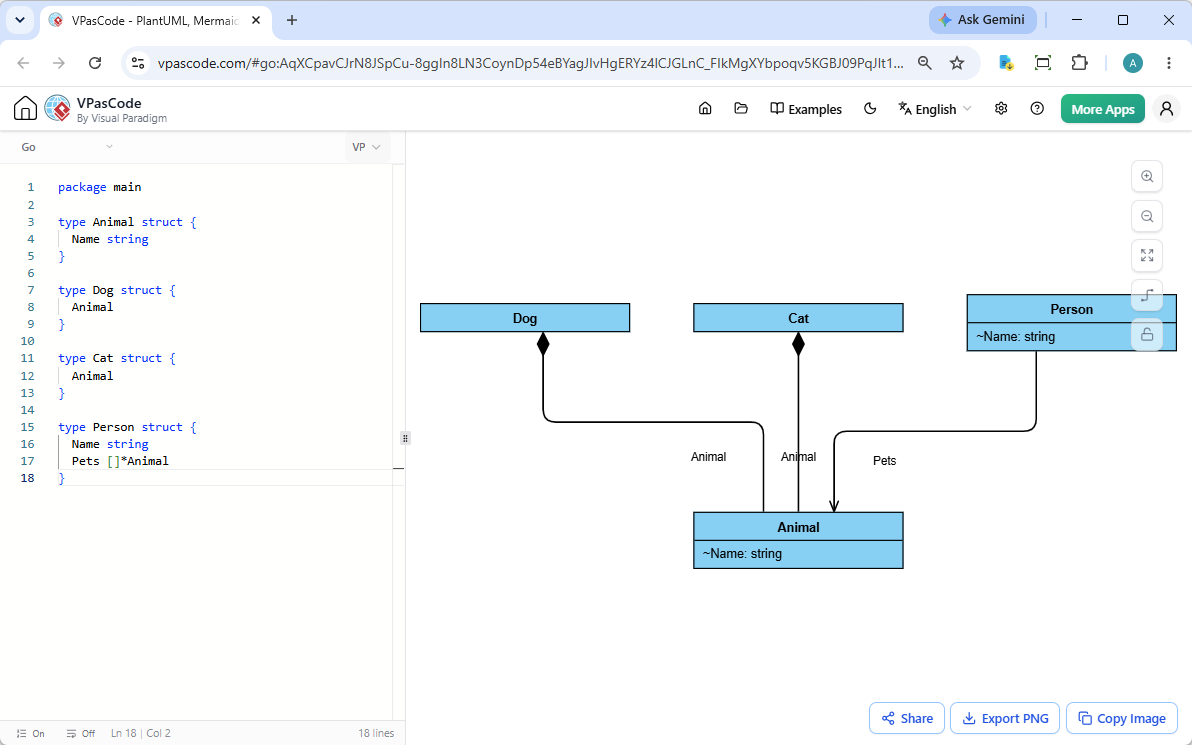
Our goal is to provide a seamless, intuitive free Go editor and visualization environment. The user interface is split into two straightforward panels:
- The Editor (Left): A clean workspace where you can type, paste, or edit your Go source code.
- The Renderer (Right): A live-updating canvas that instantly renders your code as a pristine UML Class Diagram.
Prefer working with local files? You can simply drag and drop your Go source file directly into VPasCode. This is completely equivalent to pasting your code into the editor and will trigger the visualizer immediately.
A Practical Example
Let’s look at how this highly requested feature handles standard Go structs and relationships. Take the following Go code:
package main

type Animal struct {
	Name string
}

type Dog struct {
	Animal
}

type Cat struct {
	Animal
}

type Person struct {
	Name string
	Pets []*Animal
}
When you input this code, VPasCode instantly generates a UML Class Diagram showing the inheritance of Dog and Cat from Animal, as well as the aggregation between Person and their Pets.
Want to see it in action? Click here to open and edit this exact Go example directly in VPasCode!
Export, Share, and Collaborate
As a robust online Go diagram tool, visualizing your code is just the first step. VPasCode is packed with standard features to help you share your insights:
- Export Options: Download your generated UML diagrams as high-quality PNG images or scalable SVG vectors.
- Quick Copy: Instantly copy the rendered image to your clipboard to paste into documents, chats, or presentations.
- Frictionless Sharing: Generate secure hyperlinks or QR codes to share your live diagram with colleagues and clients. Best of all? No login is required for viewers!
Industry-Unique Features to Supercharge Your Workflow
Beyond live rendering, VPasCode brings exclusive, cutting-edge AI and integration features to your diagramming experience:
- AI Code Error Fixing: Stuck on a syntax error? Click ‘Fix by AI’ and our system will not only correct the error but also explain the fix via side-by-side code diffs, helping you learn on the go.
- AI Translation: Easily break language barriers by natively translating diagram content (e.g., from English to Chinese) with a single click.
- OpenDocs Integration: Seamlessly send your generated diagrams to Visual Paradigm OpenDocs for comprehensive project documentation.
Note: Diagram editing, live rendering, auto-detection, and exporting are completely free. Advanced features like AI code error fixing and AI translation are available for Visual Paradigm Online Combo Edition (or higher) users, as well as Visual Paradigm Desktop Professional Edition (or higher) users with active maintenance.
Ready to Try It Out?
Stop manually drawing out your Go architectures. Let your code do the talking.
Launch VPasCode for free today and turn your Go code into clear, actionable UML diagrams!