


We are excited to announce a major update to Visual Paradigm VPasCode! Developers and software architects can now turn raw code into clear, accurate UML diagrams effortlessly. Today, we are focusing on our brand-new support for Python, bringing seamless, automated code visualization directly to your browser.
If you have been looking for an intuitive free Python editor and dynamic online Python diagram tool, VPasCode makes visualizing object-oriented Python code faster and easier than ever before.
What is VPasCode?
For those new to the platform, VPasCode (Visual Paradigm’s diagram-as-code platform) is a versatile, web-based diagram-as-code tool. It lets you write, edit, and visualize structured diagrams using popular text-to-diagram formats like PlantUML, Mermaid, Graphviz, ECharts, and Markmap.
Beyond traditional diagramming DSLs and structured data formats (such as JSON, YAML, and SQL), VPasCode directly parses and visualizes mainstream programming languages—including Java, TypeScript, Go, Rust, C#, PHP, Ruby, Swift, Kotlin, and now, Python.
How Python Code-to-UML Visualization Works
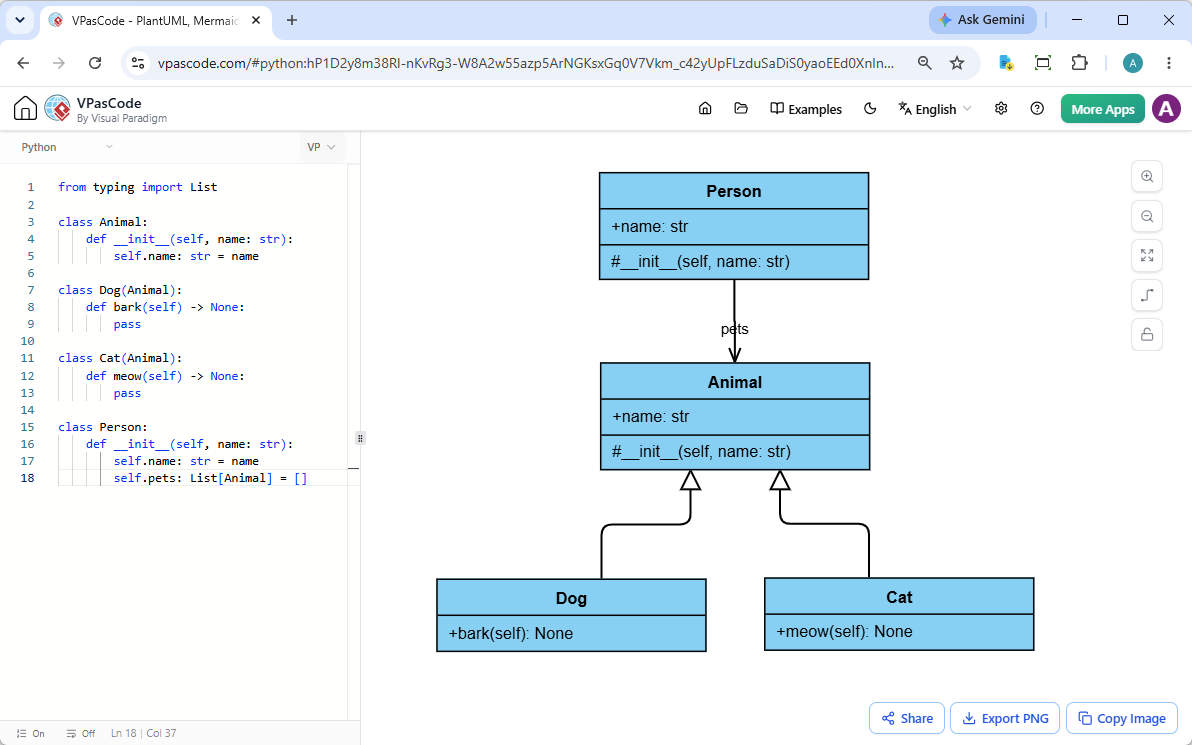
VPasCode features a side-by-side workspace designed for maximum efficiency:
- Left Pane: An interactive code editor where you can type, paste, or modify your source code.
- Right Pane: A real-time diagram renderer that updates your UML class diagram on the fly as you type.
Need to visualize an existing file? Simply drag and drop a Python file (.py) directly into the editor, and VPasCode will extract class structures, inheritance hierarchies, type hints, and method signatures instantly.
See It in Action: Python UML Class Diagram Example
Consider the following standard Python snippet demonstrating class inheritance and type annotations:
from typing import List

class Animal:
    def __init__(self, name: str):
        self.name: str = name

class Dog(Animal):
    def bark(self) -> None:
        pass

class Cat(Animal):
    def meow(self) -> None:
        pass

class Person:
    def __init__(self, name: str):
        self.name: str = name
        self.pets: List[Animal] = []
When parsed by VPasCode, this code automatically generates a clean UML class diagram showing:
DogandCatinheriting fromAnimal.- Attributes like
nameandpetswith their respective type declarations. - Methods such as
bark()andmeow()with return types. - The relationship between
PersonandAnimal.
Click here to launch this live Python example in the VPasCode editor
Core Features & Export Capabilities
Whether you are documenting codebases, preparing technical presentations, or reviewing software architectures with team members, VPasCode provides powerful built-in utilities:
- Export to SVG & PNG: Download high-resolution vector diagrams (SVG) for scalable documentation or crisp raster images (PNG) for quick inserts into slides.
- Copy to Clipboard: Instantly copy rendered diagram graphics to paste into chat tools, docs, or slide decks.
- Instant Hyperlink Sharing: Share lightweight, self-contained URLs with teammates. Recipient users can view and interact with the diagram immediately without needing to log in.
- Automatic Code Detection: Simply paste your snippet; VPasCode analyzes the language syntax automatically and renders the appropriate diagram format without requiring manual configuration.
Advanced Productivity Tools in VPasCode
Beyond standard diagramming capabilities, VPasCode includes advanced features powered by the Visual Paradigm ecosystem:
- AI Code Error Fixing: Caught a syntax error? Click “Fix by AI” to correct errors instantly while viewing detailed side-by-side diffs and explanations so you can learn as you build.
- AI Diagram Translation: Natively translate text elements inside diagrams across multiple languages for global team collaboration.
- OpenDocs Integration: Send your code diagrams directly to Visual Paradigm OpenDocs to streamline software design documentation.
Start Visualizing Your Python Code Today
Transforming complex Python code into clear architecture diagrams takes only a few seconds. Try VPasCode today to experience a fast, accessible free Python editor, a reliable online Python diagram tool, and a complete diagram-as-code tool built for modern developers.
Launch VPasCode Free Python Diagram Editor Now
Unified Platform entrance of VPasCode: Under the “Developer” category of the app hub.