


We are thrilled to announce a major enhancement to Visual Paradigm VPasCode! Our platform now natively supports the visualization of various programming languages directly as UML Class Diagrams. While this update rolls out support for 15 different languages—including Java, Go, Python, and C#—today we are putting the spotlight on TypeScript.
Whether you are documenting an existing codebase, planning a new architecture, or simply trying to understand complex object-oriented relationships, converting your code into a visual format has never been easier. If you have been searching for a reliable online TypeScript diagram tool, this update is built exactly for you.
What is VPasCode?
In case you are new to our ecosystem, VPasCode (Visual Paradigm’s diagram-as-code platform) is a unified diagram-as-code tool designed to let you create stunning diagrams using popular text-to-diagram formats. By bringing together engines like PlantUML, Mermaid, Graphviz, and ECharts into a single environment, VPasCode acts as a universal translator for your structural data and code.
Before this update, users primarily utilized VPasCode to render standard diagramming DSLs, structured data (JSON, YAML), and database schemas (SQL). Now, we have extended our unified diagram-as-code tool to parse actual application source code, automatically mapping your classes, interfaces, and dependencies into standard UML notations.
You can learn more about the platform’s full capabilities on the VPasCode Home.
How the TypeScript to UML Visualization Works
Our goal was to make the visualization process completely frictionless. We have designed the VPasCode workspace to serve as a highly responsive, free TypeScript editor combined with a real-time rendering engine.
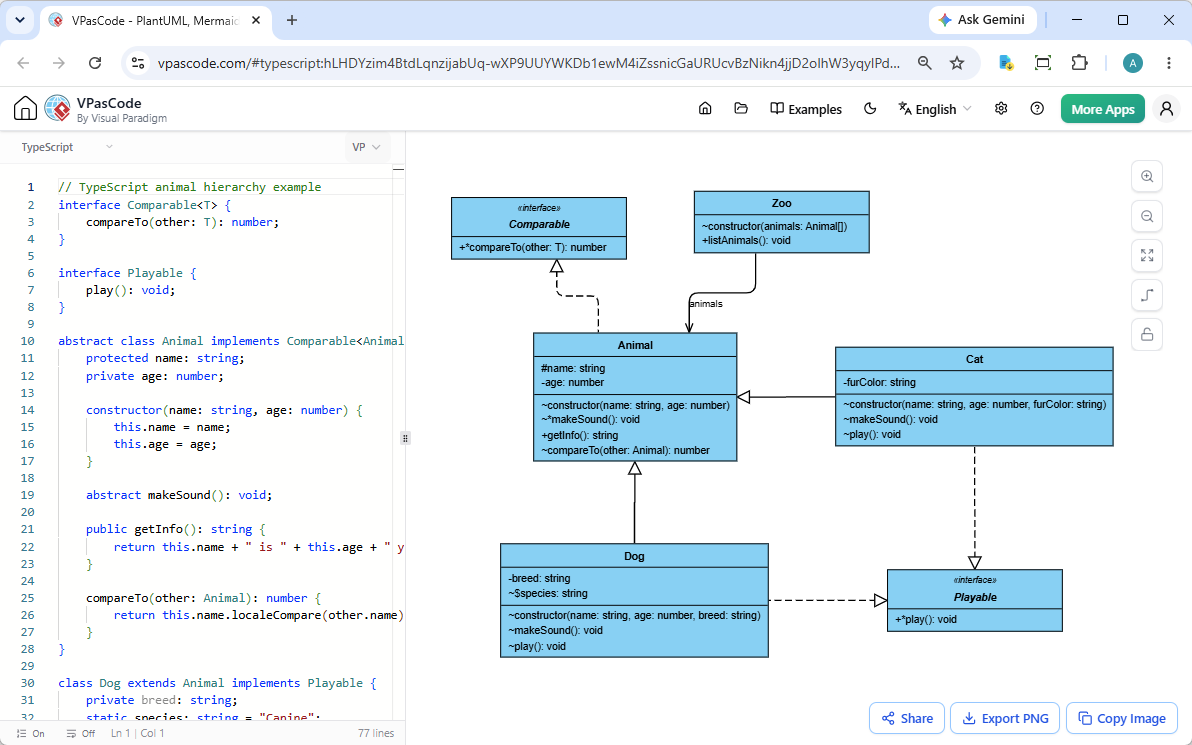
The layout is simple and intuitive: on the left side of the GUI, you paste or type your TypeScript code. As you type, the engine analyzes your object-oriented structures and instantly renders a professional UML Class Diagram on the right side of the screen.
Have existing files you want to visualize? You don’t even need to open them. Simply drag and drop your TypeScript (.ts) source files directly into the VPasCode interface. The system will automatically detect the language, populate the editor, and generate the corresponding diagram in milliseconds.
See It in Action: TypeScript Animal Hierarchy
To demonstrate how accurately this online TypeScript diagram tool maps object-oriented concepts, let’s look at a standard animal hierarchy model utilizing interfaces, abstract classes, encapsulation, and inheritance.
// TypeScript animal hierarchy example
interface Comparable<T> {
    compareTo(other: T): number;
}

interface Playable {
    play(): void;
}

abstract class Animal implements Comparable<Animal> {
    protected name: string;
    private age: number;

    constructor(name: string, age: number) {
        this.name = name;
        this.age = age;
    }

    abstract makeSound(): void;

    public getInfo(): string {
        return this.name + " is " + this.age + " years old";
    }

    compareTo(other: Animal): number {
        return this.name.localeCompare(other.name);
    }
}

class Dog extends Animal implements Playable {
    private breed: string;
    static species: string = "Canine";

    constructor(name: string, age: number, breed: string) {
        super(name, age);
        this.breed = breed;
    }

    makeSound(): void {
        console.log("Woof!");
    }

    play(): void {
        console.log(this.name + " is playing fetch");
    }
}

class Cat extends Animal implements Playable {
    private furColor: string;

    constructor(name: string, age: number, furColor: string) {
        super(name, age);
        this.furColor = furColor;
    }

    makeSound(): void {
        console.log("Meow!");
    }

    play(): void {
        console.log(this.name + " is playing with yarn");
    }
}

class Zoo {
    private animals: Animal[];

    constructor(animals: Animal[]) {
        this.animals = animals;
    }

    public listAnimals(): void {
        for (const a of this.animals) {
            console.log(a.getInfo());
        }
    }
}
When you paste this code into VPasCode, it flawlessly identifies the `Animal` abstract class, its implementation of the `Comparable` interface, and the child relationships with the `Dog` and `Cat` classes. It also maps the exact properties (like the static `species` string) and methods into standard UML compartments.
Want to try it yourself? You can open, view, and edit this exact TypeScript architecture right now. Click here to view the live rendering.
Built for Productivity and Collaboration
Because VPasCode is designed to be a frictionless, free TypeScript editor and visualization hub, we have baked in several features to ensure your generated diagrams don’t just sit in the browser:
- High-Quality Exports: Export your generated UML diagrams to SVG (for scalable, lossless vector integration) or PNG (for quick sharing in chats and documents).
- Copy to Clipboard: Instantly copy the rendered image to your clipboard and paste it straight into your presentations, documentation, or issue trackers.
- Frictionless Sharing: Generate a unique hyperlink for your diagram and share it with your team. The recipient doesn’t even need an account—no login is required to view or branch the diagram.
More Than Just an Online TypeScript Diagram Tool
While the ability to parse TypeScript (and 14 other programming languages) is our latest milestone, VPasCode remains the premier unified diagram-as-code tool on the market. Our platform natively supports massive diagramming libraries like PlantUML and Mermaid, allowing you to create everything from C4 models and Sequence diagrams to Gantt charts and Mind Maps.
Furthermore, VPasCode pushes the boundaries of text-to-diagram generation with industry-unique premium features:
- AI Code Error Fixing: Never get stuck on syntax again. If your diagram script has an error, our AI will instantly fix it and explain the correction side-by-side so you can learn from it.
- AI Diagram Translation: Seamlessly break language barriers by natively translating diagram content (e.g., from English to Chinese) with a single click.
- OpenDocs Integration: Push your visualized diagrams directly into Visual Paradigm OpenDocs for comprehensive enterprise documentation.
Note: Diagram editing, live rendering, and image exports are completely free to use. Advanced AI capabilities are available for users with VP Online Combo Edition (or higher) or VP Desktop Professional Edition (or higher) with active maintenance.
Ready to Visualize Your Code?
Stop manually drawing boxes and connecting arrows. Let your code speak for itself.
Start using VPasCode for free today and experience the fastest way to turn your TypeScript into professional UML architecture.