


In our previous post, we introduced Page-Based Sharing. Today, we’re diving deeper into the how of sharing. When you share knowledge through Visual Paradigm OpenDocs, you have two distinct ways to present your data: Static Snapshots and Live Updates.
Choosing the right mode ensures that your audience always sees the right version of your work, whether you want them to see a “work in progress” or a “finalized milestone.”
1. Static Snapshot: Freeze Time
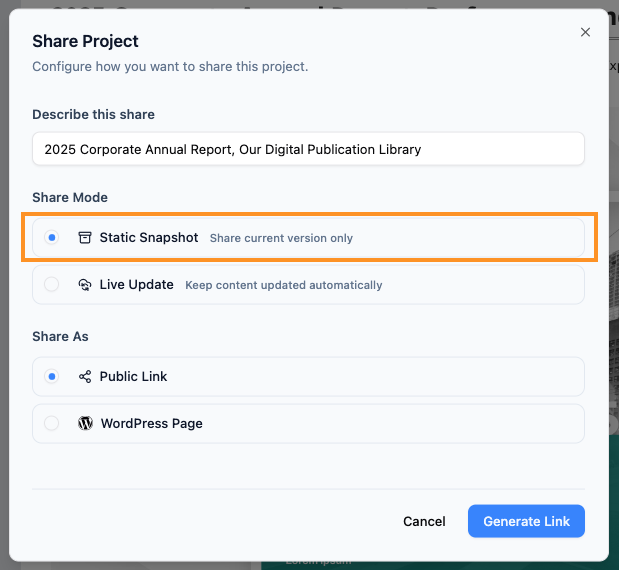
A Static Snapshot is like taking a photograph of your pages at a specific moment. Once you generate the share link, that version of the content is “frozen.”
- How it works: Even if you continue to edit the pages, add new diagrams, or change text in OpenDocs, the person viewing the shared link will only see the version that existed when you clicked “Share.”
- Best for:
- Project milestones (e.g., “Version 1.0”).
- Archiving records for compliance or audits.
- Sharing a “final” proposal that shouldn’t change during a review period.
2. Live Update: Real-Time Sync
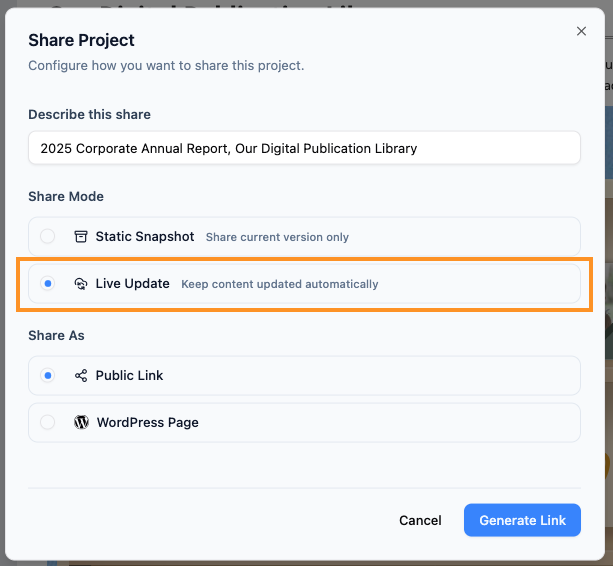
A Live Update share is a dynamic link. It acts as a window into your current working environment.
- How it works: Any change you save in your knowledge management tool is instantly reflected in the shared link. Your readers will always see the most up-to-date information without you needing to send a new URL.
- Best for:
- Collaborative projects where information changes daily.
- Internal “Knowledge Bases” or Wikis.
- Technical documentation that must always reflect the latest software version.
Quick Comparison
| Feature | Static Snapshot | Live Update |
|---|---|---|
| Content Changes | Remains the same as when shared. | Updates automatically with your edits. |
| Best Usage | Milestones & Archiving. | Ongoing Projects & Manuals. |
| Security | Safe from accidental “work-in-progress” leaks. | Requires care as edits are seen immediately. |
How to Choose Your Mode
When you are in the Share Project dialog in OpenDocs, simply select the option that fits your needs before clicking the final Share button:
- Click Static Snapshot to “share current version only.”
- Click Live Update to “keep content updated automatically.”
Pro Tip: Not sure which to pick? Most teams use Live Update for internal manuals and Static Snapshot for client-facing deliverables.
Experience the most flexible knowledge management platform today.