


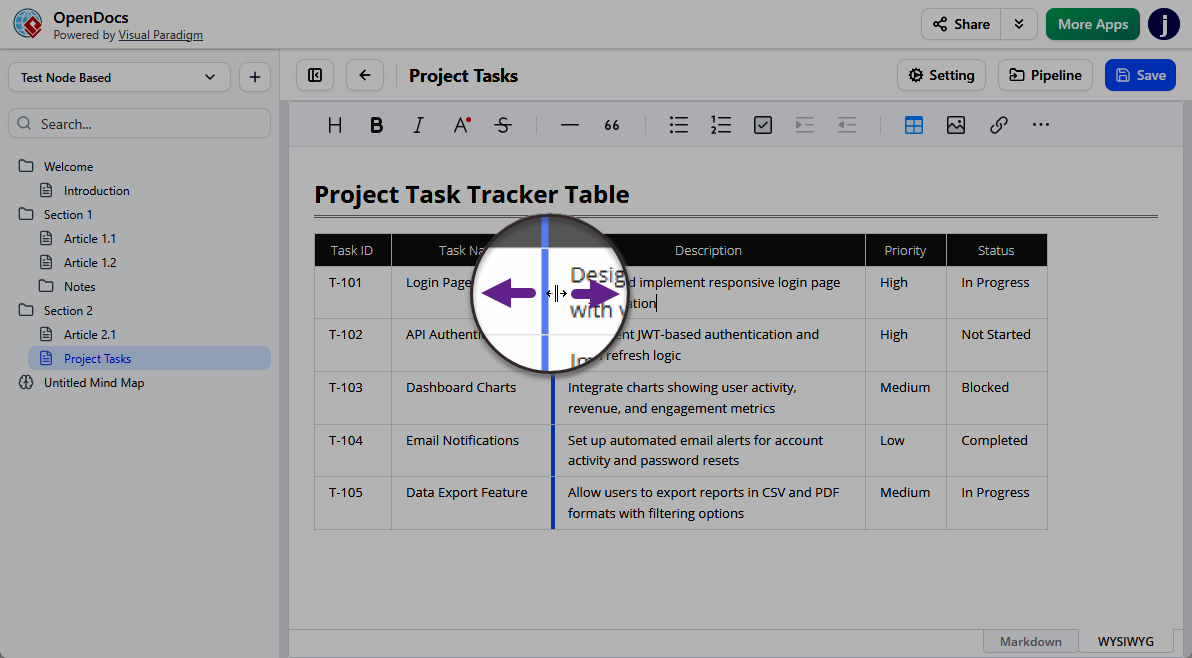
Precision Control at Your Fingertips
Static tables can often feel restrictive, especially when dealing with varying lengths of text or large datasets. With this latest update, users can now resize columns instantly by simply dragging the borders of the table headers. This allows you to manually adjust widths to fit your specific data, eliminating awkward text wrapping and wasted white space.
Why This Matters for Your Knowledge Management Tool
- Improved Readability: Ensure that critical columns are wide enough for clarity while condensing secondary information.
- Professional Layouts: Create polished, presentation-ready documents without needing advanced CSS or complex formatting tools.
- Efficiency: Spend less time fighting with table settings and more time capturing information.
A Better Way to Manage Knowledge
A robust knowledge management tool should adapt to your workflow, not the other way around. By integrating interactive elements like header-based resizing, OpenDocs provides a more fluid and responsive editing experience. This enhancement is part of our broader commitment to making Visual Paradigm OpenDocs the most versatile platform for teams to centralize their expertise.
Ready to try it out?
Experience the new table editor enhancements firsthand. Start organizing your data with precision today.