
We are excited to announce a practical productivity enhancement for Visual Paradigm OpenDocs! Gathering notes, technical specs, and AI-generated content into your workspace is now much faster and easier.
What is OpenDocs?
Visual Paradigm OpenDocs is a web-based documentation and knowledge base workspace designed for modern teams. It combines traditional written documentation with visual modeling, allowing you to create rich text documents alongside interactive diagrams on a single page.
Key highlights include:
- Interactive Visuals: Seamlessly embed flowcharts, mind maps, and UML models right next to your explanatory text.
- Smart Diagram Syncing: Connect your documentation directly to tools like VP Desktop, VP Online, and VPasCode so embedded diagrams update automatically when underlying models change.
- AI-Powered Diagramming: Turn plain text instructions into visual process flows, sequence diagrams, and work breakdown structures.
- Structured Workspace: Keep project guides, API specs, and technical notes organized with clean folder structures.
What is Markdown?
Markdown is a lightweight plain-text formatting language widely used across software development and content creation. Instead of clicking buttons to apply styling, Markdown uses simple text characters—such as # for headings, ** for bold text, - for bullet lists, and backticks for code blocks.
Because it is lightweight and portable, Markdown has become the standard output format for developer tools, code editors (like VS Code), documentation platforms (like GitHub), and AI assistants (like ChatGPT and Claude).
How Does Direct Markdown Paste Benefit You?
Previously, pasting text containing Markdown syntax into the OpenDocs visual editor would show the raw markup code, requiring manual reformatting to make the document look neat.
With our new Direct Markdown Paste Support, OpenDocs automatically detects Markdown syntax as you paste and instantly renders it into clean, styled rich text.
Key benefits:
- Zero Manual Cleanup: No more spending time removing asterisks, hash signs, or brackets.
- Instant AI Integration: Copy responses directly from AI tools and paste them straight into OpenDocs with all formatting preserved.
- Preserved Formatting Structure: Headings, tables, bullet points, blockquotes, and code blocks retain their structure instantly.
- Faster Workflow: Streamlines the process of compiling research, meeting notes, and technical drafts from external sources.
Quick Guide: How to Use the Markdown Paste Function
Using the new paste support is completely automatic:
- Copy Your Markdown Content: Copy any Markdown-formatted text from your AI prompt, code editor, GitHub repository, or note-taking app.
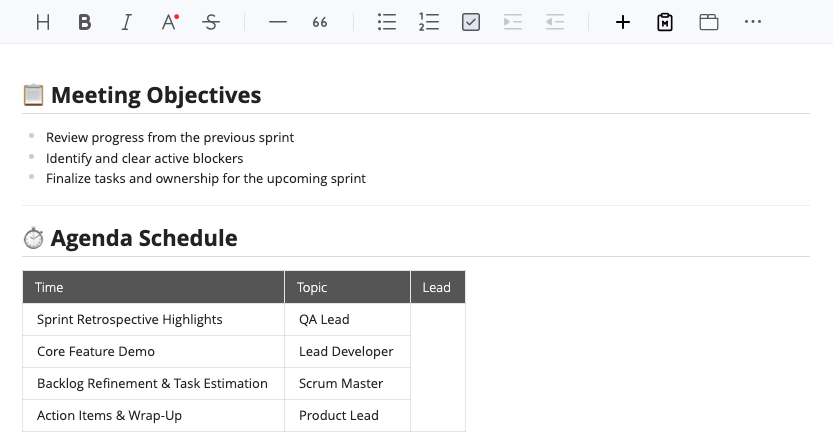
## 📋 Meeting Objectives * Review progress from the previous sprint * Identify and clear active blockers * Finalize tasks and ownership for the upcoming sprint --- ## ⏱️ Agenda Schedule | Time | Topic | Lead | | :--- | :--- | :--- | | **09:00 - 09:10 AM** | Sprint Retrospective Highlights | QA Lead | | **09:10 - 09:30 AM** | Core Feature Demo | Lead Developer | | **09:30 - 09:50 AM** | Backlog Refinement & Task Estimation | Scrum Master | | **09:50 - 10:00 AM** | Action Items & Wrap-Up | Product Lead | - Open Your OpenDocs Document: Navigate to your desired page in Visual Paradigm OpenDocs and click into the document editor.
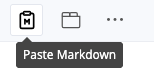
- Paste Your Content: Press “Paste Markdown” button
- Result:
Why We Built This: Rationale & Benefits
Modern documentation work rarely happens in a vacuum. Creators frequently copy output from AI chatbots, technical drafts from VS Code, or README specs from GitHub repositories into their primary workspace.
The Problem: Previously, pasting Markdown into the OpenDocs visual editor exposed raw syntax code (like # Heading or **bold**). Users had to waste time manually deleting symbols and applying formatting using toolbar buttons.
The Rationale & Core Benefits:
- Eliminating Reformatting Friction: OpenDocs now automatically parses Markdown on paste, instantly rendering clean, styled rich text. Creators can keep their momentum instead of doing repetitive editing tasks.
- Seamless AI & Developer Tool Integration: Effortlessly transfer structured responses from ChatGPT, Claude, GitHub, or local note-taking apps directly into OpenDocs with zero layout distortion.
- Preserved Document Structure: Headings, tables, bullet points, numbered lists, blockquotes, and code blocks retain their structure and styling automatically.
- Enhanced Team Productivity: Saves minutes per document page, compounding into significant time savings for engineering, product, and management teams.
Who Should Use It?
This feature is designed for anyone who regularly works across multiple tools:
- Software Engineers & Technical Authors: Effortlessly transfer README files, code documentation, and system notes from GitHub, GitLab, or local editors into OpenDocs.
- Business Analysts & Product Managers: Move research notes, user stories, and specs directly into shared team workspaces without manual reformatting.
- AI Tool Users: Anyone using ChatGPT, Claude, or custom LLM workflows to draft documentation can copy and paste outputs directly into OpenDocs in seconds.
Conclusion
By supporting direct Markdown pasting, OpenDocs eliminates friction when moving text between your favorite tools and your primary documentation workspace. You can now focus on writing and structuring your content without wasting time on repetitive styling edits.
Try It Now in OpenDocs!
Ready to speed up your documentation workflow?
Launch Visual Paradigm OpenDocs and try pasting your Markdown content today!