


Visual Paradigm now allows users to configure a custom AI endpoint for selected AI-powered agentic apps and features– either by:
- Selecting from our list of supported AI providers or
- Connecting to a custom provider (provide your own AI endpoint).
This enhancement gives organizations greater control over the AI provider, model, security configuration, performance, and usage policies behind their Visual Paradigm AI experience.
What Is Custom AI Endpoint Support?
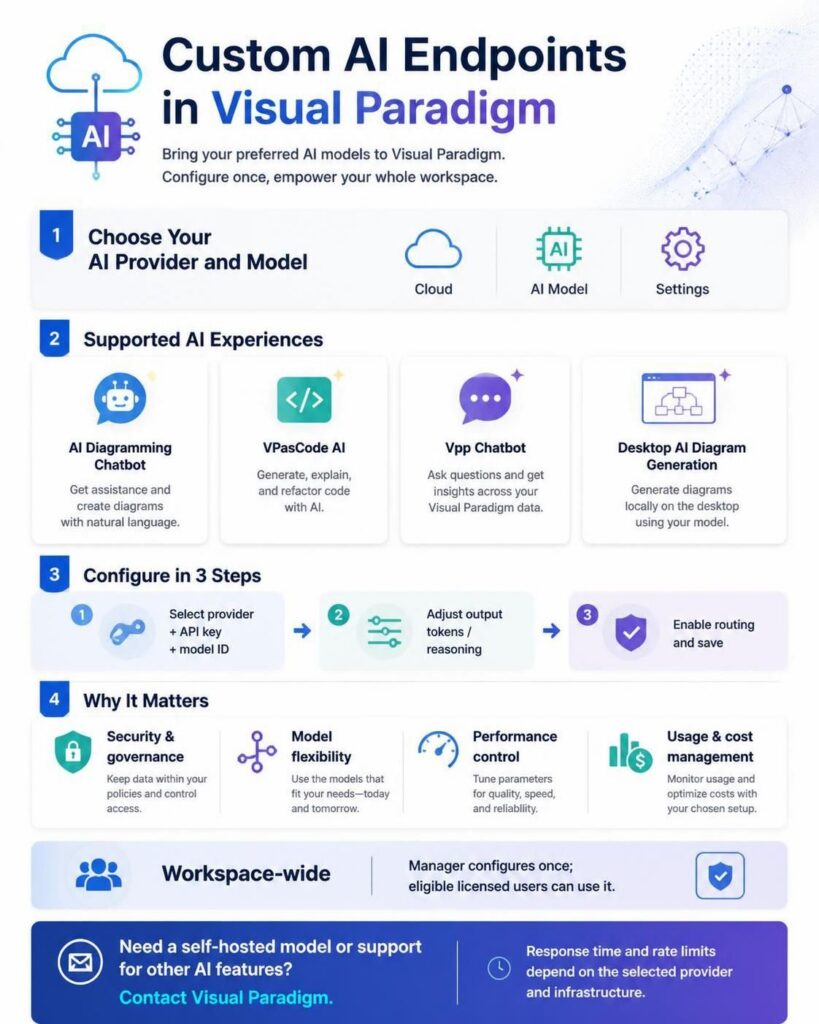
A custom AI endpoint allows an organization to route supported Visual Paradigm AI requests through its selected AI provider and model instead of using Visual Paradigm’s system-default model. Workspace managers can configure the provider, API key, model ID, maximum output tokens, and reasoning or thinking settings from the LLM configuration page. Once the configuration is enabled, it becomes effective across the workspace for the supported applications and features.
Supported Visual Paradigm AI Features
Custom AI endpoints currently apply to the following applications and agentic features:
- Visual Paradigm AI Diagramming Chatbot
- Visual Paradigm VPasCode, including:
- Visual Paradigm Vpp Chatbot
- Visual Paradigm Desktop AI Diagram Generation
The custom endpoint does not automatically apply to every AI-powered feature in Visual Paradigm. Features outside the supported list above continue to use their existing AI configuration.
Why Use a Custom AI Endpoint?
Organizations have different requirements for security, compliance, data governance, infrastructure, performance, cost management, and AI model selection. Custom AI endpoint support helps teams align Visual Paradigm’s supported AI workflows with their own technical and operational policies.
- Security and governance:
Use an AI provider and account approved by your organization’s security or IT team. - Greater infrastructure control:
Manage provider relationships, API keys, quotas, access policies, and usage monitoring through your organization’s preferred setup. - Model flexibility:
Select a model based on response quality, speed, reasoning capability, language support, cost, or workload requirements. - Performance optimization:
Choose a provider or model that performs well for your region, network environment, and expected usage volume. - Operational consistency:
Apply a common AI configuration across a workspace instead of requiring individual users to configure AI services separately. - Cost and usage management:
Manage AI consumption through your own provider account, budgeting process, quota policy, and monitoring tools. - Support for enterprise requirements:
Better align Visual Paradigm AI features with internal technology, regulatory, and infrastructure policies.
How to Configure a Custom AI Endpoint
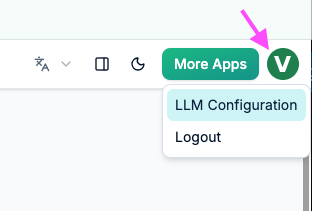
To configure a custom AI endpoint, open the LLM configuration page from a supported Visual Paradigm application:
Then, provide the required connection details.
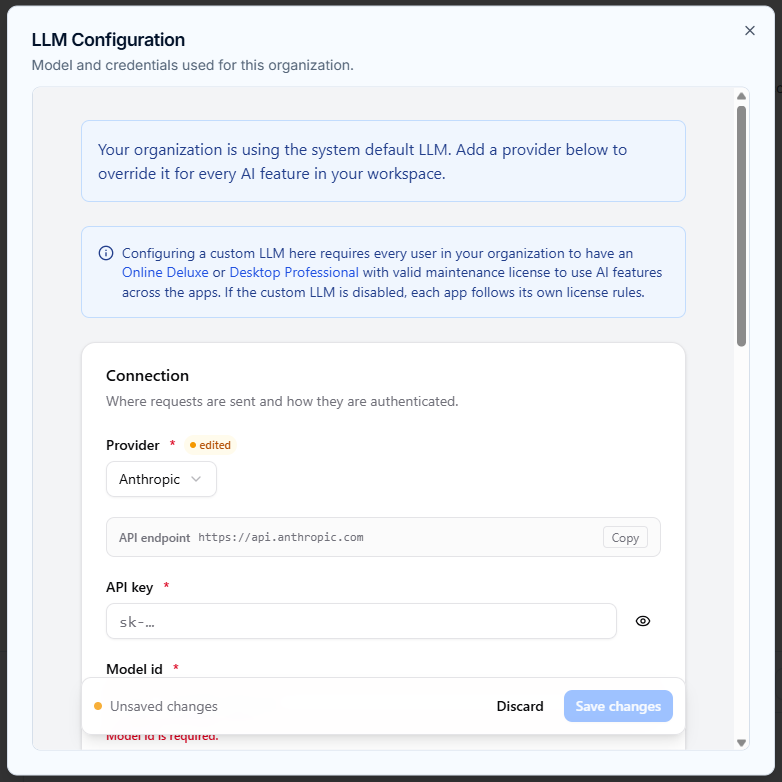
Connection settings
- Provider:
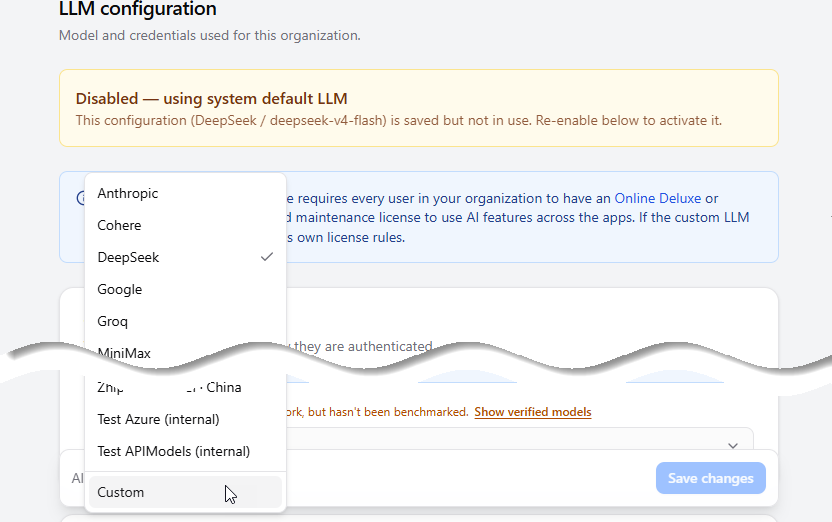
You can select an existing supported provider, such as Anthropic, Cohere, DeepSeek, Google, Groq, MiniMax, Mistral, Moonshot, OpenAI, OpenRouter, Qwen, Tencent, xAI, Z.ai (GLM), or Zhipu Big Model. - API key:
Enter the API key associated with the selected provider. - Model ID:
Enter the identifier of the AI model to use.
How to Use a Custom LLM Provider?
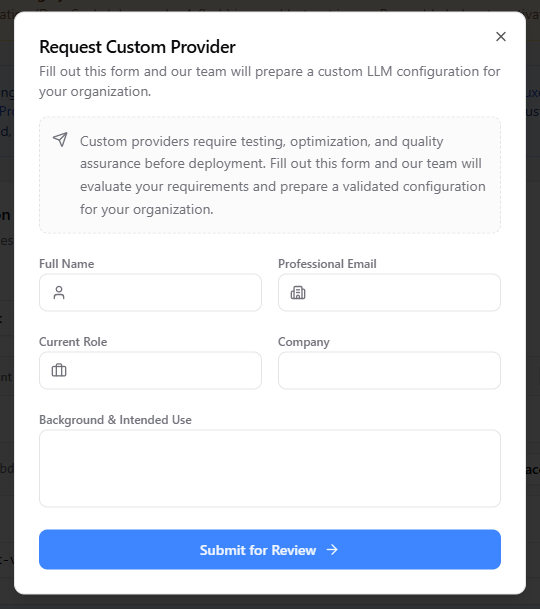
If you want to use your own custom provider or self-hosted endpoint that is not in the list, select Custom. Selecting Custom will open the Request Custom Provider dialog box.
Because custom providers require testing, optimization, and quality assurance before deployment, fill out and submit the form so our team can evaluate your requirements and prepare a validated configuration for your organization.
Model behavior settings
Optional, provider-specific model behavior settings may also be available. Provider defaults apply unless these settings are changed.
- Max output tokens:
Set the maximum number of tokens the model can generate. Increase this value for longer conversations or more complex responses, or lower it when using a model with a smaller output limit. - Reasoning effort or thinking mode:
Configure the model’s reasoning behavior when supported. The available control depends on the selected provider and model.
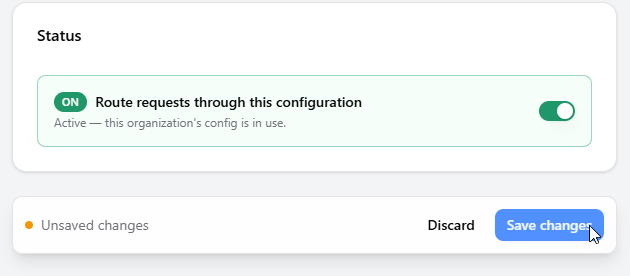
After entering the settings, enable Route requests through this configuration and click Save changes. If request routing is not enabled, supported AI requests will fall back to Visual Paradigm’s system-default model.
Workspace-Level Configuration and Licensing
Custom AI endpoint configuration is applied at the workspace level. Only the workspace manager can set or update the custom endpoint configuration.
The following licenses are required to use the supported AI features with a custom endpoint:
- Visual Paradigm Online Deluxe Edition or higher
- Visual Paradigm Desktop Professional Edition or higher
Because the configuration applies to the entire workspace, every user who wants to use the related AI functionality must have a valid qualifying license. Users without an eligible license will not be able to use the applicable AI features, even when a custom endpoint has been configured.
If a user has trouble accessing the supported AI features, the workspace manager should confirm that the custom endpoint is configured correctly, request routing is enabled, and the user has an eligible license.
Removing a Custom AI Endpoint
To remove the workspace configuration, open the LLM configuration page, go to the Danger Zone, and select Delete configuration.
Deleting the configuration removes the custom endpoint for the entire workspace. Requests will immediately fall back to Visual Paradigm’s system-default model.
Recommended Models for Fast, Everyday Operations
Based on Visual Paradigm’s internal benchmarking, the following models demonstrated comparatively rapid response generation with acceptable quality for day-to-day operations:
- MiniMax-M2.7-highspeed
- gpt-5.6-luna
- gpt-5.6-sol
- gpt-5.6-terra
- claude-sonnet-4-6
- gemini-3.6-flash
- gemini-3.7-flash
- glm-5.3
- glm-5.3-flash
- qwen3.8-max
- qwen3.8-flash
- deepseek-v4-flash-0731
- mistral-medium-3-5
- mistral-large-2407
- grok-4.6
The following models demonstrated longer generation times during testing:
- MiniMax-M2.7
- MiniMax-M3
- claude-opus-4-6-thinking
- glm-5.2
- kimi-k3
These classifications are based on internal testing under specific conditions and are provided as general guidance. Actual response times and behavior may vary depending on network routing, provider infrastructure, server load, rate limits, model availability, and request complexity. Other models may work but have not necessarily been benchmarked by Visual Paradigm.
Self-Hosted AI Models and Additional AI Features
Organizations that want to use a self-hosted AI model, connect to an internally managed AI service, use a specific model that is not currently available, or apply a custom model to other Visual Paradigm AI features can submit a request via the Custom Provider form or contact the Visual Paradigm team directly to discuss their requirements.
Our team can discuss the requested model, hosting arrangement, provider, integration method, and target AI features to determine the most suitable support options.
Frequently Asked Questions
What is a custom AI endpoint in Visual Paradigm?
A custom AI endpoint allows an eligible workspace to route supported Visual Paradigm AI requests through an organization-selected AI provider and model instead of using Visual Paradigm’s system-default model.
Which Visual Paradigm AI features support custom endpoints?
Custom endpoints support Visual Paradigm AI Diagramming Chatbot, the supported AI features in VPasCode, Visual Paradigm Vpp Chatbot, and Visual Paradigm Desktop AI Diagram Generation.
Who can configure a custom AI endpoint?
Only the manager of a workspace can set or update its custom AI endpoint configuration.
Which licenses are required?
Users need Visual Paradigm Online Deluxe Edition or higher, or Visual Paradigm Desktop Professional Edition or higher, to use the supported AI functionality with a custom endpoint.
What happens if request routing is not enabled?
Requests will fall back to Visual Paradigm’s system-default model if the workspace manager does not enable “Route requests through this configuration.”
Can I use a self-hosted or custom AI provider?
Yes. You can select Custom in the provider options on the LLM configuration page to open the Request Custom Provider form. You can submit your requirements there so our team can evaluate, test, and prepare a custom configuration for your organization.
Does custom endpoint support apply to every Visual Paradigm AI feature?
No. The custom endpoint currently applies only to the applications and features listed in this announcement. Contact the Visual Paradigm team to discuss support for other AI-powered features.