


Visual Paradigm is dedicated to providing a comprehensive suite of visualization tools for every possible scenario—from professional business processes to personal heritage documentation. To complete our latest set of enhancements, we are pleased to announce the addition of the Family Tree editor to OpenDocs.
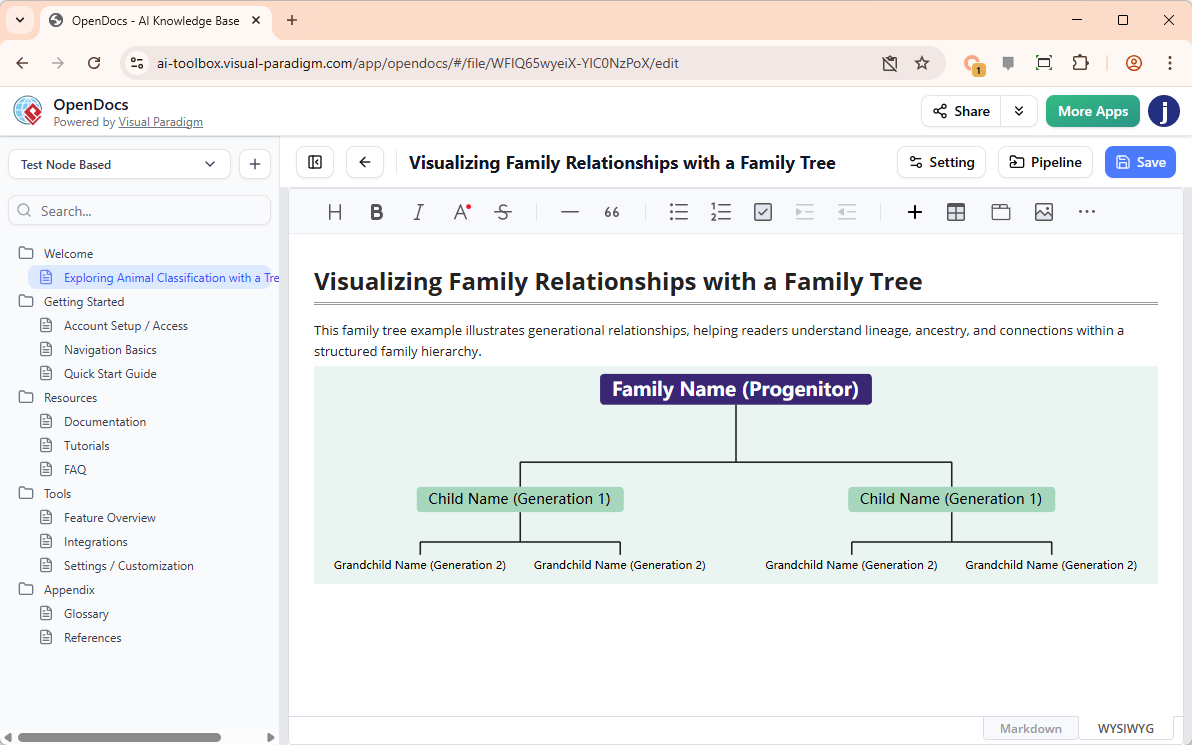
Whether you are documenting a historical biography, a fictional character’s lineage for a creative project, or simply tracking a real-world genealogy, our family tree tool provides a clean, structured way to visualize generational connections.
The Importance of Visualizing Lineage
A family tree tool is the most effective way to communicate complex relationships across generations. By using a dedicated editor within OpenDocs, you can move beyond simple text-based lists to create a visual map that is easy to follow. This tool is perfect for:
- Biographers and Historians: Clarifying family ties in academic or historical documents.
- Creative Writers: Mapping out complex character backgrounds for novels or screenplays.
- Genealogists: Building a professional-grade visual record of ancestry for family archives.
Professional Features for Detailed Mapping
While some diagrams focus on logic and flow, a family tree requires a specific focus on relationships and individual details. The Family Tree editor in OpenDocs is designed to be highly intuitive, allowing you to build your chart manually with precision. You can easily add spouses, siblings, and descendants, ensuring that every branch of the tree is accurately represented.
The editor provides a canvas where you can customize the layout, ensuring that even large families with multiple generations remain legible and well-organized within your page.
How to Create a Family Tree in OpenDocs
Creating your family tree follows the same user-friendly process as our other diagramming tools:
- Open the Inserter: In your OpenDocs editing document, click the + (Plus) icon on the top bar.
- Select Family Trees: On the left-hand menu, select Family Trees, then choose the Family Tree template on the right.
- Build Your Tree: Use the editor’s intuitive interface to add family members, define their relationships, and input names and dates.
- Customize the Look: Adjust the styling, colors, and connecting lines to create a visual that fits the tone of your document.
- Save and Embed: Click Save at the top right. Your family tree will be instantly embedded into your OpenDocs page.
Who Can Access the Family Tree Tool?
The Family Tree editor is available now for users of:
- Visual Paradigm Desktop Professional Edition
- Visual Paradigm Online Combo Edition
Start Documenting Your Legacy Today
Don’t let complex family histories become a confusing jumble of names. Use the professional family tree tool in OpenDocs to create clear, beautiful, and lasting visual records of heritage and connection.
Create Your Family Tree in OpenDocs Now
Related posts:
 Revolutionize Your Documentation with the New AI Mind Map Tool in OpenDocs
 Streamline Your Team Structure with the New AI Organization Chart Tool in OpenDocs
 Master Your Project Schedule with the New AI Timeline Tool in OpenDocs
 Meet the All-New AI Diagram Chatbot V2: The Next Generation of Intelligent Visual Modeling