


Identifying the root cause of a problem is the first step toward a permanent solution. To empower your quality management and troubleshooting processes, Visual Paradigm has integrated a professional Fishbone Diagram editor (also known as the Ishikawa or Cause-and-Effect diagram) into OpenDocs.
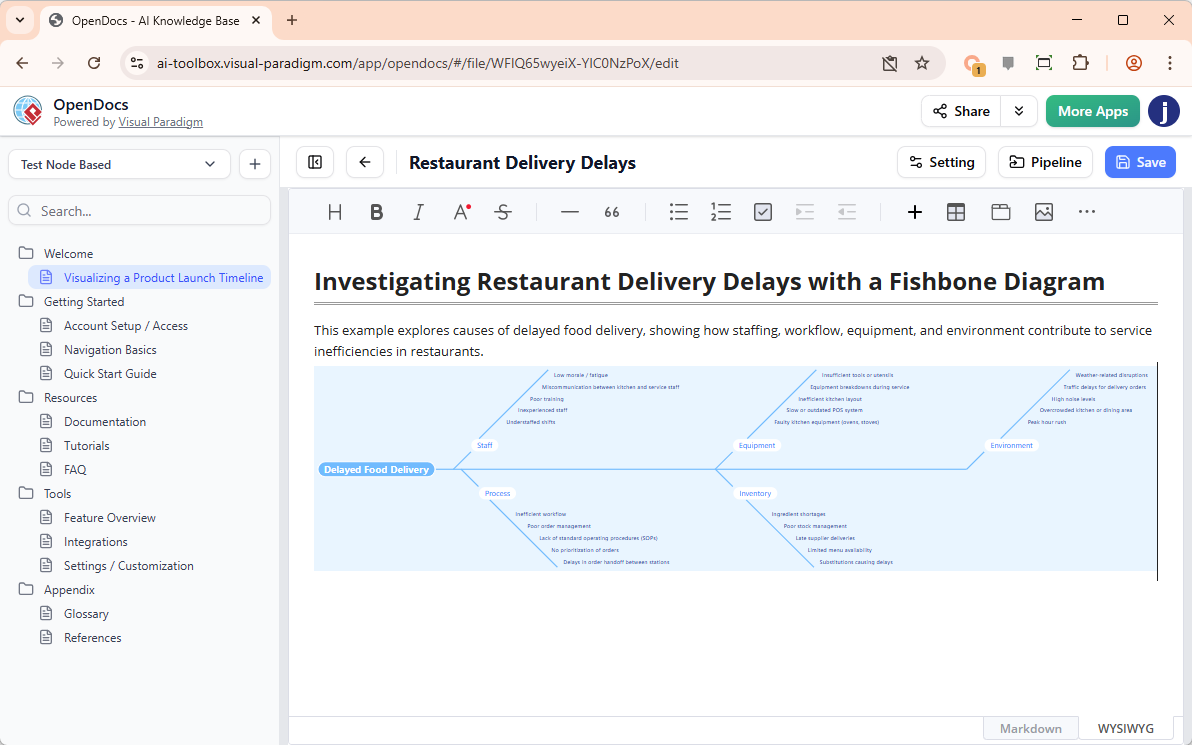
By bringing this essential analytical tool directly into your documentation, we are making it easier for teams to collaborate on complex problem-solving without ever leaving their page. With our AI fishbone diagram tool, you can move from a crisis to a structured analysis in record time.
The Value of Visual Root Cause Analysis
A fishbone diagram tool is a staple in Six Sigma, Lean, and general project management. It allows you to categorize potential causes of a problem to find its source. Integrating this into your documentation helps you:
- Brainstorm potential factors across categories like Manpower, Methods, Machines, and Materials.
- Visualize the relationship between multiple contributing causes and a single effect.
- Create a permanent record of the troubleshooting process for future audits and learning.
Analyze Problems Faster with “Create with AI”
Sometimes the hardest part of analysis is knowing which categories to look at. Our AI fishbone diagram tool takes the guesswork out of the initial setup. By clicking “Create with AI,” you can describe a problem—such as “Software release delays in the Q3 cycle”—and the AI will automatically generate a fishbone structure with logical branching causes like “unclear requirements,” “server downtime,” or “resource bottlenecks.”
This AI-generated draft provides a robust framework that your team can then refine, expand, and finalize with specific data points.
How to Create a Fishbone Diagram in OpenDocs
Transforming your analysis into a professional diagram is simple. Follow these steps:
- Enter the Editor: In your OpenDocs document, click the + (Plus) icon on the top bar.
- Select Fishbone: Navigate to Fishbone Diagrams on the left menu, then select the Fishbone Diagram template on the right.
- Generate with AI: Click Create with AI at the top right. Enter the “Effect” or the problem you are investigating and click Generate.
- Refine the Causes: Use the editor to add specific sub-causes, adjust categories, or highlight the most likely root causes.
- Save Your Work: Click Save at the top right. The diagram will be instantly embedded into your OpenDocs page for all stakeholders to see.
Availability
The AI-powered Fishbone Diagram enhancement is available to users of:
- Visual Paradigm Desktop Professional Edition
- Visual Paradigm Online Combo Edition
Stop Guessing, Start Solving
Effective documentation should do more than just record facts—it should help you find answers. Use our AI fishbone diagram tool to bring structure to your brainstorming and clarity to your solutions.
Identify Root Causes with AI in OpenDocs Now
Related posts:
 Revolutionize Your Documentation with the New AI Mind Map Tool in OpenDocs
 Streamline Your Team Structure with the New AI Organization Chart Tool in OpenDocs
 Master Your Project Schedule with the New AI Timeline Tool in OpenDocs
 Meet the All-New AI Diagram Chatbot V2: The Next Generation of Intelligent Visual Modeling