


At Visual Paradigm, we are continuously expanding the capabilities of our AI-driven tools to empower software architects, developers, analysts, and designers. Following the recent release of our next-generation Visual Paradigm AI Diagramming Chatbot, we are excited to announce our latest enhancement: robust, native support as a powerful AI JSON generator capable of generating and visualizing structured JSON code effortlessly.
While our AI Chatbot has traditionally focused on transforming text prompts into high-quality diagrams, structured data formatting is an essential extension of modern visual modeling. With this new release, users can utilize our AI JSON generator to effortlessly create clean, standardized JSON structures directly within the chatbot interface and visualize or refine them instantly using our diagram-as-code platform, Visual Paradigm VPasCode.
Key Highlights of the AI JSON Generator Enhancement
- Instant AI JSON Generation: Prompt the chatbot’s built-in AI JSON generator to construct well-structured JSON data models for user profiles, API responses, configuration files, and system schemas.
- Direct Integration with VPasCode: Transition seamlessly from raw code to interactive visuals with a single click.
- Visual Data Mapping: Automatically render a pictorial graph representing your JSON data hierarchy to quickly understand complex relationships with VPasCode.
- In-Browser Editing & Export: Edit your generated JSON code live on the VPasCode platform and export high-resolution diagram graphics for documentation or presentation purposes.
See It in Action: Generating Sample Data Models
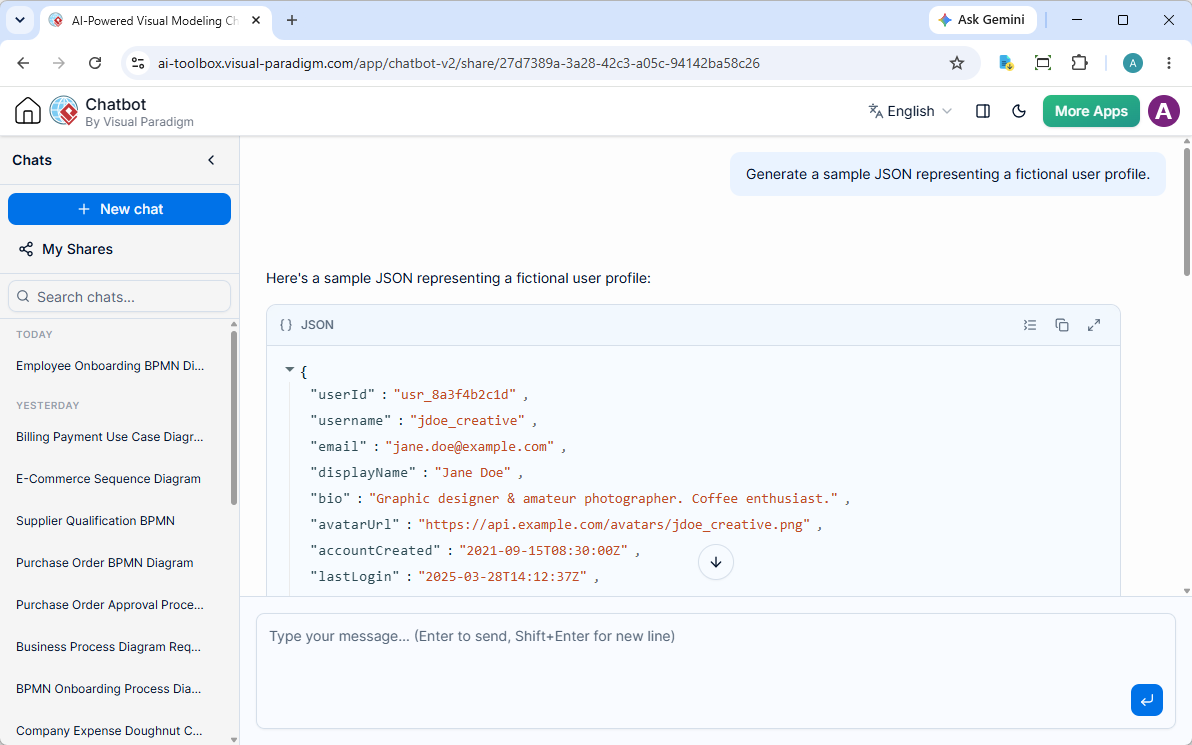
Creating structured data with our AI JSON generator is as simple as asking a question. For instance, when provided with a simple prompt like “Generate a sample JSON representing a fictional user profile,” the Visual Paradigm AI Chatbot generates complete, production-ready JSON output:
{
  "userId": "usr_8a3f4b2c1d",
  "username": "jdoe_creative",
  "email": "[email protected]",
  "displayName": "Jane Doe",
  "bio": "Graphic designer & amateur photographer. Coffee enthusiast.",
  "avatarUrl": "https://api.example.com/avatars/jdoe_creative.png",
  "accountCreated": "2021-09-15T08:30:00Z",
  "lastLogin": "2025-03-28T14:12:37Z",
  "isVerified": true,
  "preferences": {
    "theme": "dark",
    "language": "en-US",
    "notifications": {
      "email": true,
      "push": false,
      "sms": false
    }
  },
  "address": {
    "street": "742 Maple Avenue",
    "city": "Portland",
    "state": "OR",
    "zipCode": "97201",
    "country": "US"
  },
  "socialLinks": {
    "twitter": "@jdoe_creative",
    "instagram": "@janedoe_photo",
    "linkedin": "https://linkedin.com/in/janedoe"
  },
  "roles": ["member", "contributor"],
  "stats": {
    "posts": 47,
    "followers": 1253,
    "following": 340
  },
  "tags": ["design", "photography", "travel", "coffee"]
}Seamless Editing and Graph Visualization via VPasCode
Viewing raw JSON text is useful, but interpreting nested objects and data connections is significantly easier when visualized pictorially. Thanks to our deep integration with VPasCode, taking your output from an AI JSON generator to full graphic representation requires just one click.
Located directly underneath the code viewer in the AI Chatbot interface, you will find the Open in VPasCode button. Clicking this button opens your generated output inside VPasCode—our dedicated diagram-as-code environment.
Inside VPasCode, you can:
- Modify Code in Real-Time: Adjust key-value pairs, extend arrays, or reconfigure schemas dynamically.
- Inspect Data Visually: Automatically generate a graphical map displaying the structural layout of your JSON object.
- Export Diagram Images: Download the resulting visualization as a clean image file to embed in technical specifications, project documentation, or team presentations.
Frequently Asked Questions (FAQ)
How do I generate JSON using the Visual Paradigm AI JSON generator?
Simply open the AI Chatbot and describe the schema or sample data you need (e.g., “Create a JSON array of product inventory items”). The built-in AI JSON generator will format and validate the output automatically.
Can I edit the generated JSON directly?
Yes. By selecting Open in VPasCode below the generated output, you can modify the source JSON code directly in your browser and view updated visual charts in real time.
What are the benefits of visualizing JSON as a graph diagram?
Visualizing JSON structure helps teams spot missing fields, inspect complex nested properties, understand data relationships faster, and share clear architecture diagrams with stakeholders without manual diagramming.
Get Started Today
Experience how an AI JSON generator and integrated data visualization can accelerate your software design workflow. Explore full feature details on our AI Chatbot Home Page, or dive right in and start generating JSON structures today.