


Generate Stunning AI Slideshows in Seconds with Illumy AI Slides
The era of painstaking presentation building is over. We’re thrilled to announce the launch of Illumy AI Slides, a revolutionary, next-generation presentation tool built right into Visual Paradigm. Illumy solves the core problem of content creation by transforming a simple topic into a fully realized, visually stunning AI slideshow—complete with cinema-grade transitions, AI-generated imagery, and broadcast-quality output. Get ready to tell your story like never before.
Addressing the Challenge of Tedious Presentation Design
Before Illumy, creating an impactful presentation was a multi-step, time-consuming process. Users faced a tedious cycle of:
- Brainstorming and structuring the narrative flow.
- Writing and summarizing dense content for slides.
- Hunting for high-quality, relevant, and non-stock imagery.
- Manually applying transitions and animations to achieve a professional look.
- Struggling to export the final result as a high-quality video for sharing or offline viewing.
This traditional approach slows down innovation and often results in rushed, uninspired decks that fail to engage the audience.
Introducing Illumy AI Slides: Cinematic Storytelling, Simplified
We built Illumy AI Slides to completely redefine what a presentation can be. The goal was simple: provide a tool that acts as a co-creator, not just an editor. It leverages Generative AI and a high-performance WebGL engine to deliver cinematic quality in a single click, saving hours of design and writing time.
Illumy AI Slides allows you to:
- Generate a Complete Deck Instantly: Simply enter a concept like “The Future of Space Travel” and watch Illumy auto-generate the structure, content, and visuals.
- Eliminate Image Search: Integrated AI Image Synthesis crafts unique, context-aware, high-quality backgrounds for every slide, guaranteeing visual consistency.
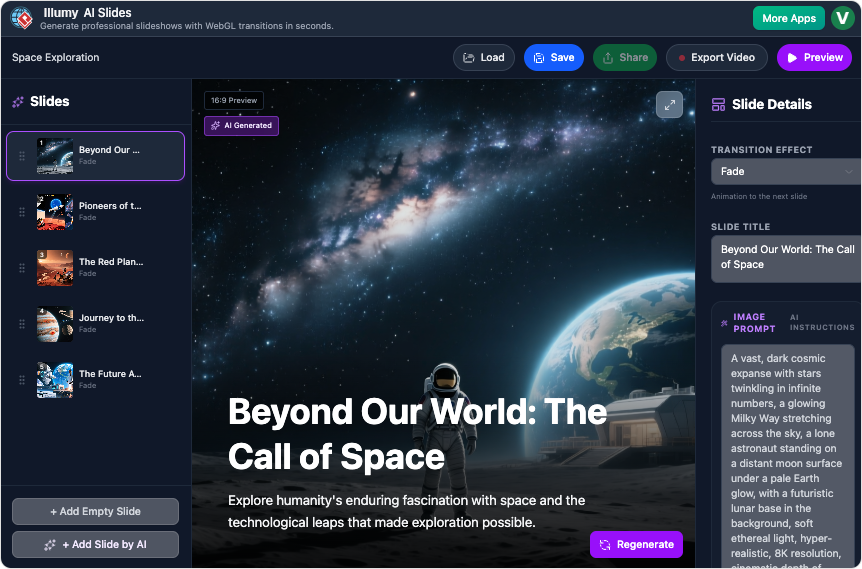
- Apply Professional Polish: Utilize over 20 unique, custom-coded WebGL transition effects—from elegant fades and page curls to dramatic 3D cubes and glitches.
- Export Broadcast Quality: Record the entire presentation in real-time and export it as a high-definition
.webmvideo file, ready for social media or internal distribution. - Maintain Control: Use the split-screen editor to fine-tune AI-generated content or image prompts, allowing for full creative oversight before final export.
How to Access and Use the New Feature
Getting started with your first Illumy AI video slideshow is incredibly easy. The entire process is designed for maximum efficiency.
Here’s the simple workflow:
- Enter Your Topic: Navigate to the Illumy AI Slides section and input a specific topic or idea (e.g., “The Impact of Quantum Computing”).
- One-Click Generation: Click the ‘Generate’ button. The AI immediately begins structuring the narrative, writing summaries, and preparing image prompts.
- Review and Refine: Use the intuitive split-screen editor to view the auto-generated deck. Adjust text, change transition types (like switching from a ‘Ripple’ to a ‘Glitch’), or regenerate specific slide images with new prompts.
- Preview and Export: Hit the full-screen preview to see the presentation auto-play with its cinema-grade transitions. When satisfied, click ‘Export’ to save the final high-definition video file.
Ready to Transform Your Presentations?
Illumy AI Slides is more than just a new feature; it’s a commitment to elevating your content and saving you valuable time. By fusing generative AI with advanced WebGL rendering, we’ve made it possible for anyone to create a professional, cinematic AI video slideshow that captivates and informs.
Stop designing slides and start telling stories. We can’t wait to see what you create!