


Accelerate Verification and Design with AI-Powered Timing Diagram Generation
We are thrilled to unveil a groundbreaking feature in Visual Paradigm: AI Diagram Generation! This functionality is set to revolutionize how you document and design complex systems. We are launching this capability with full support for the Timing Diagram, allowing you to instantly generate these intricate models from simple text inputs. The primary benefit? Drastically cutting down the time and effort required to model high-fidelity, time-dependent system behavior.
Download Visual Paradigm Desktop
Addressing the Challenge of Manual Timing Diagram Creation
Before this AI enhancement, modeling a Timing Diagram was a highly meticulous and often frustrating process. These diagrams, essential for visualizing precise interactions and state changes over time in areas like hardware design or real-time systems, presented several manual hurdles:
- High Precision Demand: Accurately drawing waveforms, lifelines, and state constraints requires painstaking manual adjustment, making small changes time-consuming.
- Tedious Repetition: Creating multiple similar timing scenarios for verification was a highly repetitive task prone to human error.
- Analysis Slowdown: The effort needed to manually translate design specifications into a visual diagram often slowed down the initial analysis and verification phases of a project.
Introducing AI Diagram Generation: Instant Timing Diagrams from Text
Our AI Diagram Generation feature was built to solve the precision challenge by automating the creation of complex visual models. Instead of manually drawing, you simply describe the timing sequence you need. This innovation ensures accuracy, saves hours of work, and allows your team to focus on validating the design logic, not drawing lifelines.
The AI-powered Timing Diagram creation allows users to:
- Generate Instantly: Create complete, complex Timing Diagrams in seconds using natural language prompts, bypassing the need for manual drawing.
- Ensure Accuracy: The AI automatically handles the precise scaling, alignment, and notational rules, guaranteeing a technically correct and professional diagram every time.
- Rapidly Prototype: Quickly test and visualize multiple timing scenarios by tweaking a text prompt, significantly speeding up design verification cycles.
- Simplify Documentation: Convert detailed specification requirements directly into visual documentation, bridging the gap between text and model.
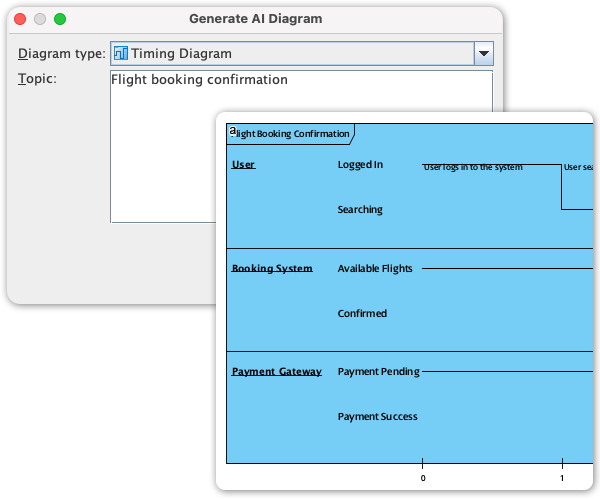
How to Access and Use AI Diagram Generation
Leveraging the power of AI to create your Timing Diagrams is seamless and intuitive within Visual Paradigm Desktop:
- Open a new or existing project in Visual Paradigm.
- Navigate to the Tools menu.
- Click AI Diagram icon
- Select Timing Diagram from the dropdown list
- Enter a topic
- Click OK
Ready to Visualize Time with Intelligence?
The introduction of AI Diagram Generation for the Timing Diagram marks a significant milestone in our mission to make complex modeling simple and fast. You now have the intelligence of AI assisting you in creating the highly precise models required for high-stakes system design. Dive into Visual Paradigm Desktop today and experience the future of system modeling!