


One of the biggest hurdles when working with diagram-as-code platforms is dealing with syntax errors. A missing bracket, a misplaced semicolon, or a typo in a keyword can immediately break your preview, forcing you to spend valuable time hunting through lines of text just to figure out what went wrong.
We believe diagramming should be fast and frictionless. That is why we are excited to introduce AI Code Error Fixing on Visual Paradigm VPasCode. The next time your script fails to render, our intelligent engine can analyze the mistake and repair it for you automatically.
How it Works: One-Click Syntax Healing
VPasCode monitors your syntax in real-time. If a code error prevents your diagram from rendering, the platform shifts from a blank screen to an assistive troubleshooting mode instantly.
Here is how the automated workflow repairs your broken scripts:
- The Rendering Error: If your script contains an error (such as a missing opening bracket
{), the diagram viewer will display a “Failed to Generate Diagram” warning block detailing the suspected error type and line number. - Triggering the AI: Instead of manually searching your code, simply click the purple “Fix by AI” button inside the error overlay.
- The Auto-Fix: Our AI instantly cross-references your diagram type’s syntax rules against your active code. It isolates the issue, generates the correct solution, and automatically injects the healthy, corrected code straight back into your editor.
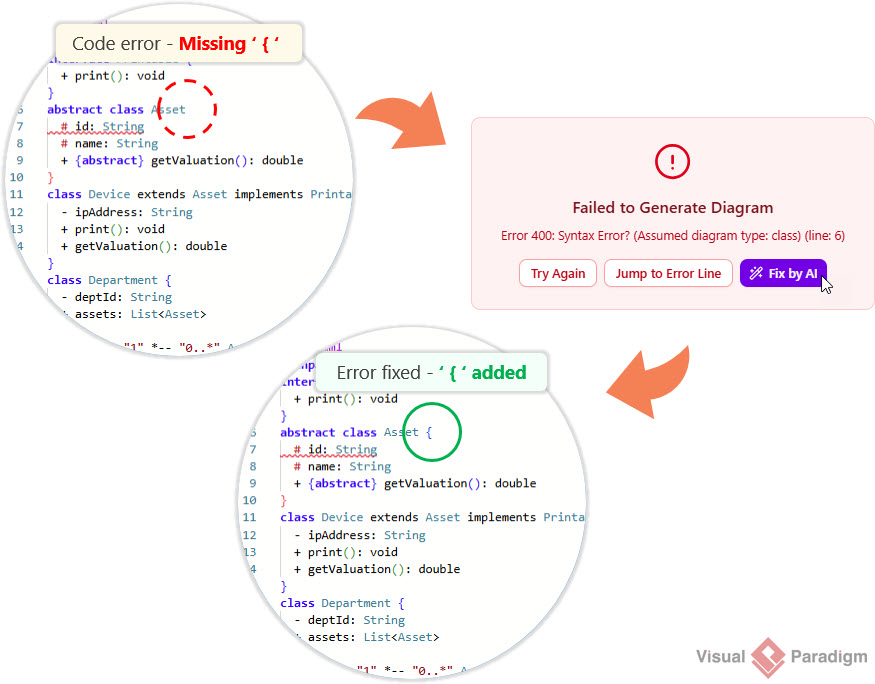
As soon as the AI applies the fix, the diagram instantly re-renders properly on your screen. No guesswork, no tedious debugging, and no interruptions to your creative momentum.
Feature Availability
The AI Code Error Fixing tool is a premium capability designed to maximize engineering productivity. It is included as a paid feature within the following packages:
- Visual Paradigm Online Combo Edition (or higher).
- Visual Paradigm Desktop Professional Edition (or higher) with an active maintenance plan.
Friendly Reminder for Desktop Users: If you are running Visual Paradigm Professional Edition (or higher) and have active maintenance, you already have full access to the web apps included in the VP Online Combo Edition. This means you can log into VPasCode and start using the “Fix by AI” tool right now!
Keep Your Momentum Flowing
Whether you are building complex enterprise software architectures in PlantUML, charting intricate sprints using Mermaid.js, or organizing vast data clusters in Graphviz, VPasCode ensures that a simple syntax error never slows you down.
- Head over to VPasCode, write your ideas freely, and let our integrated AI assistant handle the code syntax compliance for you!
- Learn more about VPasCode at https://www.vpascode.com/