


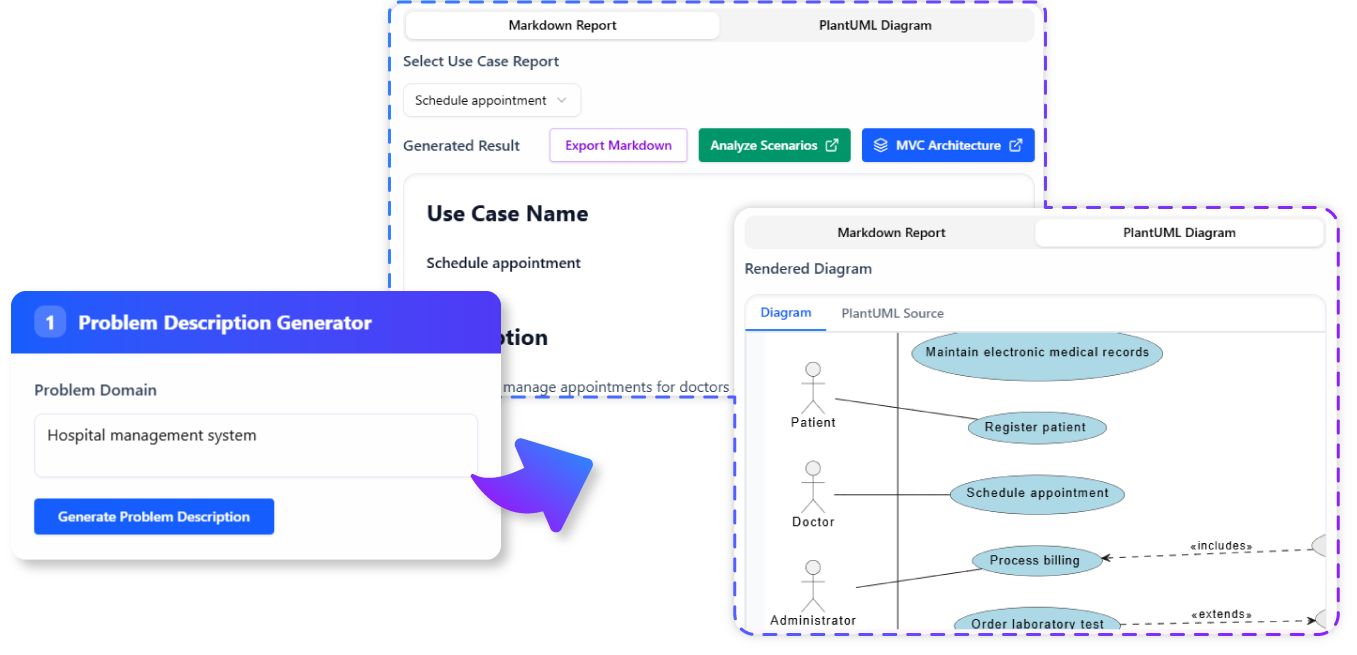
We are excited to launch the new Use Case Description Generator, a powerful and free AI use case description generator that transforms a simple problem statement into comprehensive use case models. This intelligent tool not only suggests candidate use cases but also generates detailed descriptions and corresponding PlantUML diagrams, streamlining your system analysis and design process.
The Challenge of Defining Clear System Requirements
Identifying all relevant use cases from a problem description and then writing detailed, consistent descriptions for each is a time-consuming and often inconsistent process. Furthermore, manually creating corresponding use case diagrams can introduce errors and delays. This manual effort can lead to incomplete requirements, miscommunication, and ultimately, software that doesn’t meet user needs.
Introducing the Use Case Description Generator: Your Blueprint for System Behavior
We built this tool to automate and standardize the use case modeling process. Our AI acts as an expert system analyst, taking your problem description and guiding you through the generation of a complete use case model—from identifying potential use cases to providing a detailed description and a visual PlantUML diagram.
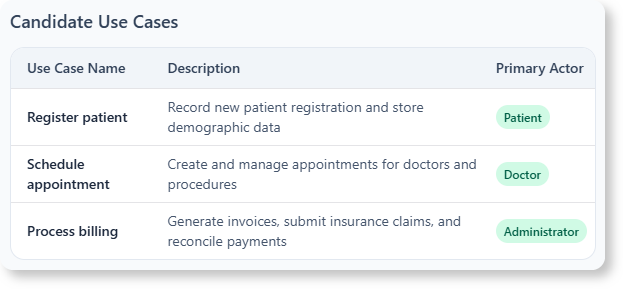
- AI-Powered Candidate Use Case Generation: Simply input a problem description, and our AI will suggest a list of relevant use cases, helping you ensure comprehensive coverage of system functionality.
- Detailed Use Case Description Generation: For any selected use case, the AI automatically generates a structured description, including actors, pre-conditions, post-conditions, main flow, and alternative flows.
- Instant PlantUML Diagram Generation: The tool provides a corresponding PlantUML diagram for the generated use case, offering a visual representation that complements the textual description.
- Improve Clarity and Consistency: Standardize your use case documentation, ensuring all stakeholders have a clear and consistent understanding of system requirements.
- Accelerate System Analysis and Design: Drastically reduce the time and effort required to create detailed use case models, allowing you to move faster from concept to design.
How to Generate Your Use Case Descriptions and Diagrams
Creating comprehensive use case models is now simpler than ever. Here’s how to access the tool:
- For Visual Paradigm Online users: Navigate directly to the app at https://ai-toolbox.visual-paradigm.com/app/use-case-description-generator/.
- For Visual Paradigm Desktop users: Open your desktop application, go to the Tools > App menu, and select the Use Case Description Generator.
Once you’re in the app, follow this simple workflow:
- Input Problem Description: Provide a clear description of the problem your system aims to solve.
- Generate Candidate Use Cases: The AI will analyze your input and suggest a list of potential use cases.
- Select and Generate: Choose a use case from the list, and the AI will generate a detailed textual description for it.
- View PlantUML Diagram: A corresponding PlantUML diagram will also be generated, providing a visual representation of the use case.
- Refine and Export: Review the generated content, make any necessary adjustments, and export your use case model.

Ready to Streamline Your System Analysis?
Eliminate the manual effort and inconsistencies from use case modeling. The Use Case Description Generator provides the automated assistance you need to create clear, complete, and visually represented use case models, accelerating your design phase and ensuring robust system requirements.
Learn More:
Discover more about the Use Case Description Generator and how it can enhance your system design process.