


We are excited to introduce Visual Paradigm Annotator, a versatile tool that bridges the gap between passive reading and active knowledge management. Whether you are conducting academic research or reviewing a live website with your team, this generator of insights allows you to layer notes, highlights, and discussions directly onto any web page or online PDF without ever leaving your browser.
Addressing the Challenge of Disconnected Research
For too long, web research has been a fragmented process. Users typically find information on one tab and are forced to copy-paste it into another tool or document to save their thoughts. This “tab-switching” leads to a loss of context, where the original source of an idea becomes difficult to trace weeks later.
Furthermore, collaborating on web-based content—like giving feedback on a design prototype or a technical wiki—often involves messy email chains or screenshots that quickly become outdated. There hasn’t been a unified generator of collaborative feedback that lives where the content does.
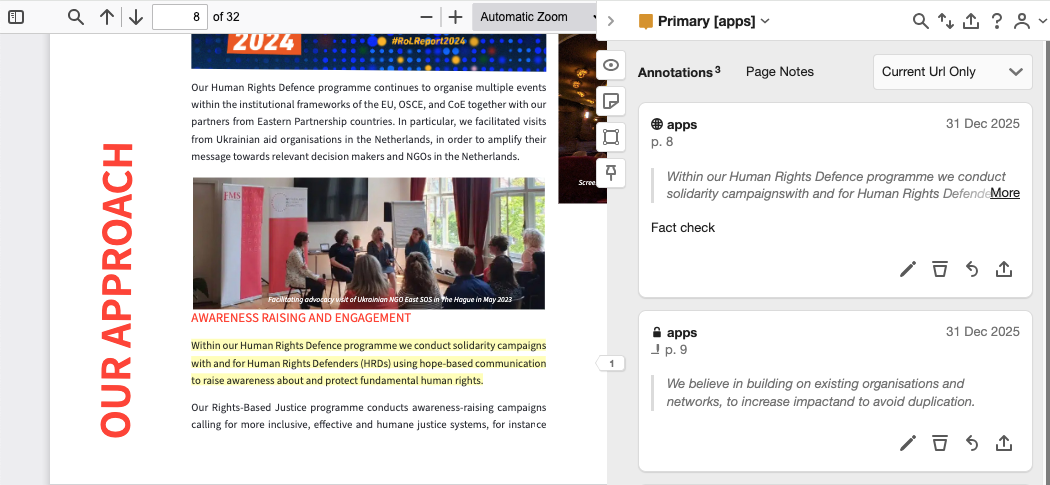
Introducing Visual Paradigm Annotator: Active Learning & Collaboration
The Visual Paradigm Annotator was built to solve these friction points by making the web interactive. It serves as a centralized tool for individuals and teams to capture ideas in real-time. By keeping your notes “anchored” to the specific sentences they refer to, you never lose the “why” behind your research. You can explore the full capabilities of the annotator here to see how it fits your workflow.
- Contextual Annotation: Attach rich-text notes directly to specific paragraphs or images on any public website.
- Private Collaboration Groups: Create secure, invite-only spaces where your team can discuss web content privately.
- Smart Tagging System: Use this tool to categorize your findings with tags like #research or #todo for instant retrieval later.
- PDF Support: Annotate online PDFs just as easily as standard web pages, perfect for academic papers and reports.
- Integrated Ecosystem: Use your existing Visual Paradigm Online account for a seamless, single sign-on experience.
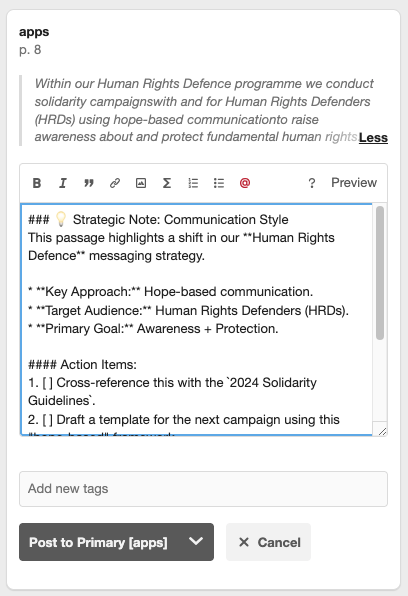
How to Access and Use the New Tool
The Visual Paradigm Annotator is available in the free edition of Visual Paradigm. You can access the tool directly through your browser to start building your knowledge base in just a few clicks using this simple workflow:
- Activate the Tool: Open the Annotator extension or sidebar while browsing any website or online PDF.
- Select and Highlight: Use your mouse to select any text. A popup will appear—click “Highlight” to save the snippet or “Annotate” to add a detailed note.
- Organize with Tags: Within the annotation box, add relevant tags to help this generator categorize your research for your dashboard.
- Collaborate: Change the visibility of your note to a “Group” scope to start a threaded discussion with invited colleagues or classmates.
Common Questions About the Annotator
Is Visual Paradigm Annotator free?
Yes, it is available as part of the free edition of Visual Paradigm, making it accessible for everyone to use.
How do I log in if I have a Visual Paradigm account?
Simply click “Log in” and choose the “Log in with Visual Paradigm Online” option. You will be redirected to the familiar login page to authenticate securely.
What if I don’t have a Visual Paradigm account?
You can easily create a free account to get started. This gives you access to the web annotator and other Visual Paradigm services.
Can others see my annotations?
It’s up to you. You can make annotations public, keep them private (“Only Me”), or share them with a select group in a private group.
What is a “Group”?
A group is a private space for collaboration. Annotations in a group are only visible to members, making it a perfect tool for team projects or client feedback.
How is this different from browser bookmarks?
Bookmarks save a link; the Annotator saves the interaction. This tool allows you to save specific highlights and notes directly on the page context.
Can I edit or delete my annotations?
Yes. You have full control. You can edit or delete your own annotations at any time using the icons in the sidebar.
Ready to Master Your Research?
The Visual Paradigm Annotator is more than just a digital highlighter; it is a powerful generator of organized knowledge. By integrating your research directly into your browser, you save time and streamline team communication. Try this free tool today and experience a smarter way to interact with the web.