


Following the successful integration of our mind map editor, Visual Paradigm is excited to announce the next step in our documentation revolution. We have officially enhanced OpenDocs to support a fully integrated Organization Chart editor. This update is designed to help businesses, HR professionals, and project managers visualize team hierarchies and reporting lines with unprecedented speed and precision.
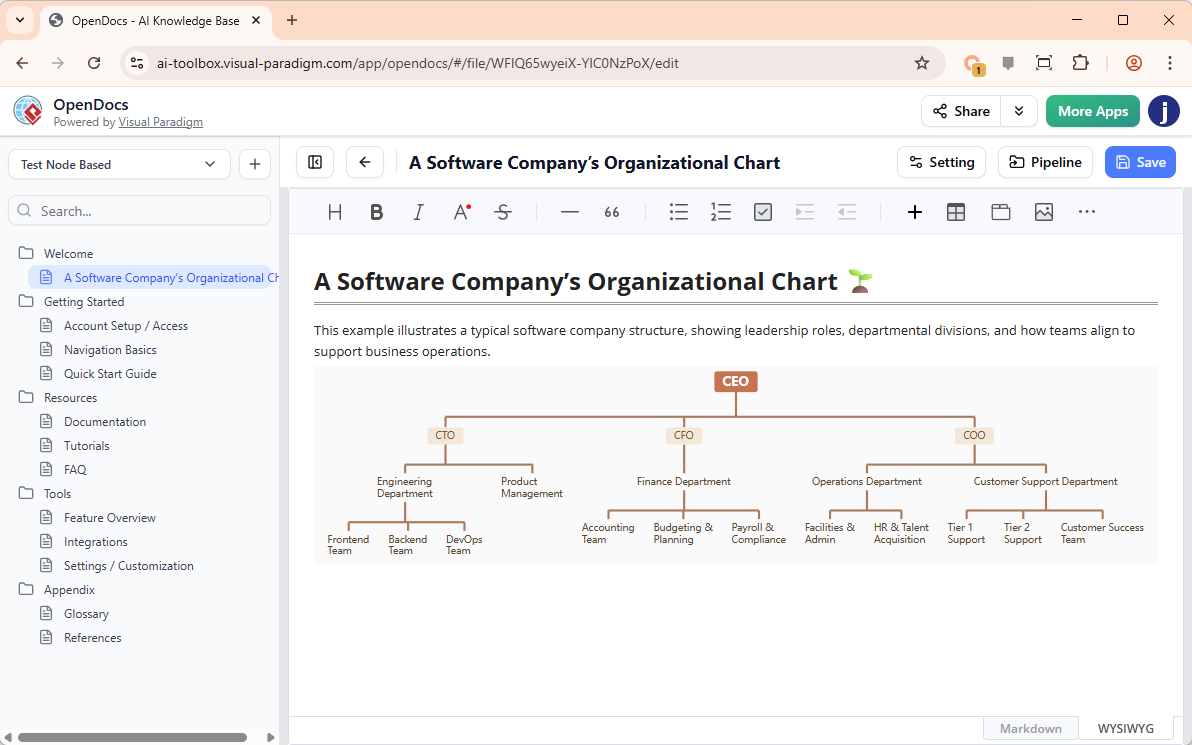
Managing a growing team is complex, but documenting it shouldn’t be. With our new AI organization chart tool, you can move from a list of names to a professional visual hierarchy in seconds.
The Power of Visual Hierarchy
A clear organizational structure is the backbone of efficient communication. By utilizing an organization chart tool within your internal documentation, you ensure that every team member understands their role, their peers, and the chain of command. This leads to:
- Elimination of role ambiguity during onboarding.
- Improved clarity for cross-departmental collaboration.
- Faster decision-making processes by identifying key stakeholders visually.
Instant Structure with “Create with AI”
Building a large-scale hierarchy manually can be tedious. That’s why we’ve brought our signature intelligence to this editor. Our AI organization chart tool allows you to skip the manual box-drawing.
By clicking “Create with AI,” you can describe your team structure—such as “A marketing department with a VP, three managers for SEO, Content, and Social Media, and two coordinators for each”—and the AI will instantly render a balanced, professional chart. You can then refine the details, add photos, or adjust reporting lines manually within the editor.
Step-by-Step: Creating Your Org Chart in OpenDocs
The process is built to be familiar and efficient, following the same intuitive workflow as our other visual tools:
- Initiate the Tool: In your OpenDocs editing document, click the + (Plus) icon on the top bar.
- Select Organization Charts: On the left sidebar, select Organization Charts, then choose the Org Chart option on the right.
- Leverage AI: Click Create with AI at the top right. Enter a description of your department or project team hierarchy and click Generate.
- Customize: Use the editor to tweak styles, update titles, or reorganize branches to match your exact needs.
- Save and Embed: Click Save at the top right. Your completed chart will be automatically embedded into your document page.
Who Can Access This Feature?
The AI-powered organization chart functionality is now live and available for users of:
- Visual Paradigm Desktop Professional Edition
- Visual Paradigm Online Combo Edition
Visualize Your Workforce Today
Don’t let your team structure live in a messy spreadsheet. Use the most efficient AI organization chart tool available to create clear, professional, and actionable diagrams that live right alongside your documentation.
Launch OpenDocs and Create Your AI Org Chart Now
Related posts:
 Preserve Your History with the New Family Tree Editor in OpenDocs
 Announcing the All-New Visual Paradigm Unified Platform
 Introducing Visual Paradigm 18.1: A New Era of Unified Ecosystems and AI-Driven Innovation
 Seamless Diagram Lifecycle Management: Enhance and Edit AI-Generated Diagrams in Visual Paradigm OpenDocs via VPasCode