


Understanding the relationships between individual ideas is the key to mastering complex subjects. To help you visualize these connections more effectively, Visual Paradigm has added a Concept Map editor to OpenDocs. Unlike a standard mind map, a concept map focuses on the “cross-links” and specific relationships between concepts, making it an essential tool for education, research, and technical system design.
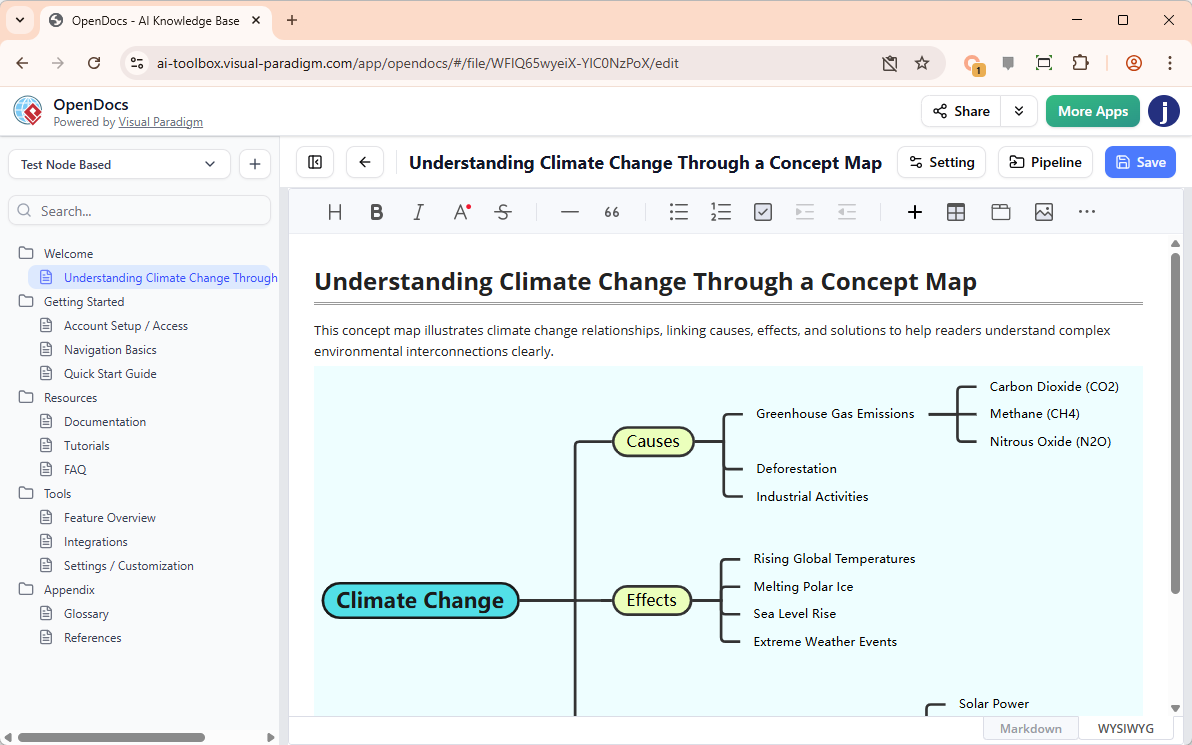
With our integrated AI concept map tool, you can transform a cluster of ideas into a structured web of knowledge without the manual labor of drawing lines and labels.
The Power of Relational Thinking
A concept map tool is more than just a brainstorming aid; it is a pedagogical and analytical powerhouse. By mapping out how ideas relate to one another, you can:
- Identify “gaps” in your understanding or documentation.
- Explain complex systems where many components interact simultaneously.
- Organize information into a logical, hierarchical structure with defined “linking phrases.”
Intelligence That Connects the Dots
The most difficult part of concept mapping is often defining the specific nature of the relationships. Our AI concept map tool solves this. By using the “Create with AI” feature, you can provide a broad topic—such as “The relationship between Cloud Computing, Cybersecurity, and Remote Work”—and the AI will generate a map that includes not just the concepts, but the linking words that describe how they interact.
This provides an immediate, high-level overview that you can then deep-dive into, adding specific nodes or refining the logic to match your specific project requirements.
How to Build a Concept Map in OpenDocs
The workflow is designed to get you from a blank page to a finished diagram in seconds:
- Open the Inserter: In your OpenDocs document, click the + (Plus) icon on the top bar.
- Select Concept Maps: Choose Concept Maps on the left-hand menu and select the Concept Map template on the right.
- Generate with AI: Click Create with AI at the top right. Enter the main theme or a list of ideas you want to connect and click Generate.
- Refine the Connections: Use the editor to add new “linking phrases,” move nodes, and customize the visual flow.
- Save and View: Click Save at the top right. Your concept map is now beautifully embedded in your documentation.
Who Can Use It?
The AI-powered Concept Map feature is available to users of:
- Visual Paradigm Desktop Professional Edition
- Visual Paradigm Online Combo Edition
Visualize Your Knowledge Today
Turn complicated theories and systems into clear, actionable visuals. Use our AI concept map tool to ensure your team, students, or stakeholders see the “big picture” as clearly as you do.
Start Your Concept Map with AI in OpenDocs
Related posts:
 Revolutionize Your Documentation with the New AI Mind Map Tool in OpenDocs
 Streamline Your Team Structure with the New AI Organization Chart Tool in OpenDocs
 Master Your Project Schedule with the New AI Timeline Tool in OpenDocs
 Meet the All-New AI Diagram Chatbot V2: The Next Generation of Intelligent Visual Modeling