


We are excited to launch the new Brainstorming app, a powerful and free AI brainstorming tool that transforms your ideas into visual mind maps in seconds. This intelligent tool helps you overcome creative blocks, organize complex thoughts, and visualize connections, making your brainstorming sessions more productive and insightful.
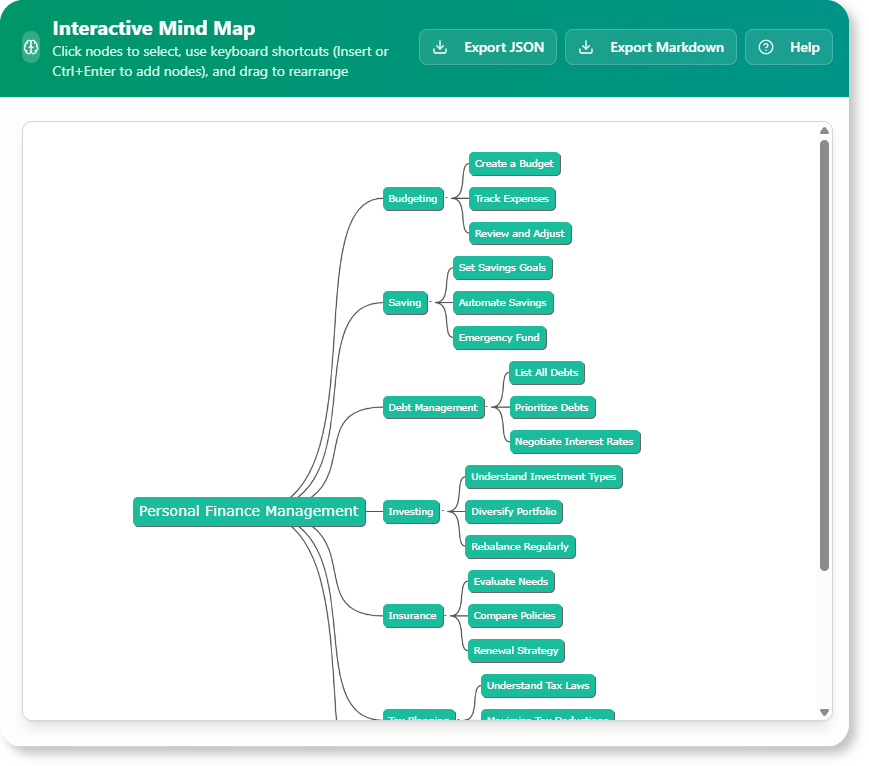
The Challenge of Generating and Organizing Ideas
Starting a brainstorming session from a blank slate can be daunting. It’s easy to get stuck, generate repetitive ideas, or struggle to organize a flurry of thoughts into a coherent structure. Traditional brainstorming methods often lack the immediate visual organization needed to truly explore connections and build upon initial concepts effectively.
Introducing the Brainstorming Tool: Your Instant Mind Map Creator
We built this tool to supercharge your ideation process. Our AI acts as a creative partner, taking your initial prompt and instantly generating a visual mind map. This allows you to quickly explore a wide range of related ideas, see how they connect, and build a comprehensive overview of any topic.

- AI-Powered Mind Map Generation: Simply enter a topic, problem, or question, and our AI will generate a dynamic mind map, populating it with interconnected ideas, concepts, and keywords.
- Instant Visual Organization: Get a clear, hierarchical, and visually engaging representation of your brainstormed ideas, making it easy to understand relationships and identify new avenues for exploration.
- Overcome Creative Blocks: The AI provides a powerful starting point, helping you bypass the initial hurdle of a blank page and immediately dive into a rich landscape of ideas.
- Expand and Refine Your Thoughts: Use the generated mind map as a foundation to add your own ideas, rearrange concepts, and further refine your thoughts, making the tool a collaborative extension of your creativity.
- A Powerful free brainstorming editor for All: Perfect for students, professionals, and teams who need to quickly generate, organize, and visualize ideas for projects, problem-solving, or creative endeavors.
How to Generate Your Mind Map
Unleashing your ideas is now simpler than ever. Here’s how to access the tool:
- For Visual Paradigm Online users: Navigate directly to the app at https://ai-toolbox.visual-paradigm.com/app/brainstorming/.
- For Visual Paradigm Desktop users: Open your desktop application, go to the Tools > App menu, and select the Brainstorming tool.
Once you’re in the app, follow this simple workflow:
- Enter Your Prompt: Type a topic, problem, or question into the input field. Be as specific or broad as you like.
- Generate Mind Map: Click the “Generate” button. The AI will process your prompt and instantly create a visual mind map.

- Explore and Expand: Review the generated mind map. You can then add your own nodes, rearrange ideas, and continue to build upon the AI’s suggestions.
- Refine and Export: Once satisfied, you can refine your mind map further and export it for presentations or further analysis.

Ready to Visualize Your Ideas with AI?
Stop struggling with scattered thoughts and start seeing your ideas come to life. The Brainstorming Tool provides the instant visual organization and creative boost you need to explore concepts more deeply, make connections, and turn your thoughts into actionable plans. Start your next brainstorming session with clarity and inspiration today.
Learn More:
Discover more about the Brainstorming Tool and how it can enhance your creative process.