


We are excited to launch the new Use Case Diagram Report Generator, a powerful and free AI use case diagram report generator that transforms your PlantUML use case diagrams into detailed textual reports. This intelligent tool automates the documentation and analysis of your diagrams, providing clear, structured insights into your system’s functionality.
The Challenge of Documenting Complex Diagrams
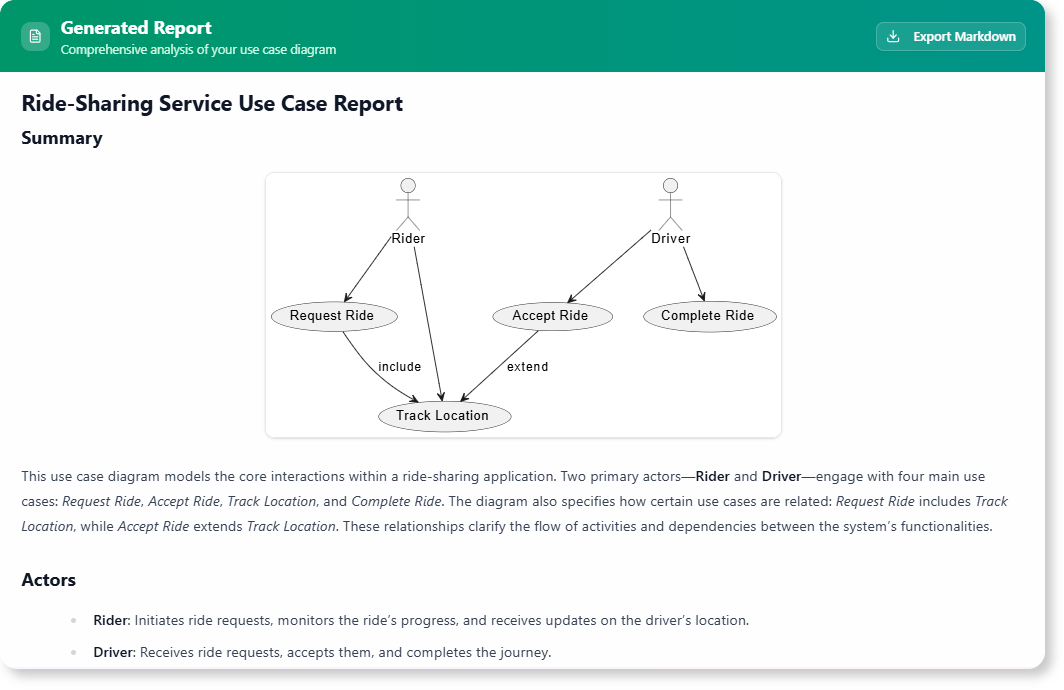
Use case diagrams are excellent for visualizing system functionality, but they often require accompanying textual documentation to explain actors, use cases, relationships, and potential complexities in detail. Manually writing these reports is time-consuming, prone to inconsistencies, and can easily fall out of sync with the diagram itself. This leads to incomplete documentation and potential misunderstandings among stakeholders.
Introducing the Use Case Diagram Report Generator: Your Automated Documentation Assistant
We built this tool to bridge the gap between visual diagrams and comprehensive textual documentation. Our AI acts as an expert system analyst, taking your PlantUML use case diagram code, visually rendering it, and then automatically generating a detailed textual report. This report provides a thorough analysis of your diagram, ensuring all aspects are clearly articulated and understood.
- AI-Powered Report Generation: Simply paste your PlantUML use case diagram code, and our AI will analyze it to generate a comprehensive textual report, detailing actors, use cases, and their relationships.
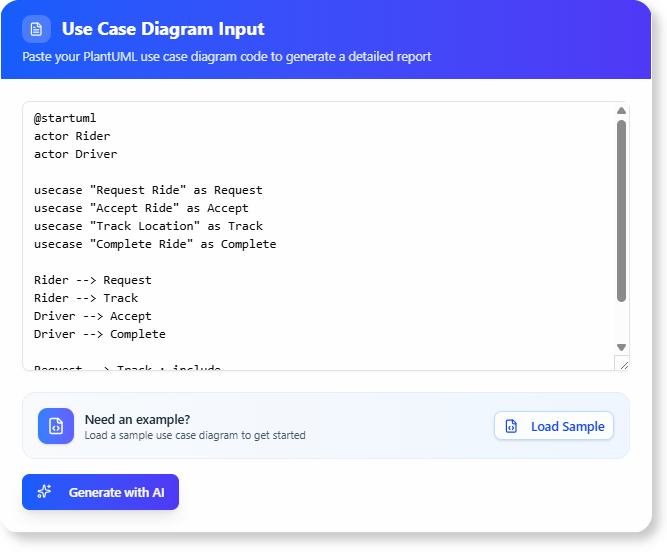
- Visual Diagram Rendering: The tool not only processes your code but also visually renders your PlantUML diagram, allowing you to see the diagram alongside its generated report.
- Automate Documentation: Drastically reduce the manual effort and time required to create detailed reports for your use case diagrams, ensuring consistency and accuracy.
- Improve Clarity and Communication: The generated reports provide a structured explanation of your diagram, making it easier for both technical and non-technical stakeholders to understand the system’s functionality.
- A Powerful free use case diagram report editor for Analysts: Perfect for business analysts, system designers, and project managers who need to quickly generate high-quality documentation from their visual models.
How to Generate Your Use Case Diagram Report
Creating detailed documentation for your use case diagrams is now simpler than ever. Here’s how to access the tool:
- For Visual Paradigm Online users: Navigate directly to the app at https://ai-toolbox.visual-paradigm.com/app/use-case-diagram-report-generator/.
- For Visual Paradigm Desktop users: Open your desktop application, go to the Tools > App menu, and select the Use Case Diagram Report Generator.
Once you’re in the app, follow this simple two-step workflow:
- Step 1: Input Your PlantUML Diagram: Paste your PlantUML code for a use case diagram into the provided input area. The tool will visually render your diagram.
- Step 2: Generate Report: Click the “Generate with AI” button. The AI will analyze your diagram and produce a comprehensive textual report, which you can then review and export as Markdown.
Ready to Automate Your Diagram Documentation?
Eliminate the manual effort and inconsistencies from diagram documentation. The Use Case Diagram Report Generator provides the automated assistance you need to create clear, complete, and consistent textual reports from your visual models, accelerating your analysis and improving communication.
Learn More:
Discover more about the Use Case Diagram Report Generator and how it can enhance your system documentation process.