


Visual Paradigm has enhanced its AI Diagramming Chatbot with support for generating UML Profile Diagrams. Users can now describe a modeling language, domain-specific notation, or set of reusable UML stereotypes in natural language and let the chatbot produce a structured UML Profile Diagram together with an explanation of the model.
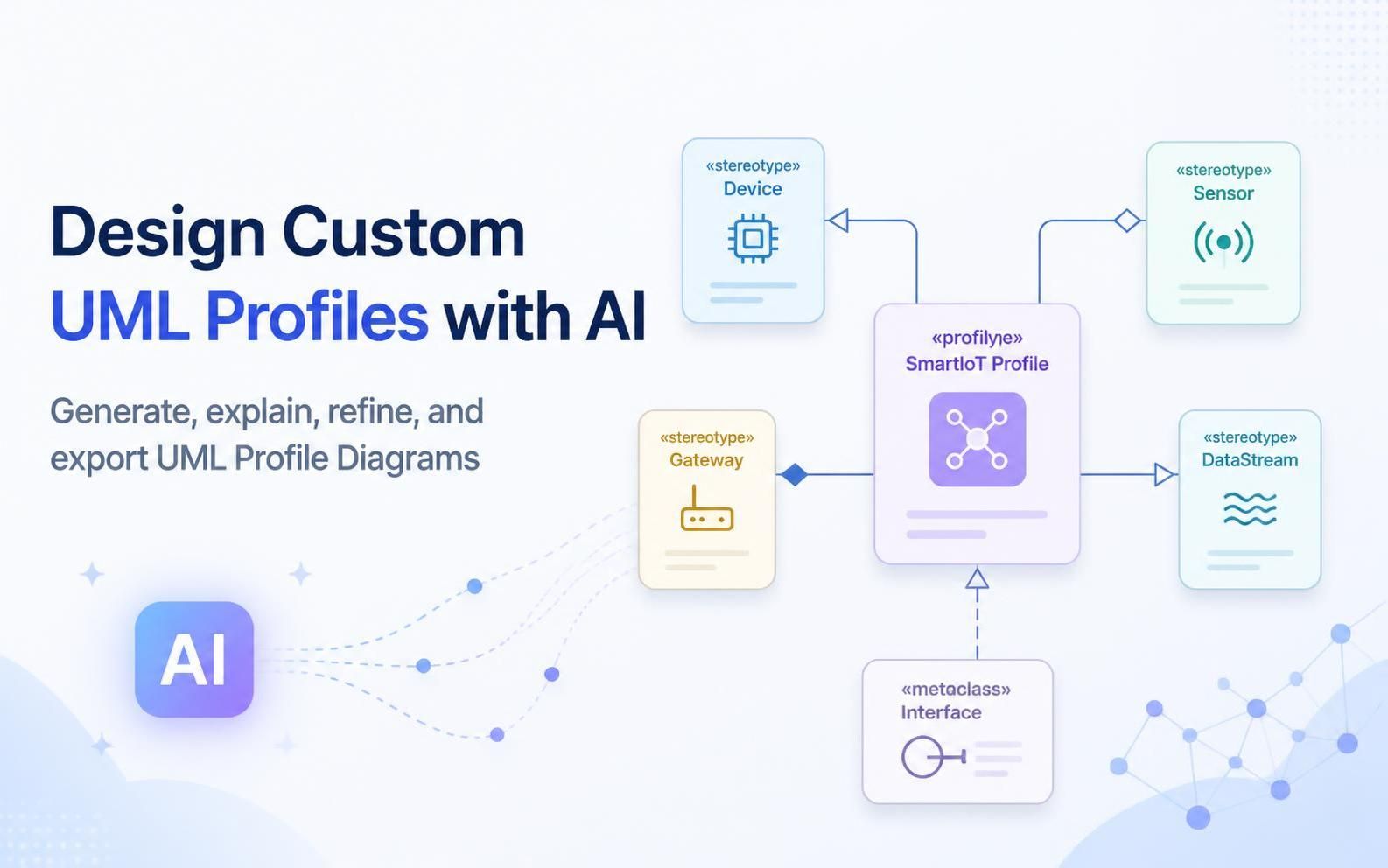
This enhancement makes the chatbot a more capable AI UML tool for software architects, system analysts, enterprise architects, and development teams who need to define customized modeling concepts quickly. By pioneering a custom domain extension for PlantUML, Visual Paradigm allows users to leverage a text-based syntax to generate profile diagrams automatically—eliminating the need to manually draw shapes or arrange profile elements on a traditional canvas.
Try the AI Diagramming Chatbot and generate your first UML Profile Diagram from a natural-language prompt.
What Is New: AI-Generated UML Profile Diagrams
A UML Profile Diagram is used to extend UML for a particular domain, technology, organization, or modeling practice. It defines custom stereotypes, tagged values, and relationships that can be applied to model elements in other diagrams.
For example, a healthcare organization may need modeling concepts for protected health information, consent policies, access controls, audit trails, and de-identification rules. These concepts are not always represented precisely by standard UML elements alone. A UML Profile Diagram allows the organization to define reusable stereotypes and metadata that express these domain-specific requirements.
With the new capability, users can submit a prompt such as:
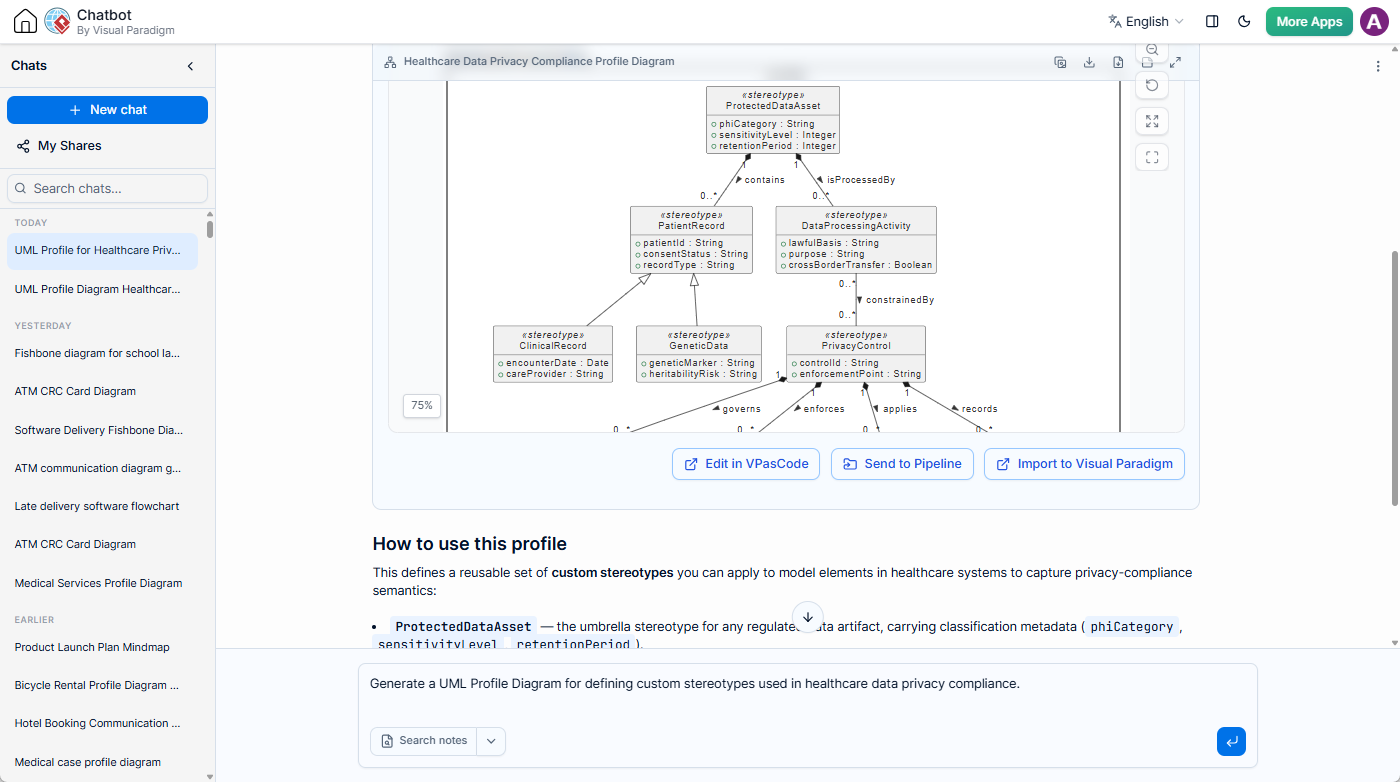
Generate a UML Profile Diagram for defining custom stereotypes used in healthcare data privacy compliance.
The AI UML Profile Diagram generator can then produce a PlantUML-based profile that includes a profile package, stereotype definitions, attributes, generalization relationships, compositions, and associations. The chatbot also provides a written explanation describing the purpose of the stereotypes and how they can be applied.
Why PlantUML for Profile Diagrams? An Industry First by Visual Paradigm
Standard PlantUML is widely celebrated for sequence, class, and activity diagrams, but it does not natively support UML Profile Diagrams out of the box. Users searching the open-source PlantUML documentation for profile diagram syntax will quickly notice its absence.
To bridge this gap, Visual Paradigm invented and pioneered the custom PlantUML-based syntax for Profile Diagrams. By extending PlantUML’s underlying rendering engine, Visual Paradigm brought text-based diagramming (“diagram-as-code”) to domain-specific modeling and profile definitions for the very first time.
Because Visual Paradigm created this notation extension, our AI Diagramming Chatbot is uniquely equipped to construct, render, and refine PlantUML Profile Diagrams seamlessly—giving teams an innovative, lightweight way to define specialized UML languages through natural language.
Example: Modeling Healthcare Data Privacy Concepts
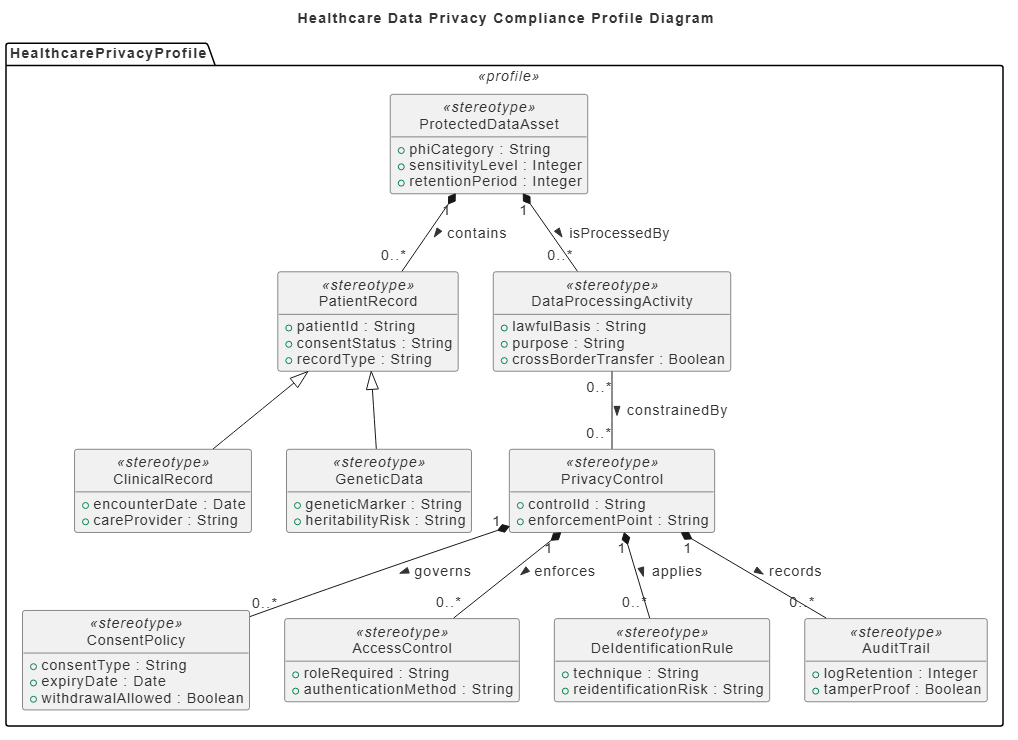
In the healthcare privacy example, the generated profile can define stereotypes such as:
ProtectedDataAssetfor regulated data artifacts and their classification metadata.PatientRecordfor patient-related records.ClinicalRecordfor records associated with clinical encounters and care providers.GeneticDatafor sensitive genetic information and associated risk indicators.PrivacyControlfor mechanisms that protect or govern regulated data.ConsentPolicyfor consent requirements, expiration, and withdrawal rules.AccessControlfor role and authentication requirements.DeIdentificationRulefor techniques used to reduce re-identification risk.AuditTrailfor tracking and retaining records of relevant activities.DataProcessingActivityfor representing the lawful basis, purpose, and cross-border processing of data.
The result is more than a visual sketch. It provides a reusable modeling vocabulary that can help teams represent compliance-related semantics consistently across hospital systems, research platforms, insurance applications, and other healthcare solutions.
Users can also ask the chatbot to extend the profile. For example, they may request additional stereotypes for data-subject rights, breach notification, data retention, consent withdrawal, or privacy impact assessments.
Why UML Profile Diagram Generation Matters
Standard UML diagrams are designed to cover a broad range of software and system modeling needs. However, many projects require concepts that are specific to a business domain, architectural approach, regulatory environment, or internal engineering method. UML profiles provide a standardized way to extend UML without abandoning the UML foundation.
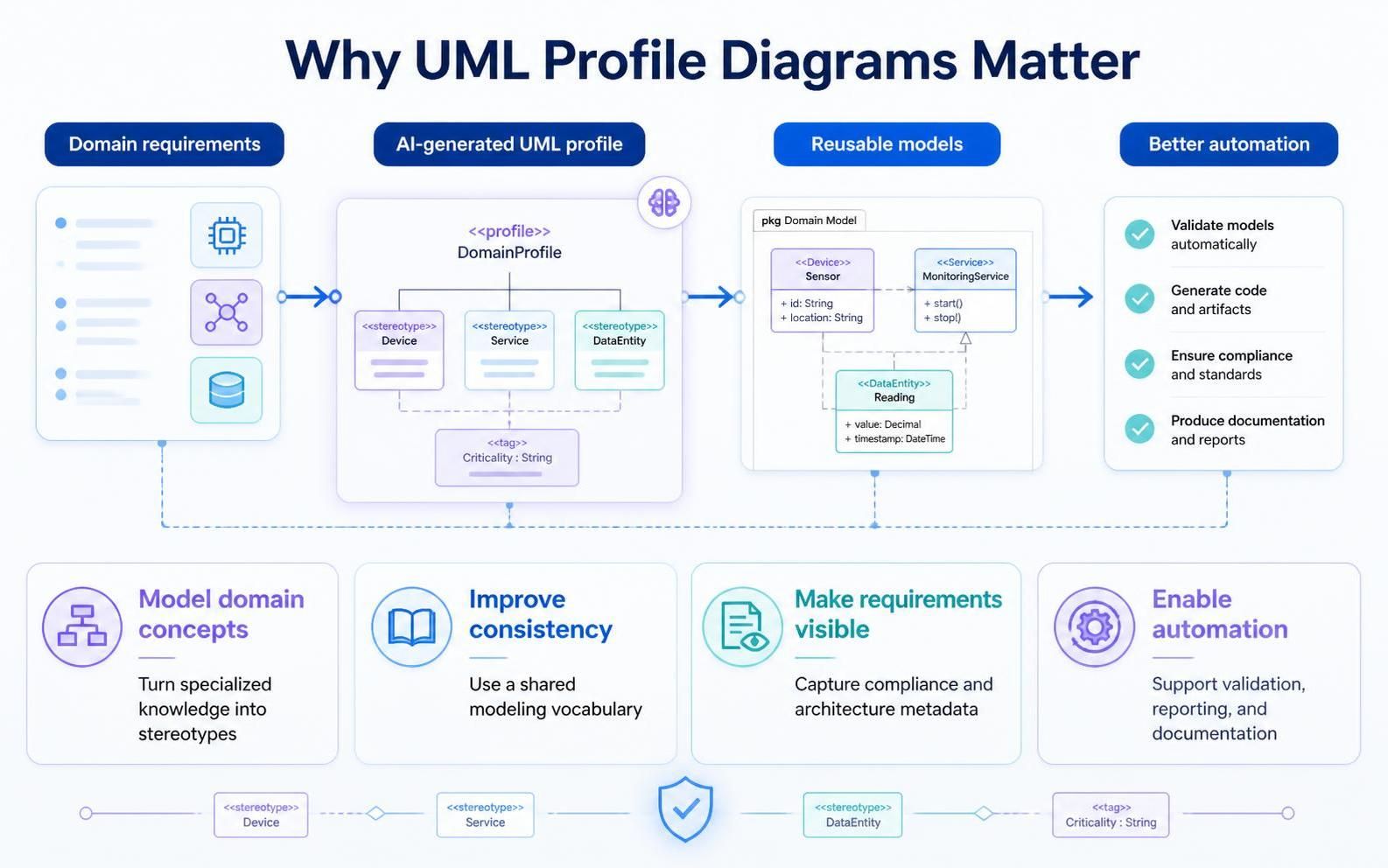
Creating a profile manually can require a clear understanding of stereotype structure, tagged values, generalization, and relationships between profile elements. It also takes time to decide how domain concepts should be organized and how they can be applied consistently.
An AI UML Profile Diagram generator helps reduce the effort involved in this initial design work. Users can begin with a business or technical description and use the generated profile as a starting point for discussion and refinement.
Turn domain knowledge into a modeling language
Domain experts may understand the required concepts without being familiar with every detail of UML profile notation. Conversational prompting provides a more accessible way to describe the domain, while the AI UML tool translates that description into a structured profile diagram.
Improve consistency across diagrams
A profile creates a shared vocabulary for a project or organization. Once stereotypes and tagged values have been defined, teams can apply them consistently to class diagrams, component diagrams, deployment diagrams, business models, and other views.
Make specialized requirements visible
Security, compliance, governance, safety, and operational requirements can be difficult to communicate through generic modeling elements. Custom stereotypes make these concerns explicit and provide a place to capture relevant metadata.
Accelerate modeling workshops
During architecture and requirements workshops, teams can use the chatbot to quickly explore alternative profile structures. Instead of spending the entire session creating shapes manually, participants can focus on naming concepts, validating relationships, and deciding which properties matter.
Create a foundation for automation
Tagged values and stereotypes can support model analysis, reporting, documentation generation, validation rules, and compliance checks. A well-structured UML Profile Diagram can therefore become the foundation for more repeatable modeling and governance practices.
From Natural-Language Prompt to Diagram-as-Code
The AI Diagramming Chatbot uses a conversational workflow. Users describe the intended diagram, review the generated result, and continue the conversation when they want to make changes.
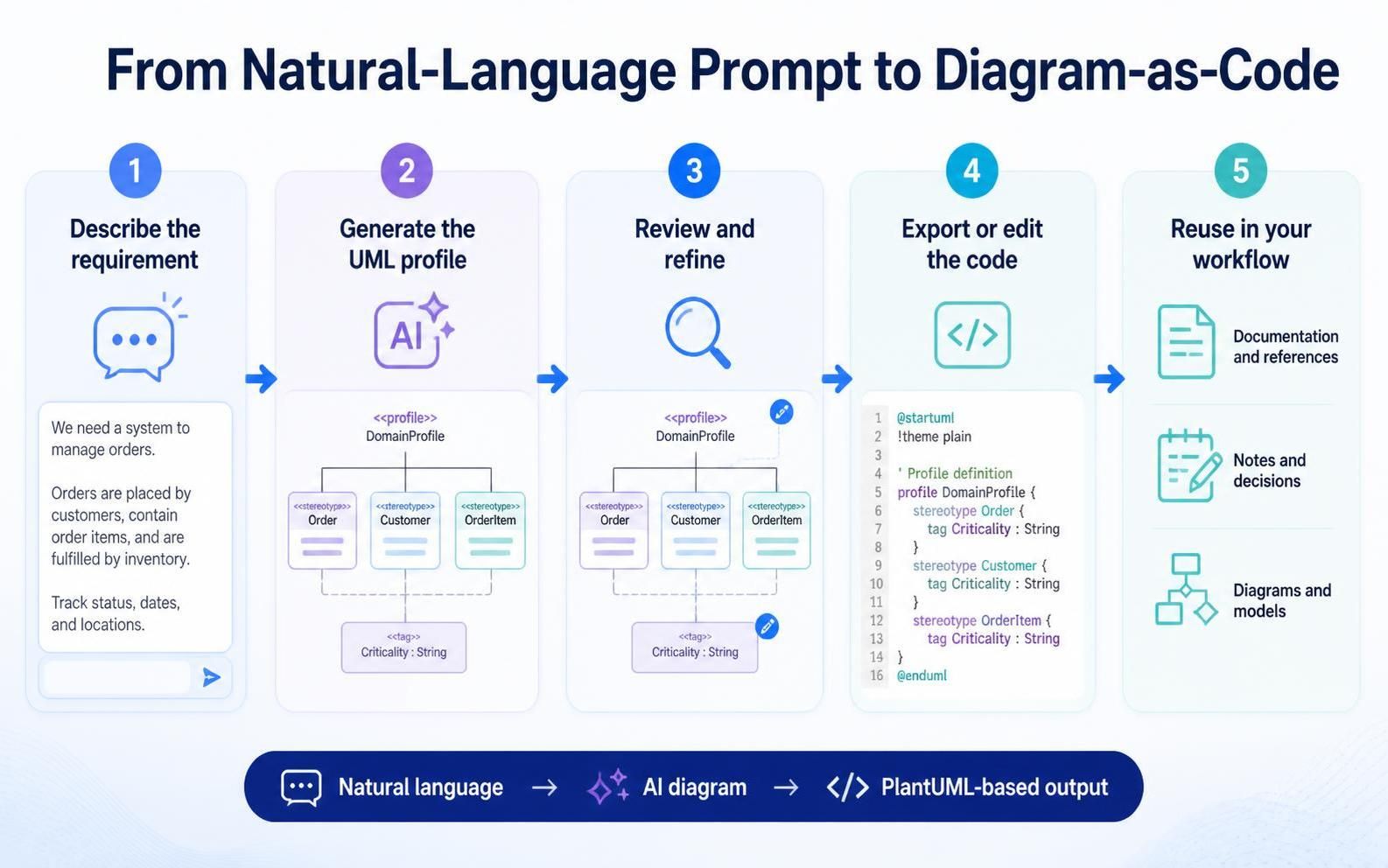
- Describe the domain or modeling requirement in natural language.
- Ask the chatbot to generate a UML Profile Diagram.
- Review the generated stereotypes, attributes, and relationships.
- Ask follow-up questions to explain or refine the diagram.
- Export the diagram as an image or continue editing the diagram code.
- Send the result to other Visual Paradigm tools for documentation, refinement, or knowledge capture.
The generated output utilizes Visual Paradigm’s custom PlantUML profile extension—an open, text-based diagram format. This makes the profile code easy to inspect, edit, reuse, and integrate into developer pipelines.
Ask AI to Explain the Diagram
Diagram generation is only one part of the experience. Users can also ask the chatbot to explain the generated UML Profile Diagram.
The explanation can describe:
- The purpose of the profile and its package structure.
- The meaning of each custom stereotype.
- The tagged values associated with each stereotype.
- The difference between generalization, composition, and association relationships.
- How the stereotypes could be applied to concrete system models.
- How the profile could be extended for additional business or regulatory requirements.
This is particularly useful for documentation, design reviews, onboarding, and collaboration between technical and non-technical stakeholders. A user can ask for a concise overview for executives, a detailed explanation for architects, or a teaching-oriented description for team members who are new to UML profiles.
Refine the Profile Through Conversation
Users do not need to achieve the final profile design in a single prompt. The chatbot supports iterative diagramming, allowing users to refine the result conversationally.
For example, after generating a healthcare privacy profile, a user could ask:
- “Add a
DataSubjectRightstereotype for access, correction, and deletion requests.” - “Add a
BreachNotificationstereotype linked toAuditTrail.” - “Separate administrative controls from technical controls.”
- “Add tagged values for data owner, jurisdiction, and classification.”
- “Explain which stereotypes should be applied to a patient portal component diagram.”
- “Simplify the profile for an introductory architecture document.”
This conversational approach makes it easier to explore alternatives, identify missing concepts, and adjust the level of detail without rebuilding the diagram manually from the beginning.
Useful for More Than Healthcare Compliance
Although healthcare privacy is a useful example, UML Profile Diagram generation can support many industries and modeling scenarios.
- Cybersecurity: Define stereotypes for threats, vulnerabilities, security controls, trust zones, and authentication mechanisms.
- Cloud architecture: Represent cloud services, deployment constraints, regions, availability requirements, and operational responsibilities.
- Financial services: Model regulated data, transaction risks, approval controls, audit requirements, and compliance obligations.
- Internet of Things: Define stereotypes for sensors, gateways, devices, protocols, telemetry, and device lifecycle states.
- Embedded and safety-critical systems: Capture safety classifications, hardware constraints, verification activities, and assurance levels.
- Enterprise architecture: Add metadata for business capabilities, applications, technology standards, ownership, and lifecycle status.
- DevOps and platform engineering: Define stereotypes for pipelines, environments, deployment units, observability controls, and service-level objectives.
- Data governance: Represent data owners, retention rules, classification levels, lineage, quality requirements, and stewardship responsibilities.
In each case, the AI UML Profile Diagram generator can help teams move from a domain description to a reusable modeling extension.
Export the Diagram as an Image
After reviewing the generated profile, users can export the diagram as an image. This makes it convenient to include the result in presentations, architecture proposals, design reviews, project reports, training materials, and technical documentation.
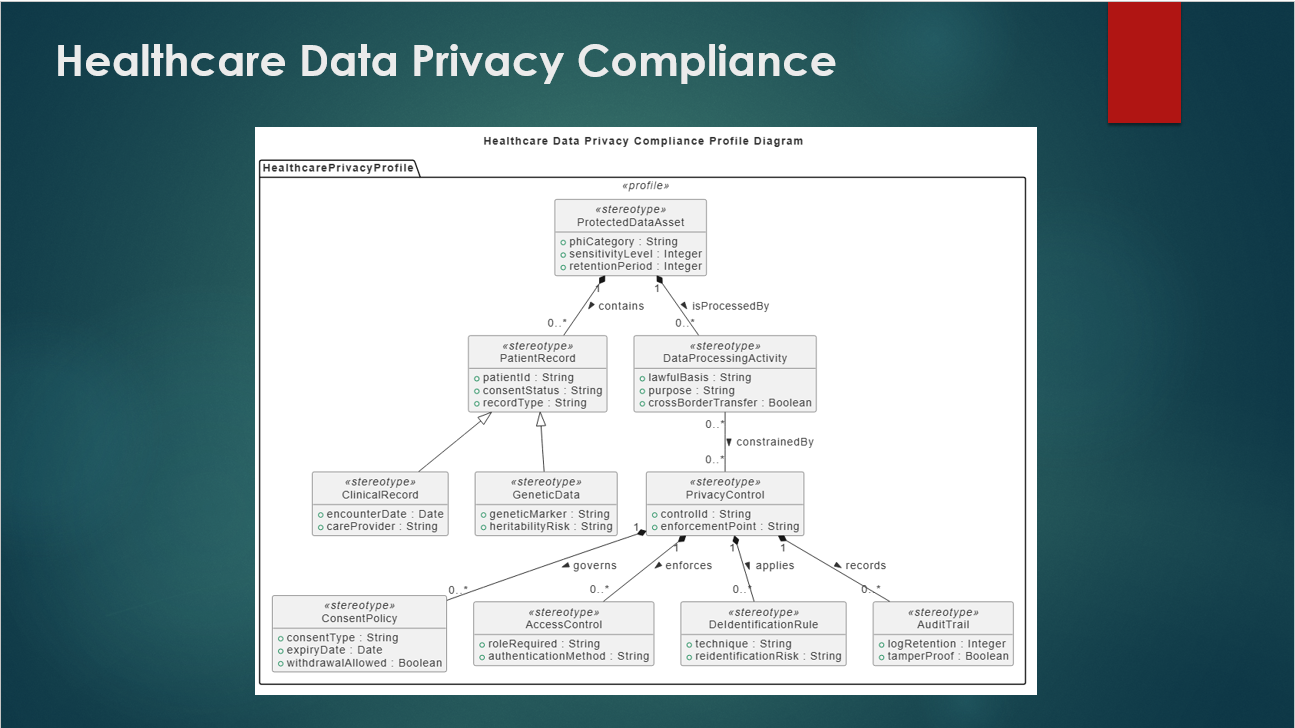
The chatbot also provides diagram viewing capabilities that help users inspect the generated output before exporting it. Users can zoom in, fit the diagram to the screen, and use full-screen viewing when reviewing larger profiles.
Continue Working in the Visual Paradigm Ecosystem
The AI Diagramming Chatbot is designed to work as part of the Visual Paradigm ecosystem. Generated diagrams and explanations can move into the tools that users already use for editing, documentation, and knowledge management.
Touch up the diagram in VPasCode
Because the generated UML Profile Diagram is represented as PlantUML-based code, users can send it to Visual Paradigm VPasCode for code-level refinement. This is useful when users want precise control over the profile structure, layout, syntax, naming, or visual presentation.
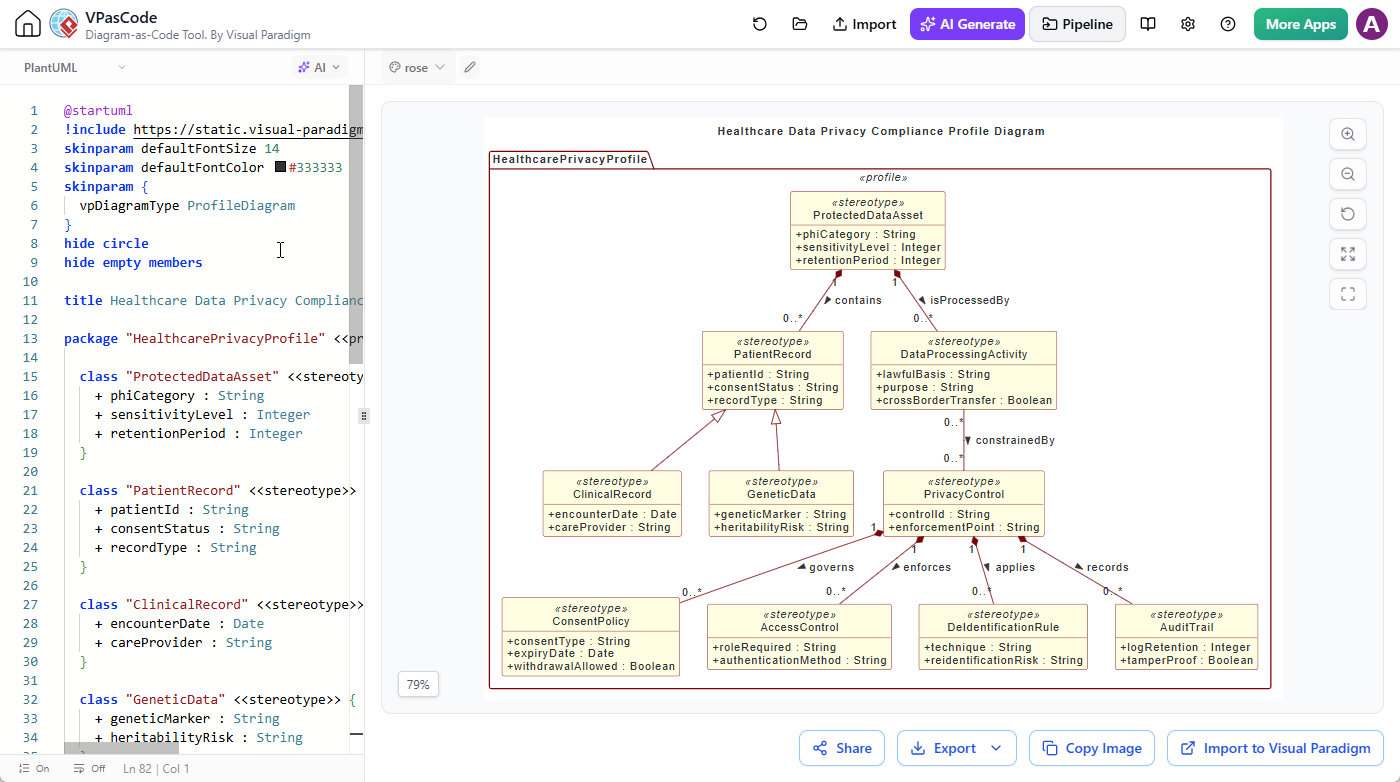
The AI can provide a strong initial version, while VPasCode gives experienced users a focused environment for manual touch-ups and detailed diagram-as-code editing.
Document the result with OpenDocs
A profile diagram is often most valuable when it is presented together with its purpose, usage guidance, and examples. Users can send the generated diagram to the Pipeline and insert it into pages edited with Visual Paradigm OpenDocs.
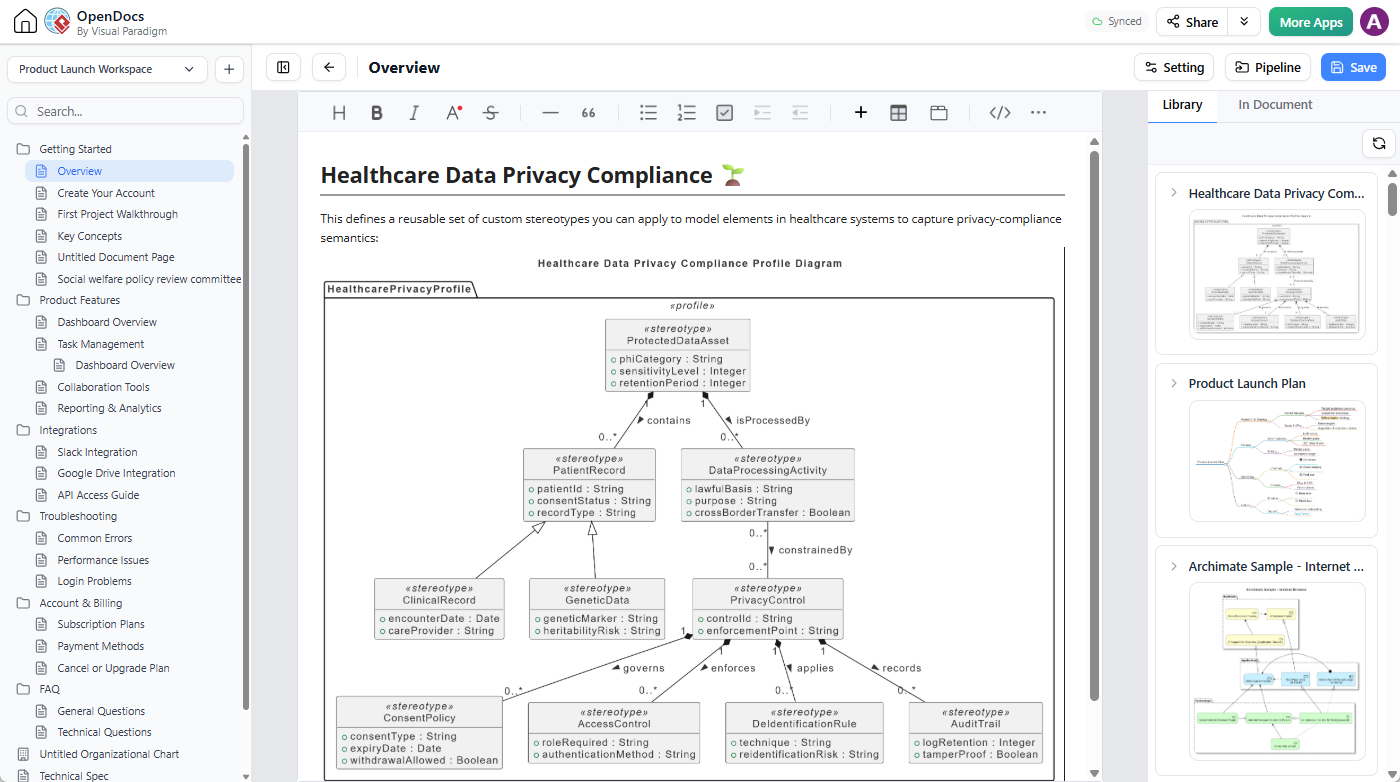
This supports documentation workflows such as:
- Architecture standards and modeling guidelines.
- Domain-specific language documentation.
- Security and compliance design records.
- Project architecture specifications.
- Onboarding and internal training materials.
- Reusable modeling pattern catalogs.
Save useful content in NotesKeep
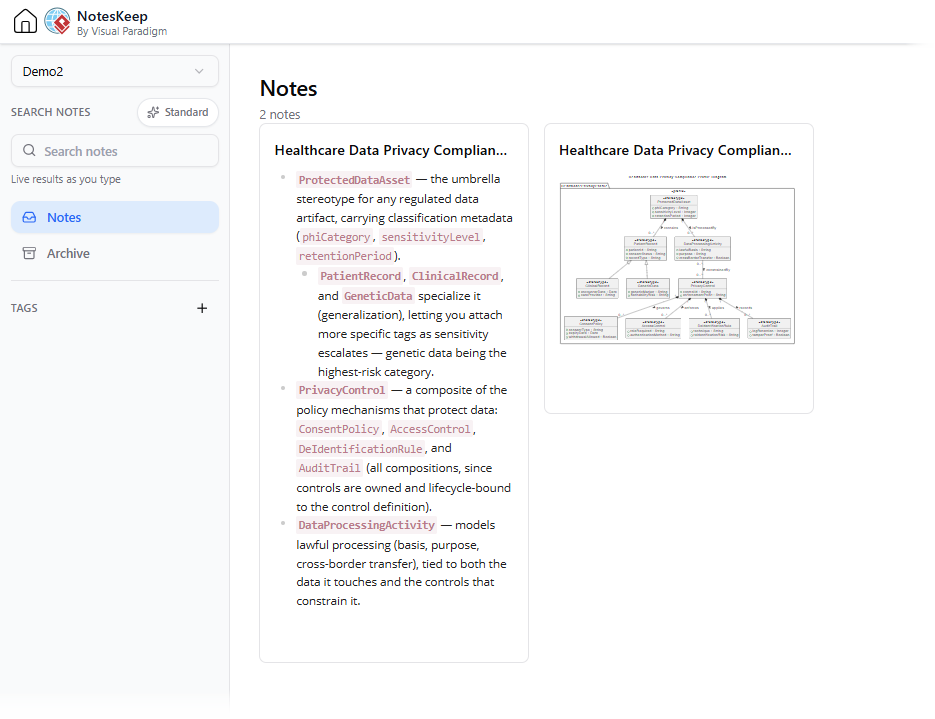
Users can send the generated diagram, the chatbot’s reply, or selected phrases and paragraphs to Visual Paradigm NotesKeep. This makes it possible to preserve the reasoning behind a profile, not just the final image.
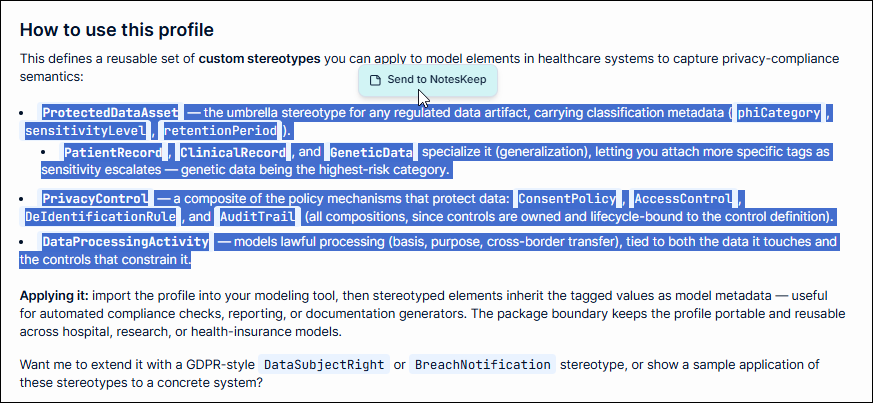
For example, a team can keep the following together in its project knowledge base:
- The original business requirement.
- The prompt used to generate the profile.
- The generated UML Profile Diagram.
- The explanation of each stereotype.
- Design decisions made during refinement.
- Future improvement ideas and follow-up questions.
Keeping these materials together can help teams maintain continuity between early exploration, formal architecture documentation, and later implementation discussions.
Open, Reusable, and Easy to Share
The AI Diagramming Chatbot supports open text-based formats such as PlantUML, Mermaid, and Graphviz, depending on the diagram type. For UML Profile Diagrams, Visual Paradigm’s specialized PlantUML notation provides a practical bridge between conversational AI and traditional diagram-as-code workflows.
Users can inspect the generated code, reuse it in compatible VP ecosystem workflows, refine it with other tools, and share the chat session with colleagues. The complete example session for the healthcare data privacy profile is available here:
Open the shared UML Profile Diagram generation session
Who Can Benefit from the AI UML Tool?
The enhanced chatbot is useful for anyone who needs to create or communicate specialized UML modeling concepts.
- Software architects can define architecture-specific stereotypes and modeling conventions.
- Enterprise architects can extend UML with organization-specific governance and lifecycle metadata.
- Security architects can create reusable concepts for controls, trust boundaries, risks, and security requirements.
- Business analysts can explore domain-specific structures without manually constructing every diagram element.
- Compliance teams can represent regulatory concepts and link them to system or data models.
- Development teams can create a shared vocabulary for recurring implementation and deployment patterns.
- Educators and students can use generated profiles to learn how UML can be extended for specialized domains.
- Documentation teams can combine diagrams with explanations and supporting project knowledge.
How to Get Started
To generate a UML Profile Diagram, open the AI Diagramming Chatbot and describe the modeling language or domain concepts you want to define.
A useful prompt normally includes:
- The domain or business context.
- The purpose of the profile.
- The stereotypes that should be included (optional).
- The properties or tagged values that each stereotype should carry (optional).
- The audience or intended use of the profile.
For example:
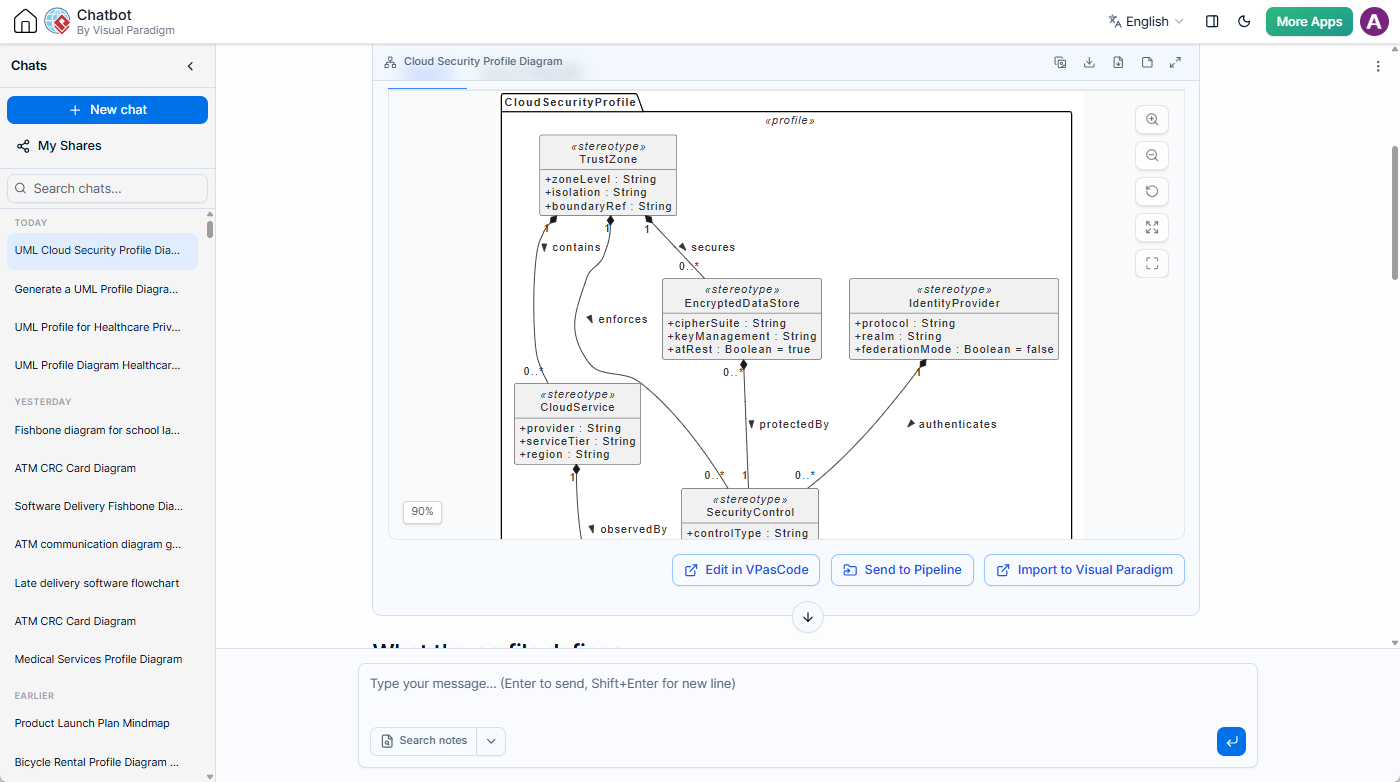
Generate a UML Profile Diagram for a cloud security architecture. Define stereotypes for cloud service, trust zone, identity provider, security control, encrypted data store, and monitoring service. Explain how the profile can be applied to a deployment diagram.
After the first result is generated, continue the conversation to add, remove, rename, or reorganize profile elements. You can then ask for an explanation, export the diagram as an image, edit the PlantUML-based output, document it in OpenDocs, or save the discussion in NotesKeep.
Start Creating UML Profiles with AI
The addition of UML Profile Diagram generation expands the Visual Paradigm AI Diagramming Chatbot beyond standard diagram creation. By inventing a dedicated PlantUML syntax extension for profile diagrams, Visual Paradigm enables users to define the modeling vocabulary behind their systems, not just draw the systems themselves.
Whether you are designing a compliance profile, documenting an enterprise architecture standard, defining a security modeling language, or exploring a domain-specific notation, the AI UML tool can help you move from an idea to a reusable profile more quickly.
Try the AI UML Profile Diagram generator now and turn your domain knowledge into a structured, explainable, and reusable UML profile.