


We are excited to announce a major upgrade to the Visual Paradigm AI Diagramming Chatbot! Known for transforming natural language descriptions into professional UML, BPMN, ERD, and system architecture diagrams, our chatbot is taking a massive leap forward. Today, we are expanding beyond pure visual models to support comprehensive AI data format generation across a wide spectrum of code and structured data formats.
Users can now instantly generate, edit, visualize, and convert key data formats including SQL, JSON, JSON Schema, JSONC, JSON5, JSONL, TOON, YAML, XML, CSV, and TOML—all through simple conversational prompts. Combined with our seamless VPasCode integration, this feature turns raw text prompts into production-ready data structures and instant visual diagrams in seconds.
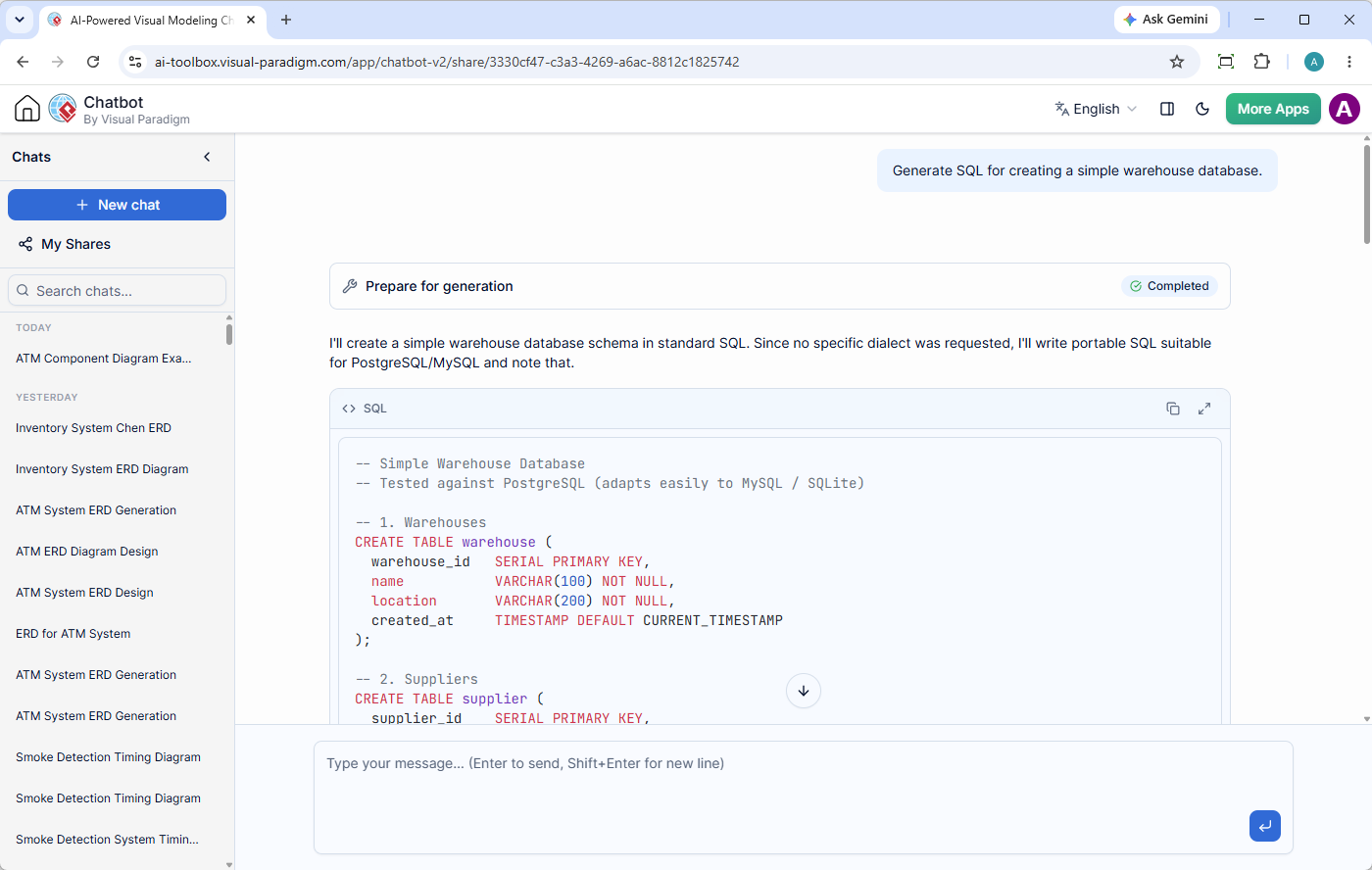
Ready to try it right now? Jump straight into the action with the Visual Paradigm AI Diagramming Chatbot App.
Why AI Data Generation Matters: Bridging the Gap Between Code and Architecture
Modern software development, enterprise architecture, and data analytics rely heavily on structured data. However, manually drafting database schemas, crafting nested XML configuration files, or formatting large CSV datasets for testing can be tedious, error-prone, and time-consuming.
By empowering the Visual Paradigm AI Diagramming Chatbot to function as a versatile AI SQL generator, AI JSON XML generator, and AI CSV generator, we are solving several critical workflow bottlenecks:
- Eliminate Syntax Errors: Writing complex SQL schemas or deeply nested YAML/XML configs manually often leads to syntax mismatches. AI generation guarantees syntactically sound code tailored to your target framework or database engine.
- Accelerate Prototyping and Mocking: Instantly create realistic test data, seed scripts, and sample API payloads without spending hours manually filling spreadsheet rows or JSON objects.
- Unify Design and Implementation: Designers can move seamlessly from visual ERDs and class models to physical SQL DDL scripts or JSON Schemas within a single conversational environment.
- Democratize Data Modeling: Business analysts and non-technical stakeholders can describe business requirements in plain English and receive fully structured data formats like CSV or XML ready for integration.
Supported Data Formats at a Glance
Whether you need an AI JSON generator for REST API payloads or an AI YAML generator for DevOps pipelines, our AI chatbot handles a broad set of modern file and syntax specifications:
- Database & Query Languages: SQL (PostgreSQL, MySQL, SQLite, Oracle, SQL Server)
- JSON Ecosystem: JSON, JSON Schema, JSONC (JSON with Comments), JSON5, JSONL (JSON Lines)
- Structured Markup & Configuration: XML, YAML, TOML, TOON
- Tabular Data: CSV (Comma-Separated Values)
Real-World Examples: What You Can Generate
To see how effortless data generation is, explore these real examples produced directly by the Visual Paradigm AI Diagramming Chatbot.
1. AI SQL Generator Example
User Prompt: “Generate SQL for creating a simple warehouse database.”
Chatbot Output:
-- Simple Warehouse Database
-- Tested against PostgreSQL (adapts easily to MySQL / SQLite)

-- 1. Warehouses
CREATE TABLE warehouse (
  warehouse_id   SERIAL PRIMARY KEY,
  name           VARCHAR(100) NOT NULL,
  location       VARCHAR(200) NOT NULL,
  created_at     TIMESTAMP DEFAULT CURRENT_TIMESTAMP
);

-- 2. Suppliers
CREATE TABLE supplier (
  supplier_id    SERIAL PRIMARY KEY,
  name           VARCHAR(150) NOT NULL,
  contact_name   VARCHAR(100),
  contact_phone  VARCHAR(30),
  email          VARCHAR(150)
);

-- 3. Products
CREATE TABLE product (
  product_id     SERIAL PRIMARY KEY,
  sku            VARCHAR(50) UNIQUE NOT NULL,
  name           VARCHAR(200) NOT NULL,
  description    TEXT,
  unit_price     NUMERIC(10, 2) NOT NULL DEFAULT 0,
  category       VARCHAR(100),
  supplier_id    INT REFERENCES supplier(supplier_id)
);

-- 4. Inventory -- stock level per product per warehouse
CREATE TABLE inventory (
  inventory_id   SERIAL PRIMARY KEY,
  warehouse_id   INT NOT NULL REFERENCES warehouse(warehouse_id),
  product_id     INT NOT NULL REFERENCES product(product_id),
  quantity       INT NOT NULL DEFAULT 0,
  min_level      INT NOT NULL DEFAULT 0,
  UNIQUE (warehouse_id, product_id)
);

-- 5. Inbound receipt -- stock arriving from suppliers
CREATE TABLE goods_receipt (
  receipt_id     SERIAL PRIMARY KEY,
  warehouse_id   INT NOT NULL REFERENCES warehouse(warehouse_id),
  supplier_id    INT REFERENCES supplier(supplier_id),
  received_at    TIMESTAMP DEFAULT CURRENT_TIMESTAMP,
  note           TEXT
);

-- 6. Receipt line items
CREATE TABLE receipt_item (
  receipt_item_id SERIAL PRIMARY KEY,
  receipt_id     INT NOT NULL REFERENCES goods_receipt(receipt_id),
  product_id     INT NOT NULL REFERENCES product(product_id),
  quantity       INT NOT NULL CHECK (quantity > 0)
);

-- 7. Outbound shipment -- orders leaving the warehouse
CREATE TABLE shipment (
  shipment_id    SERIAL PRIMARY KEY,
  warehouse_id   INT NOT NULL REFERENCES warehouse(warehouse_id),
  ship_to        VARCHAR(200) NOT NULL,
  shipped_at     TIMESTAMP DEFAULT CURRENT_TIMESTAMP,
  status         VARCHAR(20) DEFAULT 'PENDING'
);

-- 8. Shipment line items
CREATE TABLE shipment_item (
  shipment_item_id SERIAL PRIMARY KEY,
  shipment_id    INT NOT NULL REFERENCES shipment(shipment_id),
  product_id     INT NOT NULL REFERENCES product(product_id),
  quantity       INT NOT NULL CHECK (quantity > 0)
);

-- Sample seed data
INSERT INTO warehouse (name, location) VALUES
  ('Central DC', '1200 Industrial Ave, Springfield'),
  ('West Hub', '45 Harbor Blvd, San Diego');

INSERT INTO supplier (name, contact_name, email) VALUES
  ('Acme Parts Co.', 'Jane Doe', '[email protected]'),
  ('Global Logistics Ltd.', 'Bob Smith', '[email protected]');

INSERT INTO product (sku, name, unit_price, category, supplier_id) VALUES
  ('SKU-1001', 'Steel Bolt M8', 0.25, 'Hardware', 1),
  ('SKU-1002', 'Aluminum Sheet 1m', 12.50, 'Materials', 2),
  ('SKU-1003', 'Packaging Tape', 3.20, 'Packaging', 1);

INSERT INTO inventory (warehouse_id, product_id, quantity, min_level) VALUES
  (1, 1, 5000, 1000),
  (1, 2, 200, 50),
  (2, 1, 3000, 1000),
(2, 3, 800, 200);2. AI XML & Configuration Generator Example
User Prompt: “Generate XML for a configuration file containing application, database, and security settings.”
Chatbot Output:
<?xml version="1.0" encoding="UTF-8"?>
<configuration>
    <application>
        <name>Order Management System</name>
        <version>2.4.1</version>
        <environment>production</environment>
        <debug>false</debug>

        <server>
            <port>8080</port>
            <host>0.0.0.0</host>
            <contextPath>/api</contextPath>
            <maxThreads>200</maxThreads>
            <gracefulShutdown>true</gracefulShutdown>
            <requestTimeout>30s</requestTimeout>
        </server>

        <logging>
            <level>INFO</level>
            <file>/var/log/oms/app.log</file>
            <rotation>
                <size>50MB</size>
                <backups>5</backups>
            </rotation>
        </logging>
    </application>

    <database>
        <driver>org.postgresql.Driver</driver>
        <host>db.example.com</host>
        <port>5432</port>
        <name>oms_prod</name>
        <username>oms_app</username>
        <password>enc:${DB_PASSWORD_SECRET}</password>

        <pool>
            <minConnections>5</minConnections>
            <maxConnections>50</maxConnections>
            <connectionTimeout>1000</connectionTimeout>
            <idleTimeout>300s</idleTimeout>
            <maxLifetime>1800s</maxLifetime>
        </pool>

        <options>
            <ssl>true</ssl>
            <autoCommit>false</autoCommit>
            <readTimeout>15s</readTimeout>
            <writeTimeout>15s</writeTimeout>
        </options>
    </database>

    <security>
        <authentication>
            <method>OAuth2</method>
            <issuer>https://auth.example.com</issuer>
            <audience>oms-api</audience>
            <tokenLifetime>15m</tokenLifetime>
            <refreshLifetime>7d</refreshLifetime>
        </authentication>

        <authorization>
            <defaultRole>reader</defaultRole>
            <roleHierarchy>
                <role>admin</role>
                <role>operator</role>
                <role>reader</role>
            </roleHierarchy>
            <pathRules>
                <rule pattern="/admin/*" roles="admin" />
                <rule pattern="/orders/*" roles="admin,operator,reader" />
                <rule pattern="/public/*" roles="anonymous" />
            </pathRules>
        </authorization>

        <cors>
            <enabled>true</enabled>
            <allowedOrigins>https://app.example.com</allowedOrigins>
            <allowedMethods>GET,POST,PUT,DELETE,OPTIONS</allowedMethods>
            <allowedHeaders>Authorization,Content-Type</allowedHeaders>
            <maxAge>3600</maxAge>
        </cors>

        <rateLimit>
            <enabled>true</enabled>
            <requestsPerMinute>120</requestsPerMinute>
            <burstSize>20</burstSize>
        </rateLimit>
    </security>
</configuration>3. AI CSV Generator Example
User Prompt: “Generate CSV for monthly sales data containing month, product category, units sold, and revenue.”
Chatbot Output:
month,product_category,units_sold,revenue
January,Electronics,1200,96000
January,Clothing,1850,46250
January,Home & Garden,980,58800
January,Books,1400,23800
February,Electronics,1100,88000
February,Clothing,1700,42500
February,Home & Garden,1050,63000
February,Books,1250,21250
March,Electronics,1350,108000
March,Clothing,1600,40000
March,Home & Garden,1120,67200
March,Books,1500,25500
April,Electronics,1420,113600
April,Clothing,1750,43750
April,Home & Garden,1080,64800
April,Books,1380,23460
May,Electronics,1500,120000
May,Clothing,1900,47500
May,Home & Garden,1150,69000
May,Books,1450,24650
June,Electronics,1600,128000
June,Clothing,2100,52500
June,Home & Garden,1250,75000
June,Books,1550,26350Interactive Code Explanation & Seamless VPasCode Integration
Generating data code is only half the story. The Visual Paradigm AI Diagramming Chatbot provides a complete interactive workflow to inspect, understand, edit, and visualize your outputs:
1. Instant AI Code Explanation
Unsure how a specific SQL query works or need clarification on a complex JSON Schema rule? Directly within the chat interface, you can ask the AI to explain the generated code line by line, detail security implications, or suggest performance optimization tips.
2. Embedded Code Viewer & One-Click “Open in VPasCode”
All generated data blocks are automatically formatted inside a clean, interactive code viewer. With a single click on “Open in VPasCode”, your code is transferred directly to VPasCode—Visual Paradigm’s dedicated diagram-as-code and data environment.
3. Real-Time Data Editing and Diagram Visualization
Once opened in VPasCode, you unlock powerful dual-pane editing capabilities:
- Live Data Editing: Modify values, add schema attributes, or update configuration properties on the left editor.
- Automatic Diagram Rendering: As a diagram-as-code engine, VPasCode automatically parses the code on the left and instantly renders visual diagrams (such as ERDs, class diagrams, or chart visualizations) on the right GUI panel in real time.
Part of the Visual Paradigm AI Ecosystem
This data format enhancement seamlessly integrates into the broader Visual Paradigm AI Ecosystem. Whether you work in a browser or inside enterprise software, your code and diagrams flow naturally across tools:
- OpenDocs Integration: Send AI-generated schemas, configurations, and diagrams directly into Visual Paradigm OpenDocs for enterprise documentation and team knowledge bases.
- VP Online & Desktop Sync: Move from rapid conversational ideation to visual drag-and-drop editing in VP Online or export directly to Visual Paradigm Desktop for enterprise-grade modeling.
- Session Sharing & Artifact Navigation: Manage generated code snippets and visual artifacts effortlessly using the interactive Artifacts Pane and session management tools.
Get Started with AI Data Generation Today
Ready to supercharge your design and data modeling workflow with an intelligent AI SQL generator, AI JSON generator, and AI diagramming tool?
Experience the feature live on our web application or learn more on our official product page:
- Launch the App: Try Visual Paradigm AI Diagramming Chatbot Now
- Learn More: Explore AI Diagramming Chatbot Overview