


At Visual Paradigm, we are constantly refining our artificial intelligence capabilities to make project management and technical diagramming as intuitive as possible. Following the recent rollout of our Next-Gen AI Diagramming Chatbot v2 Upgrade, we are thrilled to announce a targeted optimization specifically engineered for project managers, Scrum masters, and systems engineers: our newly enhanced AI PERT Chart Generator.
Program Evaluation and Review Technique (PERT) charts are critical for mapping project dependencies, identifying critical paths, and calculating realistic timelines. While our previous version delivered technically accurate PERT charts, our product team has re-architected the generation logic to deliver cleaner layouts, highly readable schedules, and streamlined collaborative workflows.
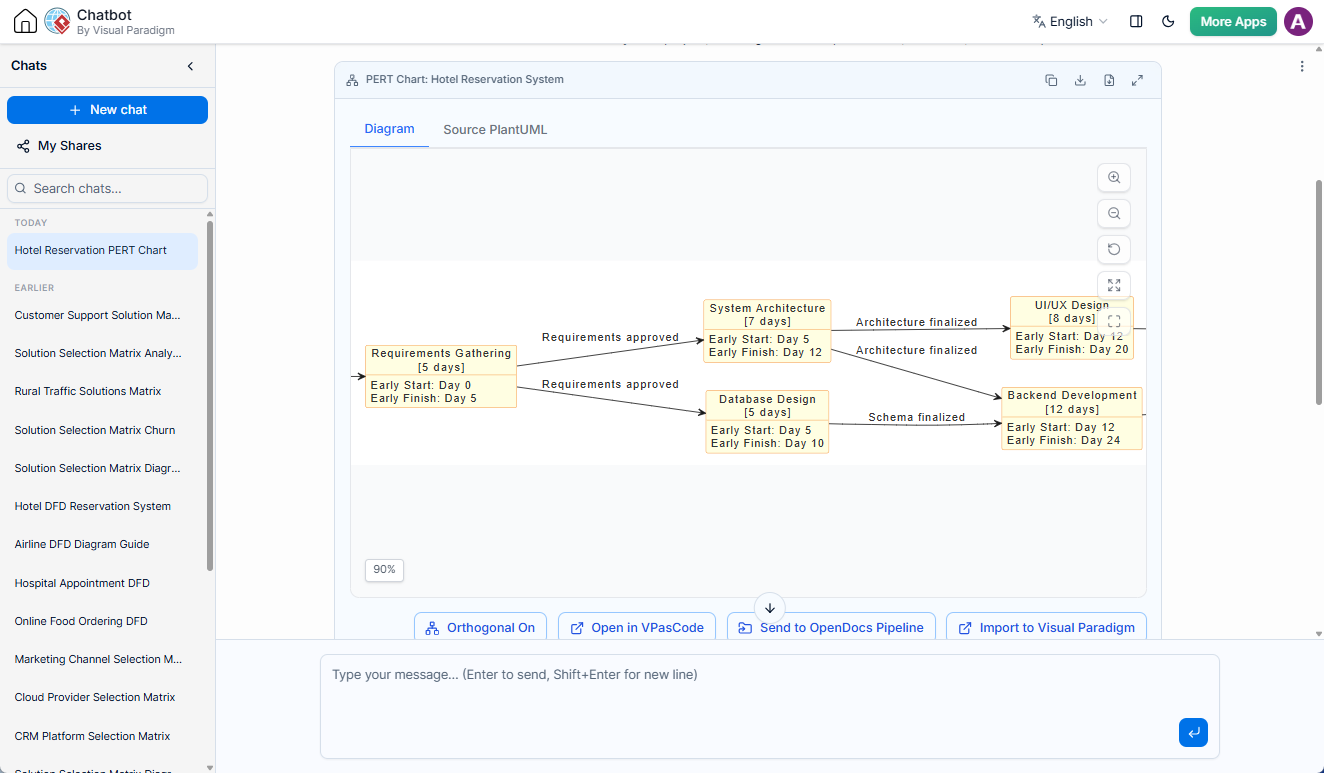
Whether you want to visualize a complex construction schedule or a software development sprint, these updates ensure your AI-generated diagrams are immediately presentation-ready.
Key Enhancements in the AI PERT Chart Generator
1. Dynamic Relative Timeframes (Day # vs. Fixed Dates)
In project planning, hardcoding calendar dates early in the ideation phase can introduce rigid limitations. If a project kickoff shifts by a week, every single node in the chart becomes outdated.
To solve this, our AI Chatbot now utilizes a Relative Day Numbering System (Day #) for Early Start (ES) and Early Finish (EF) constraints. Instead of displaying a fixed date like “October 12,” the nodes dynamically compute schedules relative to the project launch (e.g., Early Start: Day 16, Early Finish: Day 30). This abstract approach aligns with industry best practices, allowing teams to evaluate project duration, float time, and sequencing independently of fluid calendar shifts.
2. Clutter-Free Layouts (Elimination of Unnecessary Swimlanes)
Swimlanes are an excellent tool for categorizing tasks by department or owner in large cross-functional workflows. However, applying them universally to PERT charts often introduced visual noise. For small-to-medium project models, forcing tasks into swimlanes frequently resulted in mostly empty columns or a single massive container hosting every node.
We have removed automatic swimlane containment from the core PERT generator. By focusing strictly on sequential flow, the layout engine uses optimized orthogonal lines to display dependencies clearly. The result is a compact, highly comprehensible network diagram that fits perfectly into status reports and executive slide decks.
See the Enhancement in Action: Construction Project Example
To demonstrate the clarity of the upgraded generation engine, here is the clean, readable PlantUML data produced by the AI Chatbot when prompted to “Generate a PERT Chart for a typical construction project”:
@startuml
skinparam linetype ortho
skinparam vpDiagramType PERTChart
skinparam defaultFontSize 14
skinparam defaultFontColor #333333
left to right direction
title PERT Chart: Construction Project

skinparam object {
    BackgroundColor LightYellow
    BorderColor DarkOrange
}

object "Project Start\n[0 days]" as start {
  Duration = 0 days
}

object "Site Preparation\n[5 days]" as sitePrep {
  Early Start: Day 1
  Early Finish: Day 5
}

object "Foundation Work\n[10 days]" as foundation {
  Early Start: Day 6
  Early Finish: Day 15
}

object "Framing & Structure\n[15 days]" as framing {
  Early Start: Day 16
  Early Finish: Day 30
}

object "Plumbing Rough-In\n[8 days]" as plumbing {
  Early Start: Day 31
  Early Finish: Day 38
}

object "Electrical Rough-In\n[8 days]" as electrical {
  Early Start: Day 31
  Early Finish: Day 38
}

object "HVAC Installation\n[10 days]" as hvac {
  Early Start: Day 31
  Early Finish: Day 40
}

object "Interior Finishing\n[20 days]" as interior {
  Early Start: Day 41
  Early Finish: Day 60
}

object "Exterior Finishing\n[15 days]" as exterior {
  Early Start: Day 31
  Early Finish: Day 45
}

object "Roofing\n[7 days]" as roofing {
  Early Start: Day 16
  Early Finish: Day 22
}

object "Windows & Doors\n[5 days]" as windows {
  Early Start: Day 23
  Early Finish: Day 27
}

object "Flooring & Tiling\n[10 days]" as flooring {
  Early Start: Day 61
  Early Finish: Day 70
}

object "Painting\n[8 days]" as painting {
  Early Start: Day 61
  Early Finish: Day 68
}

object "Final Inspections\n[5 days]" as inspections {
  Early Start: Day 71
  Early Finish: Day 75
}

object "Project Complete\n[0 days]" as complete {
  Duration = 0 days
}

' Dependencies
start --> sitePrep : "Notice to proceed"
sitePrep --> foundation : "Site cleared"
foundation --> framing : "Concrete cured"
framing --> roofing : "Frame approved"
framing --> windows : "Frame complete"
framing --> plumbing : "Structure ready"
framing --> electrical : "Structure ready"
framing --> hvac : "Structure ready"
framing --> exterior : "Structure ready"
roofing --> windows : "Roof sealed"
plumbing --> interior : "Rough-in passed"
electrical --> interior : "Rough-in passed"
hvac --> interior : "Rough-in passed"
windows --> interior : "Glazing done"
exterior --> interior : "Exterior sealed"
interior --> flooring : "Walls complete"
interior --> painting : "Walls complete"
flooring --> inspections : "Flooring done"
painting --> inspections : "Painting done"
inspections --> complete : "All passed"
@enduml
Continuous Iteration: Natural Language Fine-Tuning
While the initial generation provides a robust foundation, we understand that project constraints are subject to change. The AI Diagramming Chatbot supports iterative prompts, allowing you to fine-tune the output using conversational commands. If you need to add buffer days, introduce parallel paths, or modify task durations, simply type your request into the chat interface (e.g., “Add 3 days of delay risk to the foundation work node”) and watch the diagram adjust seamlessly.
Advanced Post-Generation Workflows
Visual Paradigm bridges the gap between text-based generation and traditional desktop design tools through our integrated software ecosystem.
Real-Time Refinement via VPasCode
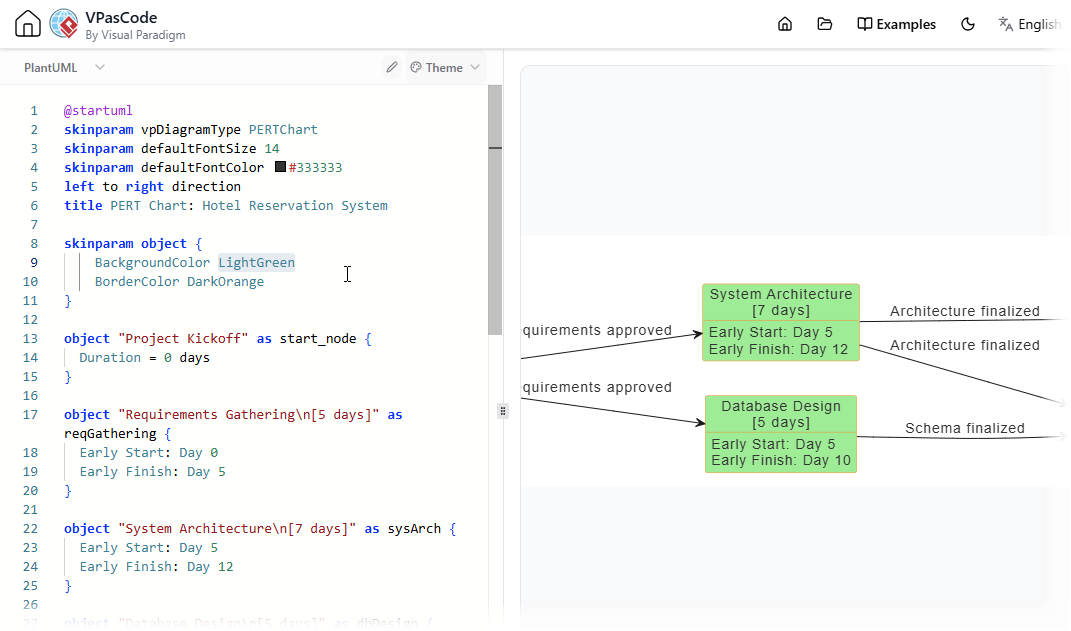
For engineers who prefer direct control over their code, our integration with Visual Paradigm’s VPasCode gives you a comprehensive Diagram-as-Code playground. Directly beneath the AI chatbot’s diagram viewer, you can select Open in VPasCode. This instantly opens the diagram within our dedicated syntax editor. Any adjustments made to the PlantUML markup render in real time on the live preview canvas, allowing you to quickly download vector graphics or crisp PNG images.
Documentation Pipelines with Visual Paradigm OpenDocs
A PERT chart yields the highest value when contextualized alongside project charters, technical specifications, and stakeholder reports. By leveraging our OpenDocs Pipeline Integration, users can click Send to OpenDocs Pipeline to publish the diagram directly to their centralized documentation hub. Simply open the Pipeline shelf inside OpenDocs and drag the PERT component onto any internal wiki page or active article canvas.
Get Started with AI-Powered Diagramming
To explore the capabilities of our artificial intelligence engine and learn how it supports software design, agile planning, and cloud architecture visualization, visit our official AI Chatbot Home Page.
Ready to build your next project roadmap? Launch the cloud application directly to generate charts in seconds:
Try the Live AI Diagramming Chatbot v2 Application
Frequently Asked Questions (FAQ)
How do I generate a PERT chart using AI?
You can generate a PERT chart by opening the Visual Paradigm AI Toolbox app, selecting the Chatbot interface, and typing a natural language prompt such as “Generate a PERT Chart for a commercial construction plan with relative timelines.”
Can I edit the chart manually after the AI builds it?
Yes. You can use subsequent chat prompts to modify the layout via AI, or click “Open in VPasCode” to edit the raw PlantUML code directly inside our cloud editor.
Why does Visual Paradigm use Day numbers instead of calendar dates in PERT charts?
Using relative day numbers (e.g., Day 1 to Day 5) makes the project plan modular. If your start date shifts, your critical path calculations and sequence stay mathematically sound without forcing you to re-date every task block manually.