


Starting a new business plan or strategic analysis often begins with a blank canvas, a daunting task that can stifle momentum before it even begins. We’re excited to announce a powerful new tool designed to eliminate this hurdle: the Visual Paradigm Model Canvas Tool. This innovative AI canvas maker transforms your simple business ideas into fully populated, strategic canvases in seconds.

Addressing the Challenge of the Blank Canvas
Tools like the Business Model Canvas, Lean Canvas, or SWOT Analysis are invaluable for strategic planning. However, filling them out from scratch requires significant time, research, and creative energy. Teams often struggle to articulate their ideas across all required sections, leading to incomplete analyses and stalled progress.
This manual process can be a major bottleneck, preventing you from quickly validating ideas and aligning your team. We knew there had to be a better, faster way to move from concept to a clear, actionable plan.
Introducing the AI Model Canvas Tool: Turn Ideas into Strategy Instantly
The new AI Model Canvas Tool was built to act as your strategic partner. By simply describing your business, product, or idea in plain language, you can generate a rich, comprehensive canvas that provides a solid foundation for your planning sessions.
With our new AI business model canvas tool, you can:
- Generate Instantly: Create complete Business Model Canvases, Lean Canvases, SWOT analyses, and more from a single text prompt.

- Save Valuable Time: Skip hours of initial brainstorming and research, and jump straight into refining your strategy.
- Gain Expert Insights: Leverage AI to populate all sections of your chosen canvas with relevant, well-structured ideas you might not have considered.
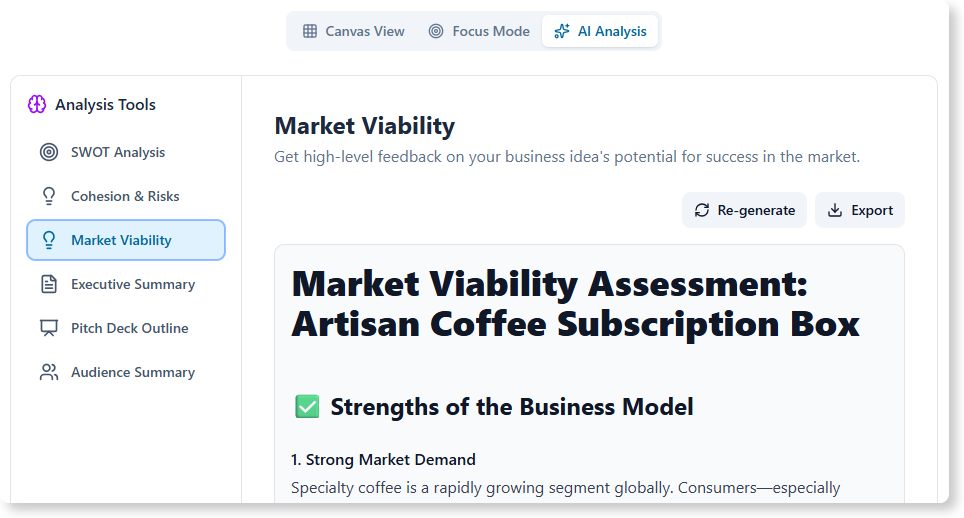
- Ensure Comprehensive Planning: Eliminate blank spots and ensure every critical aspect of your business model is thoughtfully addressed from the start.
- Iterate with Ease: Quickly generate multiple canvas variations for different business ideas or strategic pivots.
How to Access and Use the New Feature
Getting started with the AI Model Canvas Tool is simple. Here’s how you can access it:
For Visual Paradigm Online Users:
If you have a Combo Edition (or higher) subscription, you can directly access the tool at https://ai-toolbox.visual-paradigm.com/app/canvas/.
For Visual Paradigm Desktop Users:
If you have a Professional Edition (or higher) license with active maintenance, navigate to the Tools > App menu from your desktop application and select the AI Model Canvas Tool from the list.
Once you’ve opened the app, the workflow is just a few simple steps:
- Select a Canvas: Choose your desired framework from the list of available canvas types.
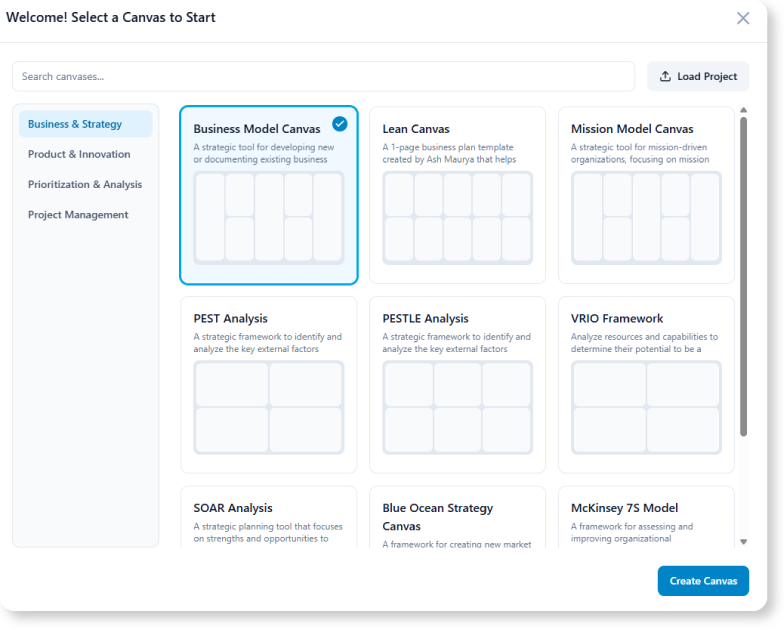
- Describe Your Idea: In the input field, type the topic of your business, product, or project.
- Generate: Click the “Generate” button and watch as the AI populates your entire canvas.

- Refine: Review the AI-generated content and edit the text in each section to perfectly match your vision.
Ready to Build Your Next Big Idea?
The new AI Model Canvas Tool is more than just a feature; it’s a catalyst for innovation. It empowers you and your team to focus on what truly matters—strategic thinking and execution—by handling the heavy lifting of initial ideation. Move from a rough concept to a structured, shareable plan in minutes, not hours.
This feature is now available for all Visual Paradigm Online users with a Combo Edition subscription and Visual Paradigm Desktop users with a Professional Edition license and active maintenance.
For a detailed guide on using this new feature, please visit our support article: Learn more about the AI Model Canvas Tool.