


Just last week, we reached a major milestone with the launch of the all-new Visual Paradigm Unified Platform. This historic release bridged the gap between desktop visual modeling and browser-based cloud productivity, bringing over 100+ specialized apps, real-time collaboration tools, and a centralized cloud drive into one powerful visual workspace. If you haven’t explored the core pillars of that release yet, you can catch up on our full breakdown in the Official Unified Platform Launch Announcement.
The reception has been incredible. But at Visual Paradigm, our goal is to continuously refine your experience. We design software that adapts to how enterprise architects, agile teams, and project managers actually work. To make your cloud data drive even more intuitive, structured, and friction-free, we are excited to roll out our very first wave of productivity enhancements today.
These upgrades focus on giving you granular organization, cleaner discovery interfaces, and smarter filtering systems so you can spend less time navigating and more time building.
1. Zero-In on Your Active Initiatives with the New “Projects” List
As your cloud repository grows to house dozens of diagrams, system architectures, and business plans, keeping your digital workspace tidy is vital. To help you maintain a razor-sharp focus, we have introduced a dedicated Projects List positioned perfectly on the left-hand side of your My Artifacts pane.
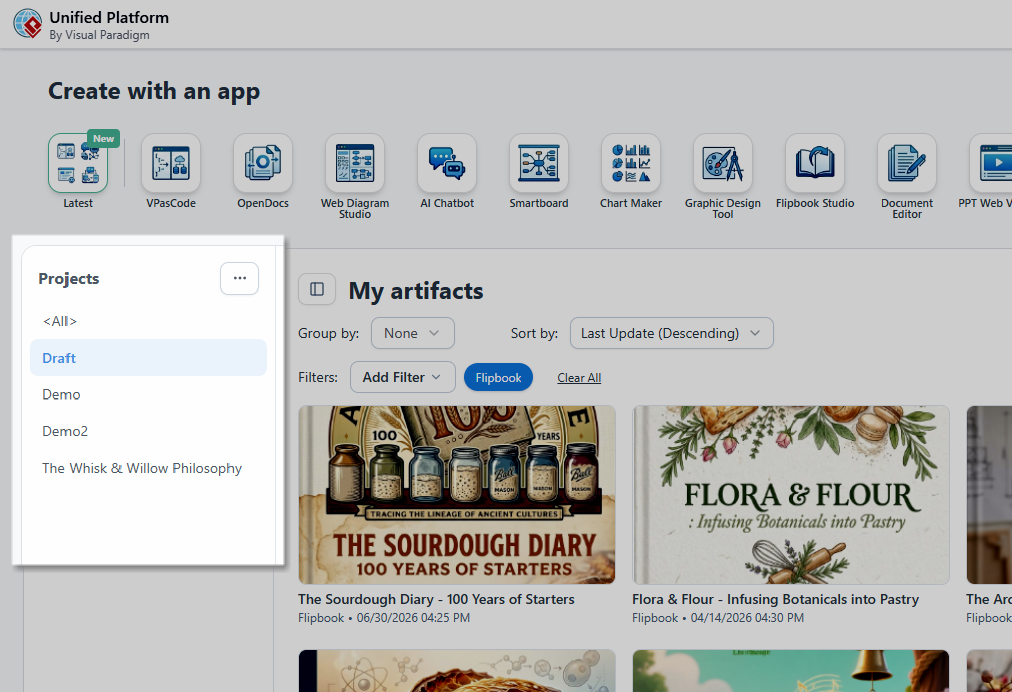
Rather than looking at a broad list of every file you own, you can now anchor your attention on a singular operational goal. Simply select a specific project from the left panel, and your My Artifacts canvas on the right will instantly update to display only the files, documents, and visual maps tethered to that exact initiative.
2. Frictionless Project Creation, Built Inline
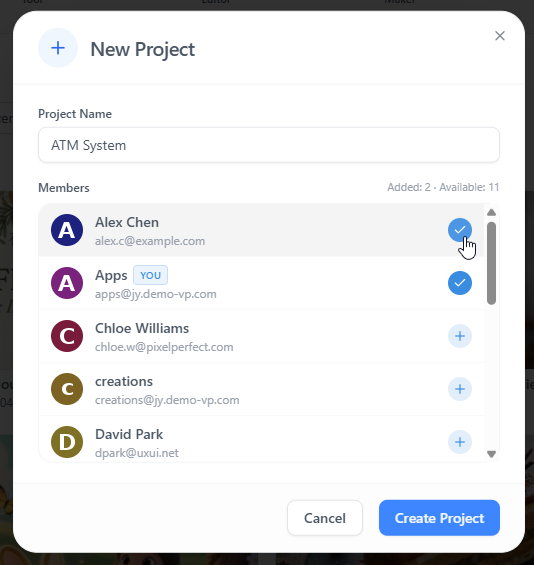
Because great projects begin in a flash of inspiration, we want to ensure organizing them is just as spontaneous. Alongside the new navigation structure, you can now spin up an entirely new project bucket right from your active panel.
Simply click the Ellipsis (…) button located at the very top of your project list and select New Project. There is no need to jump out to separate configuration screens or leave your current workspace layout—just name your project and immediately begin grouping your relevant assets.
3. Visualize Your Work Your Way: Grid Layout for Artifact Lists
Different workflows require different visual perspectives. While compact lists are great for scanning metadata, sometimes you need a rich, highly visual presentation to recognize your canvas layouts immediately.
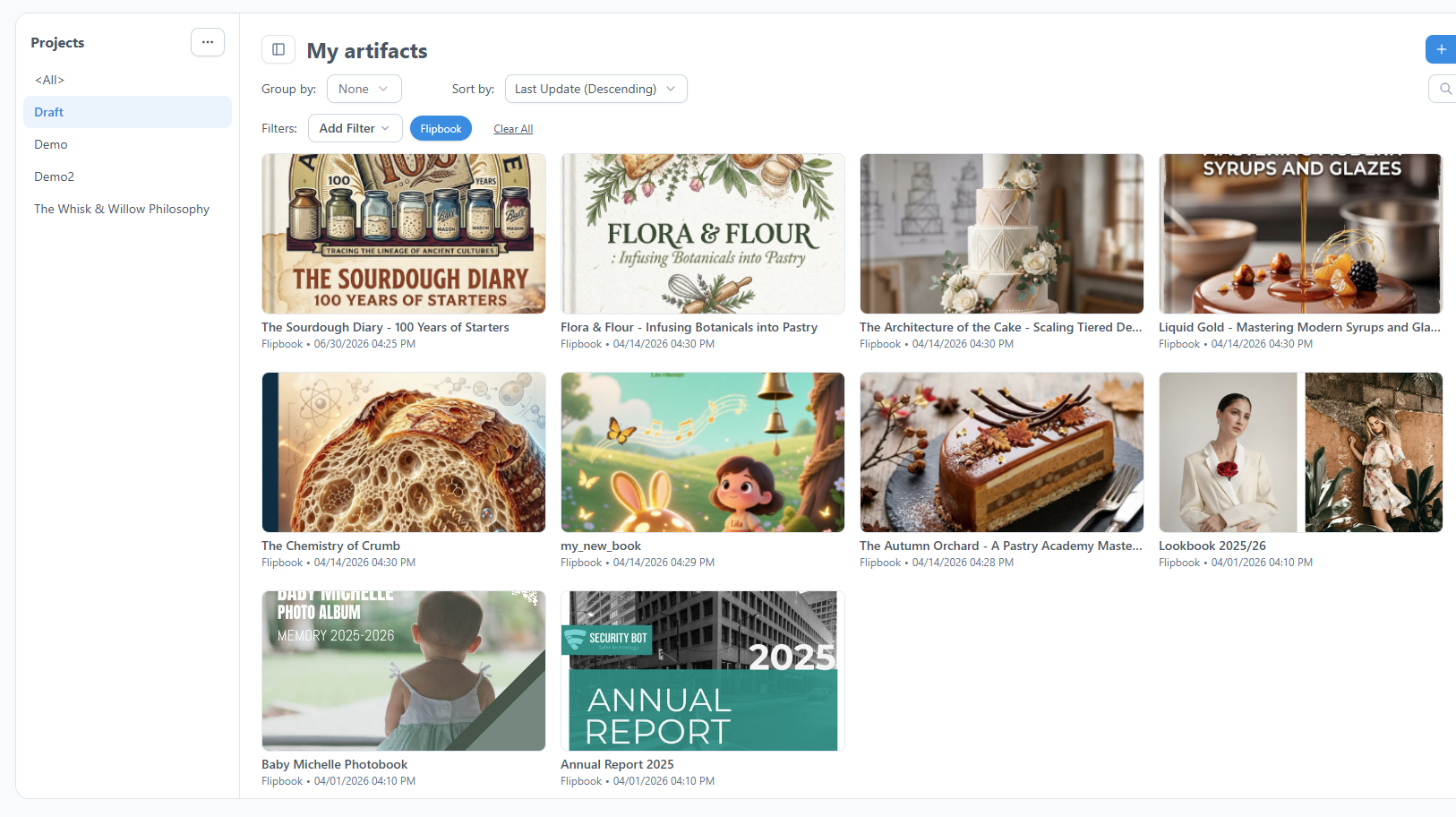
With today’s update, we have introduced a brand-new Grid Layout toggle for the artifact list views. You can now alternate between standard tabular lists and a rich graphical grid, turning your My Artifacts hub into a highly scannable gallery of visual cards.
4. Precision Content Sorting with Enhanced ‘Group By’ Options
To help you slice and dice your workspace views instantly, we have enhanced the Group By engine to support two highly requested view states: Artifacts or None.
- Group by Artifacts: If you are looking strictly for a specific output type—such as isolating your UML diagrams, business process maps, or PRD text documents—this setting stacks your items into distinct, logical buckets based on their app type.
- Group by None: If you prefer an unsegmented, flat chronological feed of your latest modifications across all application domains, switching to None opens up a clean, continuous timeline.
5. Smarter Contextual Filtering with the Upgraded ‘Filters’ UI
When you have a suite of over 100+ creative and analytical applications feeding into a single repository, traditional filter menus can become overwhelmingly cluttered. We have reimagined the filtering process to make asset discovery simple and lightweight.
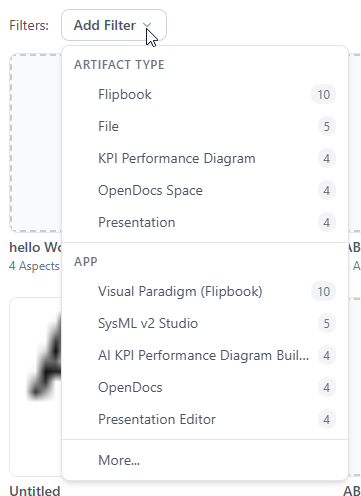
Instead of packing every imaginable file type into a massive dropdown menu, the updated Filters UI uses contextual awareness to optimize your view:
- Dynamic Proximity: The filter dropdown now dynamically restricts its options, showing only the specific asset types actively present in your current folder or project scope.
- Frequency Ordering: Filter criteria are automatically ranked based on volume, meaning the file types you use most frequently bubble to the top of the selection list.
- Clean Thresholds: The primary interface keeps your selection clean by displaying a focused list of roughly the top 10 most relevant items. Need a deeper dive? A single click opens up the complete Add Filters UI popup for complex multi-variable queries.
Experience the Future of Visual Collaboration Today
These updates integrate naturally into our broader vision: giving you a high-performance, unified command center where complex engineering structures, visual designs, and project documentation live in total harmony. Whether you are working directly within the embedded browser interface inside Visual Paradigm Desktop or accessing your assets via an external web browser, these optimization tweaks are available to you right now.
Log in to your dashboard to experience a cleaner, faster, and more project-focused workspace.