


Instantly Generate Complex Diagrams with Our New AI Diagram Generator. We are thrilled to announce the launch of a revolutionary new capability in Visual Paradigm: the AI Diagram Generator. This powerful feature eliminates the most time-consuming part of system design—the initial manual drawing—by allowing you to instantly generate a diagram with AI from a simple text prompt. It’s designed to streamline your modeling workflow, allowing you to transition from a conceptual idea to a fully editable, accurately laid-out diagram in seconds.
Download Visual Paradigm Desktop
Addressing the Challenge of the Blank Canvas
Before this release, starting a new project or system documentation meant facing the “blank canvas.” Users had to manually drag, drop, connect, and align every element for diagrams like Class, Sequence, or State Machine diagrams. This process was not only tedious and repetitive but also created a significant delay between the initial brainstorming and the actual visual modeling, often stifling the design flow and requiring painstaking manual correction of layout.
Introducing the Visual Paradigm AI Diagram Generator: Modeling on Demand
We built the AI Diagram Generator to fundamentally change how you approach system modeling. The core purpose is to maximize your productivity by focusing your time on design decisions and refinement, not diagram creation. It serves as your intelligent assistant, instantly translating your intent into a professional, industry-standard diagram.
This new feature allows you to:
- Bypass the initial manual setup for complex structures.
- Quickly visualize concepts for immediate feedback and iteration.
- Instantly generate Use Case, Class, State Machine, Sequence, Requirement, Object diagrams, and PERT Charts (with more types coming soon!).
- Ensure clean, pretty layouts automatically, adhering to best practices.
- Jump straight into editing a functional diagram within the Visual Paradigm editor.
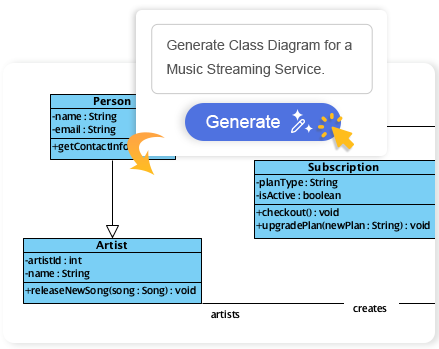
How to Access and Use the New Feature
Getting started with this powerful AI UML generator is quick and intuitive. The feature is available to all users with a Professional Edition license (or higher) and an active maintenance plan.
Follow these simple steps to generate your first diagram:
- From the Visual Paradigm main menu, navigate to Tools > AI Diagram.
- Select the desired diagram type from the available options (e.g., Class Diagram).
- In the prompt field, clearly enter the topic or system name. For example, if generating a Use Case Diagram, you might enter “Online Retail System” or “Hospital Management System.”
- Click OK.
The AI Class Diagram Generator (or other chosen generator) will process your request, create the diagram, and display it with a professional, clean layout, ready for you to continue your detailed design work.
Ready to Transform Your Modeling Workflow?
The Visual Paradigm AI Diagram Generator represents a massive leap forward in modeling efficiency. It’s an indispensable tool for anyone who needs to quickly prototype, document, or analyze a system. We’ve started with 7 powerful diagram types, including the AI Sequence Diagram Generator and AI State Machine Diagram Generator, and we are actively working to expand this list. Stay tuned for more updates!