


We’re excited to announce a powerful new addition to OpenDocs, our AI-powered knowledge management tool designed for creating, managing, and sharing rich documentation and diagrams. As part of our ongoing commitment to enhancing productivity, OpenDocs now fully supports EPC diagrams (Event-driven Process Chain diagrams) – with seamless AI generation capabilities.
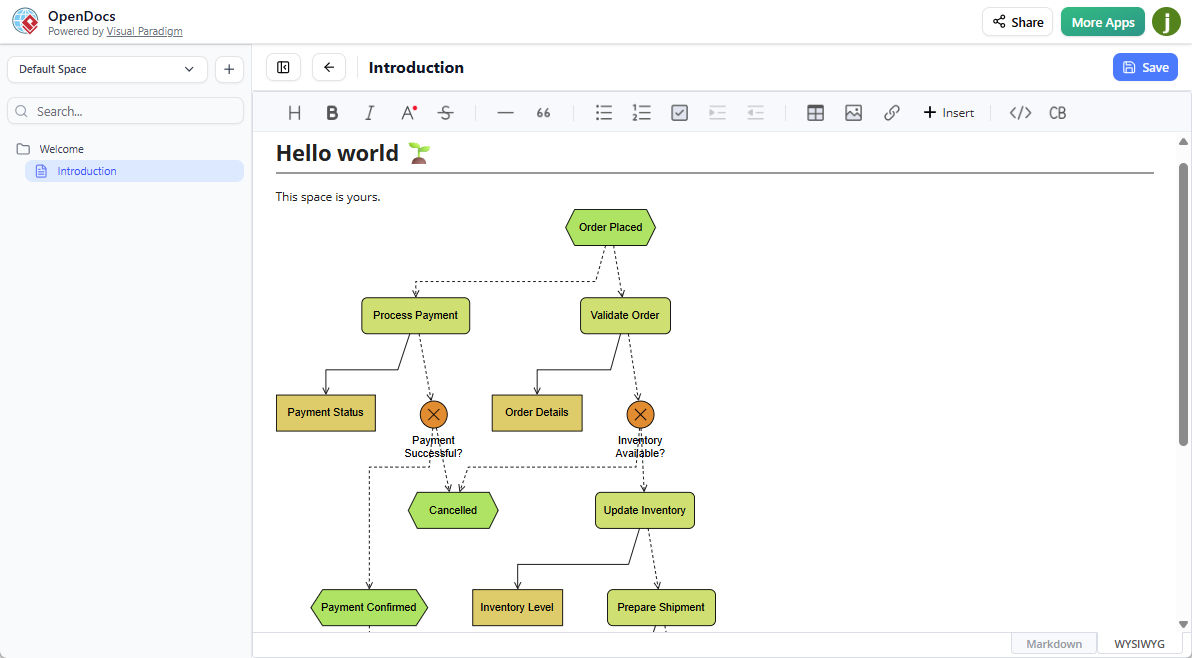
What is an EPC Diagram?
An Event-driven Process Chain (EPC) diagram is a widely-used flowchart-based modeling technique for visualizing business processes. It represents workflows as a chain of events (states or triggers, shown as hexagons) and functions (activities or tasks, shown as rounded rectangles), connected by logical operators (AND, OR, XOR). EPC diagrams are especially popular in business process modeling, enterprise resource planning (ERP) configuration, SAP implementations, and process optimization – helping analysts, managers, and teams clearly document and analyze complex workflows.
With this latest update, OpenDocs becomes a leading AI EPC diagram tool and AI EPC diagram generator, allowing you to create professional-grade EPC diagrams in seconds.
Introducing AI-Powered EPC Diagram Creation in OpenDocs
Starting today, you can now:
- Embed an EPC diagram component directly into any document page for seamless visual storytelling.
- Create a dedicated Component Page (a full page focused on your EPC diagram) for detailed focus and collaboration.
- Generate EPC diagrams with AI – simply describe your business process in natural language (e.g., “Order fulfillment process from customer request to delivery, including approval steps”), and our AI EPC diagram generator will produce a complete, editable Event-driven Process Chain diagram instantly.
This builds on OpenDocs’ existing AI-powered diagram generation for types like UML class diagrams, sequence diagrams, use case diagrams, ArchiMate, and more. The AI EPC diagram tool accelerates diagramming for business analysts, system architects, project managers, and anyone documenting processes – reducing manual effort while ensuring clarity and consistency.
Why Use the AI EPC Diagram Generator in OpenDocs?
- Boost Productivity: Turn text descriptions into polished EPC diagrams in moments, freeing you to focus on analysis and refinement.
- Enhance Clarity: Combine AI-generated EPC diagrams with rich text, embedded images, and collaborative Spaces for comprehensive documentation.
- Seamless Integration: Edit diagrams on the fly within documents, share entire Spaces publicly with a single link, and access everything from any browser – no installation required.
- Professional Results: Leverage industry-standard EPC notation in an AI-powered knowledge management tool trusted by professionals worldwide.
How to create a EPC Diagram with AI?
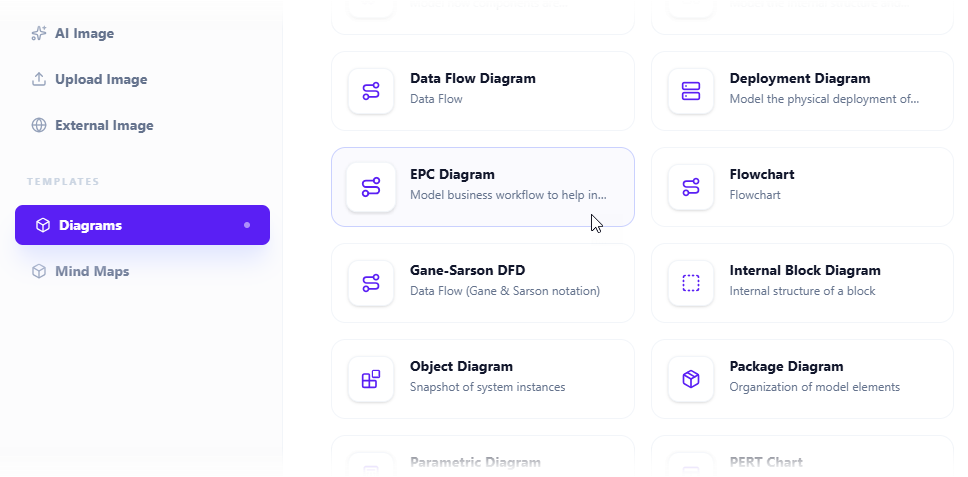
- Click on the Insert button in the top bar of your document editor.

- The Insert dialog box is opened. Select Diagrams tab on the left, and then EPC Diagram on the right.
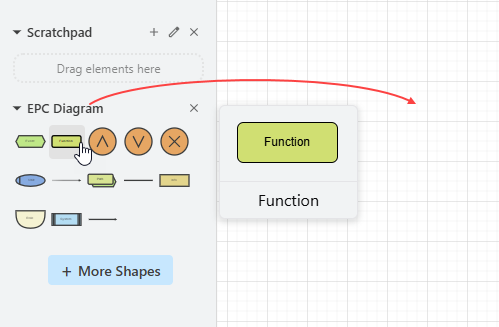
- This opens the diagram editor. You can draw the EPC diagram using the symbols on the palette (Just drag and drop a symbol onto the diagram canvas).
To generate a diagram with AI, click on Create with AI at the top right.

- Describe your problem in the input box. Click Generate.
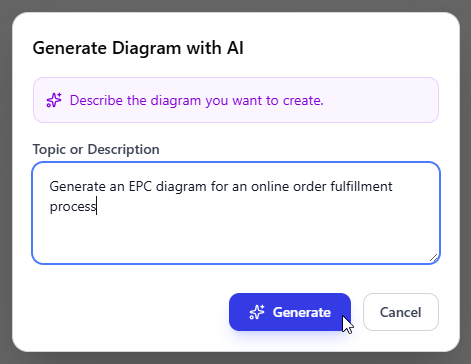
- AI will analyze your problem and generate a EPC diagram accordingly. Below is an example generated.
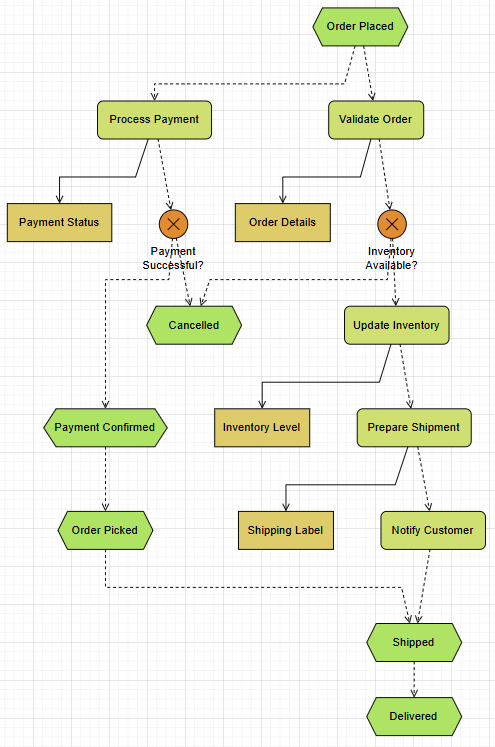
- You may touch up the EPC diagram by adjusting the layout, adding new shapes, etc.
- Click Save at the top right.
- Click Close to return to the document editor. The diagram is embedded into your document.
Get Started with AI EPC Diagrams Today
Ready to experience the power of our new AI EPC diagram tool? Head over to OpenDocs and start generating Event-driven Process Chain diagrams with AI right away.
Try OpenDocs Now – Launch the AI EPC Diagram Generator
For full details on embedding diagrams, creating component pages, and using AI generation in OpenDocs, visit our OpenDocs home page.
This update is available immediately to users with a Visual Paradigm Online (Combo Edition) or Visual Paradigm (Professional Edition) license. Stay tuned for more exciting enhancements to our AI-powered knowledge management tool!
What business process will you model first with the AI EPC diagram generator? Share your creations with us!
Related posts:
 Exciting Update: Yourdon & Coad DFD Now Available with AI Generation in OpenDocs
 Exciting Update: Gane-Sarson DFD Now Supported in OpenDocs – Powered by AI Diagram Generation
 Introducing UML Profile Diagram Support in OpenDocs: Unlock Advanced AI Profile Diagram Generation
 New Feature Alert: Send Diagrams from Visual Paradigm AI Chatbot Directly to OpenDocs!