


Update (August 4, 2026): This release now supports printing AI diagramming chat sessions directly to paper or PDF, in addition to Markdown export.
We are excited to announce a major enhancement to our flagship AI Diagramming Chatbot. You can now export your entire conversation history directly into structured Markdown files. This new feature allows you to preserve the full journey of your project ideation, retain text explanations alongside code-based diagrams, and seamlessly integrate your workflow with external AI large language models (LLMs).
Whether you rely on an AI diagram generator for software engineering, enterprise architecture, or business analysis, this update gives you complete ownership over your generative prompts, iterative history, and visual outputs.
Why Markdown Export Matters
Diagramming is rarely a one-step process. When using a professional AI diagram generation tool, the final visual model is often the result of an incremental dialogue—starting from an initial problem statement, progressing through real-time feedback, and refining specific sub-components. Along the way, the chatbot provides context, detailed component descriptions, and architectural rationales.
Previously, capturing this full context required manual copying or relying entirely on saved cloud sessions. With the new Markdown export feature, your entire conversation journey—from the very first prompt to the final diagram script—can be downloaded and archived instantly.
Key Benefits of Exporting to Markdown
- Complete Context Preservation: Capture not just the visual diagrams, but the exact chain of thought, prompt iterations, and text explanations provided by the AI.
- Portability & Offline Access: Store your Markdown files locally or in your preferred documentation repository to review your design discussions on any device, anytime.
- AI LLM Interoperability: Use the exported Markdown file as a structured prompt input for external AI tools like ChatGPT, Claude, or custom LLM pipelines to run further analysis, extract specifications, or generate code.
- Diagram-as-Code Native: All generated visuals are exported in native diagram-as-code formats—including PlantUML, Mermaid, Graphviz, and MarkMap—making them ready for version control in Git or direct rendering in Markdown-compatible editors.
How to Export Your Chat Session
Exporting your conversation is fast and effortless within the chatbot interface:
- Open your current chat session in the AI Diagramming Chatbot app.
- Click the … (More Options) button located in the top-right corner of the interface.
- Select Export from the drop-down menu.
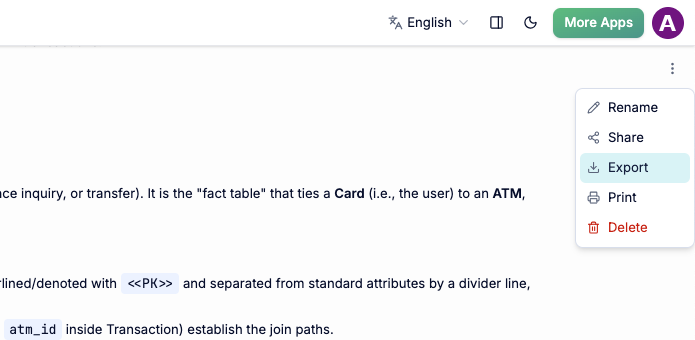
- A
.mdMarkdown file will be generated instantly for download, containing the full text transcript alongside properly formatted diagram-as-code blocks.
How to Print Your Chat Session
If you need a physical hard copy or want to quickly save your chat as a PDF, you can also print your conversation directly from the chatbot interface:
- Open your current chat session in the AI Diagramming Chatbot app.
- Click the … (More Options) button located in the top-right corner of the interface.
- Select Print from the drop-down menu.
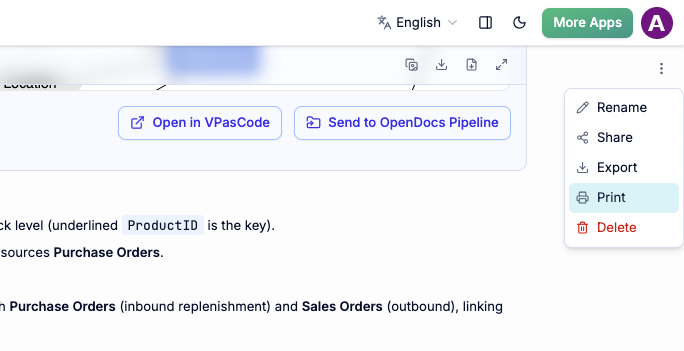
This will automatically open your browser’s print dialog, allowing you to print the full transcript and diagrams directly to a connected printer or save it locally as a PDF file.
Empowering Your Diagram-Driven Workflows
The Visual Paradigm AI Ecosystem is designed for high-precision modeling across technical and business domains. Powered by domain-trained models, our AI diagram generator delivers near-zero error rates compared to generic text models. It supports over 50 diagram types across multiple domains:
- UML & Systems Engineering: Class, Sequence, Use Case, Activity, State, SysML Block Definition, and Requirement diagrams.
- Enterprise Architecture & Cloud: ArchiMate, C4 Model (Context, Container, Component, Deployment), and System Architecture maps.
- Business & Process Mapping: BPMN, DFD, Flowcharts, WBS, Git Graphs, and PERT charts.
- Strategy & Analysis: SWOT, PESTLE, Ansoff Matrix, McKinsey 7S, and Eisenhower Matrices.
By bringing Markdown exports to our AI diagram generation tool, we are making it easier than ever to bridge initial conversational ideation with downstream documentation environments like Visual Paradigm OpenDocs, VPasCode, VP Online, and desktop project suites.
Try the New Export Feature Today
Ready to streamline your visual modeling and documentation workflows? Experience the updated conversational interface and export your first session today.