


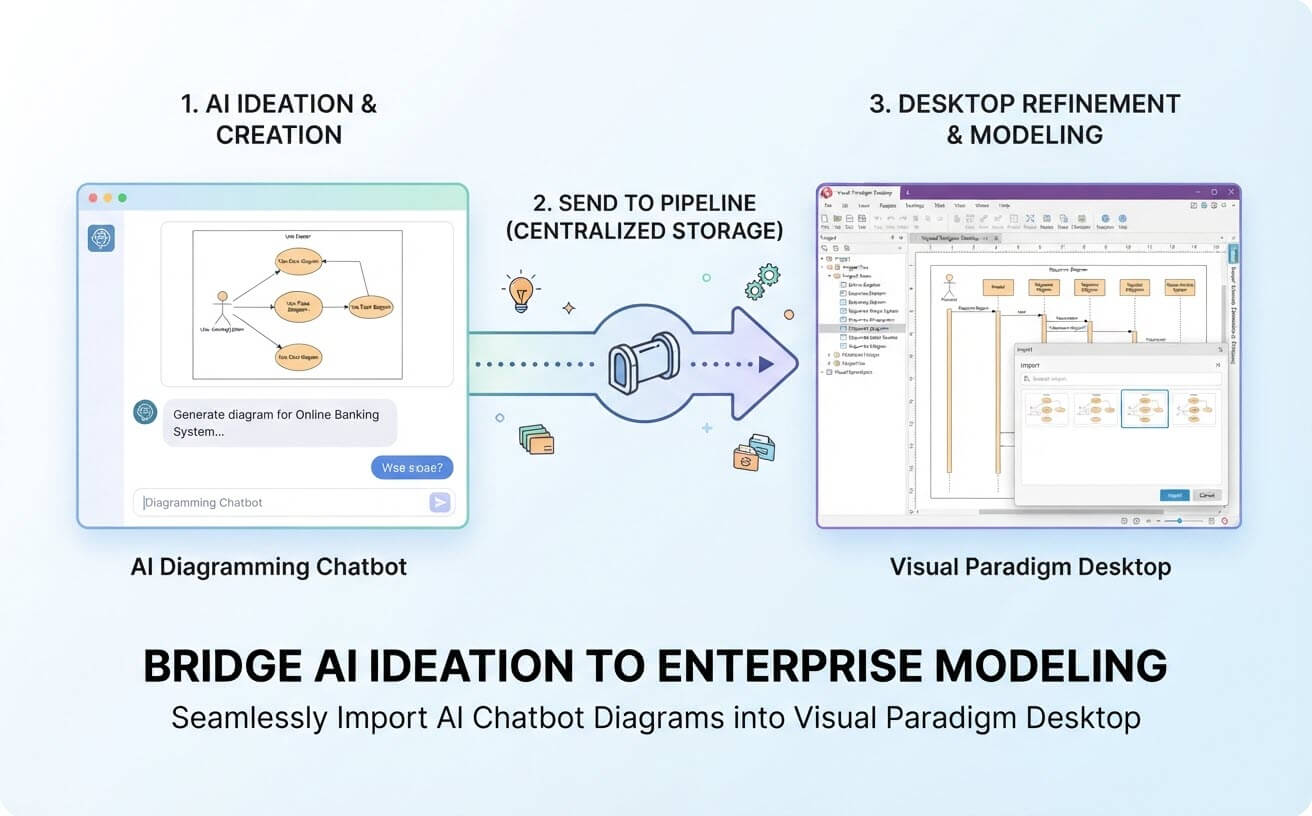
In the fast-paced world of system design, software engineering, and enterprise architecture, the journey from initial concept to detailed modeling is often fragmented. Brainstorming with AI tools is fast and flexible, but turning those raw insights into rigorous, maintainable models traditionally requires starting from scratch. Today, we are thrilled to announce a powerful workflow enhancement: the seamless integration that allows you to export diagrams from the Visual Paradigm AI Diagramming Chatbot directly into Visual Paradigm Desktop.
This update bridges the gap between creative AI-driven ideation and robust enterprise-grade model refinement, ensuring your workflow stays frictionless, collaborative, and deeply structured.
Why This Enhancement Matters: The Value Proposition
Many standalone AI diagram generators stop at a flat image or a temporary script, leaving users stranded when it comes to true system design and documentation. Visual Paradigm delivers a complete, end-to-end ecosystem. Here is why this new integration changes the game for architects, developers, and analysts:
- Frictionless Transition from Ideation to Modeling: Move effortlessly from quick AI brainstorming sessions into professional, long-term engineering models without losing context or re-drawing shapes manually.
- Centralized Pipeline Hub: Thanks to the Visual Paradigm Pipeline, your generated diagrams live in a flexible, central space. You are never rushed to choose a destination; collect, curate, and review your diagrams at your own pace before bringing them into your desktop project.
- Enterprise-Grade Refinement: Once inside Visual Paradigm Desktop, your diagrams become living models. You can detail element specifications, write comprehensive reports, leverage sub-diagrams and model references, and maintain strict traceability across your entire project.
- Team Collaboration & Traceability: Backed by Visual Paradigm Desktop’s legendary reputation for visual modeling and team collaboration tools, your AI-assisted designs instantly gain multi-user support and enterprise governance.
Practical Use Case: Progressive System Design from Chat to Sequence Diagram
To truly understand the power of this integration, let’s look at a practical, real-world scenario: designing an online banking application through progressive ideation and transitioning it smoothly into a desktop software architecture model.
- AI Chatbot Prompting: Open the Visual Paradigm AI Diagramming Chatbot and prompt the AI: “Generate a Use Case diagram for an ATM System.” Review the resulting visual output, ensure it fits your scope, and click “Send to Pipeline” directly from the popup menu below the diagram viewer.
- Conversational Context Expansion: Stay in the same chat session to maintain full context. Ask the AI: “Now derive a detailed Sequence Diagram for the ‘Withdraw Cash’ use case.” Once the sequence diagram is generated and optimized to your liking, send this second diagram to the Pipeline as well, taking full advantage of a non-linear, stress-free collection process.
- Desktop Refinement & Traceability: Open Visual Paradigm Desktop, access the Pipeline window via the project toolbar under Import > Visual Paradigm Pipeline, and import both diagrams simultaneously. From there, establish deep structural governance by linking the Sequence Diagram directly beneath the “Fund Transfer” use case shape as a nested sub-diagram, securing complete traceability from high-level functional requirements down to technical message flows.
How It Works: Connecting AI Chatbot to Desktop via the Pipeline
The secret behind this smooth workflow is the Visual Paradigm Pipeline—a centralized hub engineered to connect the diverse apps and tools within our AI-powered ecosystem. Instead of a rigid, forced export, the Pipeline acts as your intelligent staging area.
Whether you are designing complex architecture using UML, SysML, ArchiMate, or C4 models, the operational process is straightforward and intuitive:
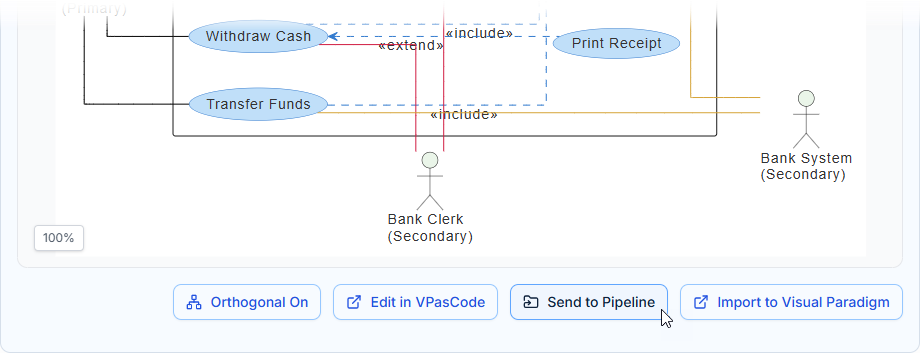
- Send to Pipeline from AI Chatbot: While interacting with the AI chat interface, continue refining your diagrams until you create exactly what you need. Click “Send to Pipeline” from the popup menu. You can keep generating and collecting multiple diagrams without immediate pressure to export.
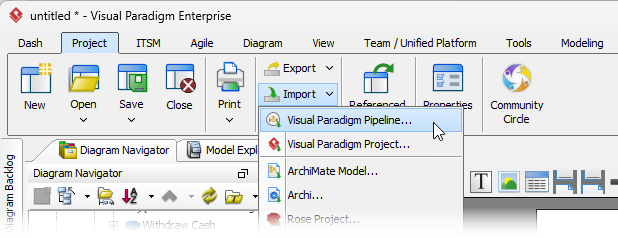
- Open the Pipeline in Desktop: Open Visual Paradigm Desktop. Navigate to the project toolbar and select Import > Visual Paradigm Pipeline to launch the import window.
- Select and Filter Your Diagrams: Choose the exact diagrams you sent over from your chat sessions. If you have collected a large batch, click the tiny Filter button on the right to narrow down your selection by specific diagram types.
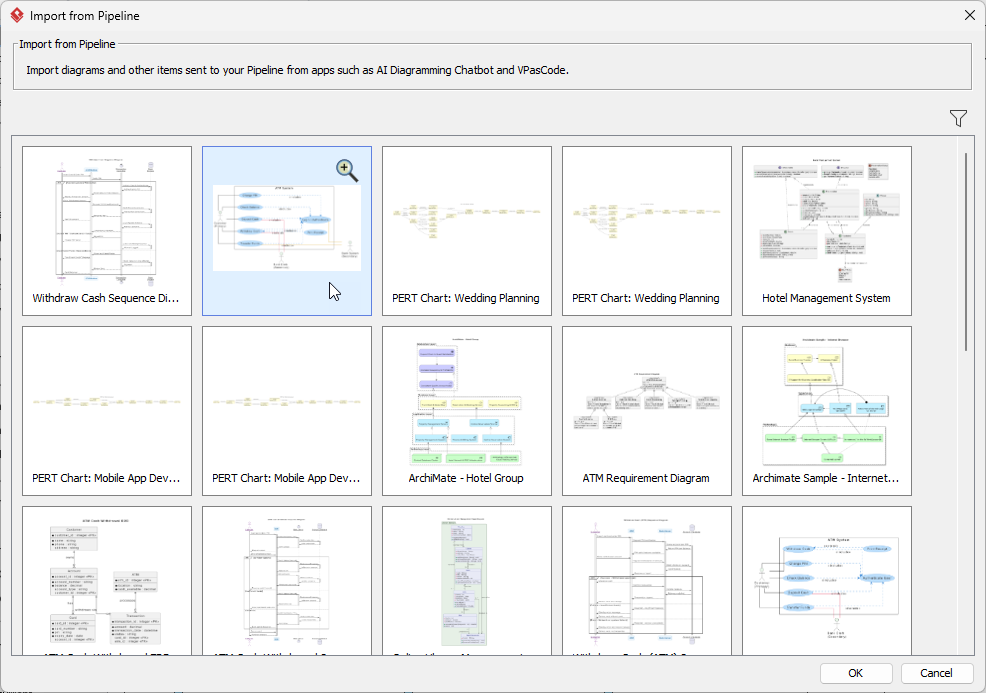
- Confirm and Model: Click OK to instantly instantiate a brand new, fully editable diagram inside Visual Paradigm Desktop!
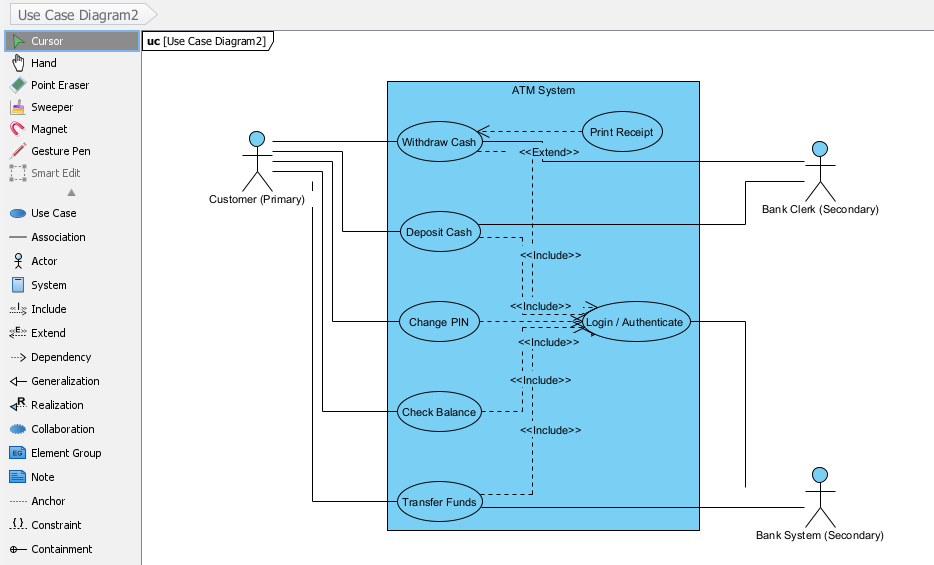
Unleash Full Modeling Capabilities After Importing
Once your AI-generated diagram is inside Visual Paradigm Desktop, a universe of advanced engineering features opens up:
- Utilize the intuitive Resource-Centric Interface to rapidly create, edit, or delete shapes.
- Build sub-diagrams and referenced diagrams to keep complex systems modular and clean.
- Detail element specifications to build deep metadata and data dictionaries.
- Generate automated documentation and technical reports for stakeholders.
- Collaborate seamlessly with teammates using enterprise-grade Team Collaboration features.
Supported Diagram Types for Desktop Import
The import mechanism supports a vast array of industry-standard modeling frameworks natively recognized by Visual Paradigm Desktop, including:
- UML: Class, Sequence, Component, Activity, Object, Use Case, Deployment, State, Package, Composite Structure, Timing
- SysML: Requirement, Block Definition, Internal Block
- Enterprise Architecture: ArchiMate and C4 Models (System Context, Container, Component, Deployment)
- Structures & Flows: WBS, Markmap (imported as Mindmap), PERT Chart, Org Chart, Chen ERD, Standard ERD, and Flowcharts
Get Started Today
Ready to experience the ultimate fusion of artificial intelligence and professional visual modeling? Start brainstorming smarter and building stronger architectures right now.
Try the AI Diagramming Chatbot now or explore the Visual Paradigm AI Ecosystem Overview to learn more about how our tools work together to elevate your productivity.
To learn more about this feature, please visit:
https://www.visual-paradigm.com/features/export-diagrams-from-ai-chatbot-to-vp-desktop/