
At Visual Paradigm, we are committed to refining the intersection of artificial intelligence and professional modeling. While AI ArchiMate diagram generation has been a staple of our toolkit, we have just rolled out a significant enhancement to the underlying engine in Visual Paradigm Desktop. This update focuses specifically on the quality, comprehensiveness, and relevance of the generated results based on your input prompts.
The core of this improvement ensures that when you use our AI ArchiMate generator, the resulting models more accurately reflect the complex relationships and architectural layers described in your requirements. Whether you are utilizing the recently added ArchiMate 4 standard or the classic 3.1 specification, you will notice a smarter distribution of elements and a more intuitive structural flow.
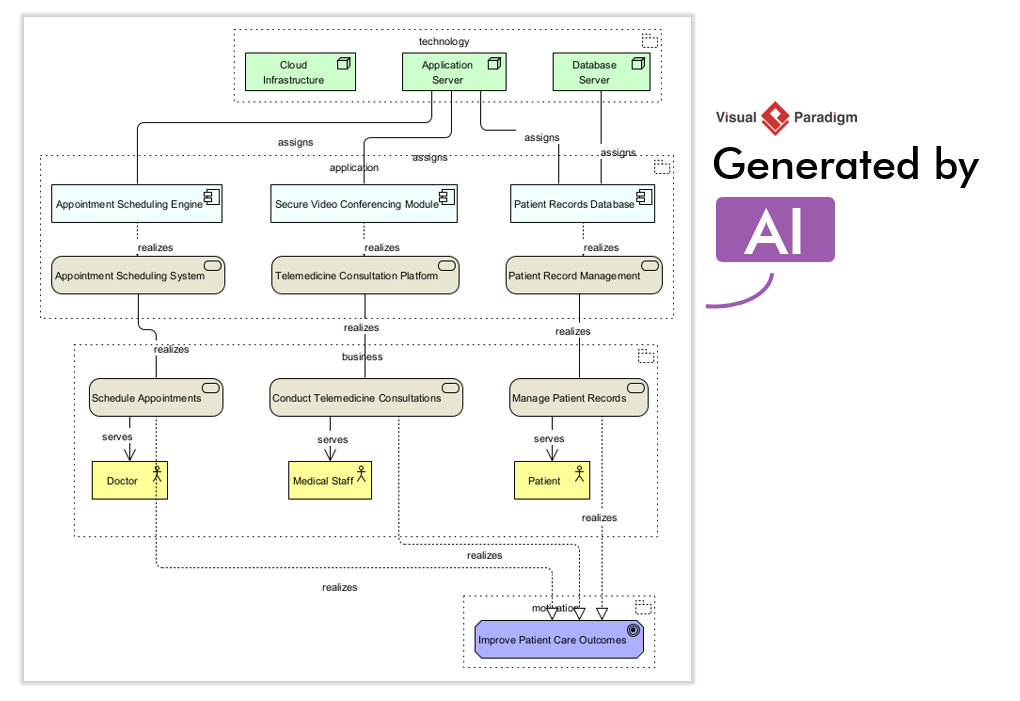
What is ArchiMate Diagram Generation in Visual Paradigm?
For those new to the ecosystem, ArchiMate Diagram Generation is a feature within Visual Paradigm Desktop that translates natural language descriptions into formal architectural models. It acts as an AI ArchiMate tool that bridges the gap between high-level conceptual ideas and standardized notation. By analyzing your text, the engine identifies business actors, application components, and infrastructure nodes, automatically arranging them into a compliant ArchiMate view.
Why the Enhanced Quality Matters
The latest refinements to the AI ArchiMate diagram tool focus on three specific areas of improvement:
- Contextual Relevance: The AI now better understands the nuances of your prompt, ensuring that the generated elements are directly tied to your specific business or technical case.
- Comprehensive Element Mapping: Expect a richer set of relationships. The engine is now more adept at identifying implicit connections like “assignment” and “serving” within your descriptions.
- Structural Clarity: We have improved how the AI ArchiMate tool handles complex multi-layered prompts, resulting in diagrams that require less manual reorganization and are ready for immediate analysis.
How to Use the Enhanced AI ArchiMate Generator
You can experience these quality improvements immediately within Visual Paradigm Desktop. To generate a more comprehensive model, follow these steps:
- In Visual Paradigm Desktop, select Tools > AI Diagram Generation to open the dialog box.
- Select the diagram type: Choose ArchiMate Diagram or the recently released ArchiMate 4 Diagram.
- Optionally select a viewpoint to guide the AI’s focus, or leave it as Unspecified for a broad overview.
- Enter your prompt. For example: “Generate an ArchiMate Diagram for a cloud-based e-commerce platform handling order processing, inventory management, and payment integration.”
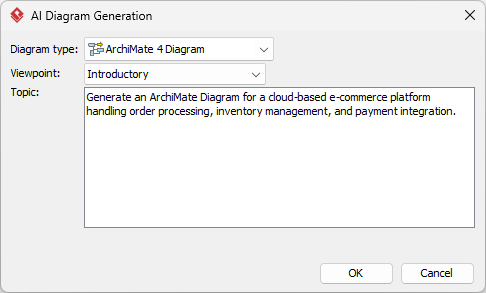
- Click OK. The engine will process your request and generate a new, highly relevant ArchiMate diagram directly in your project.
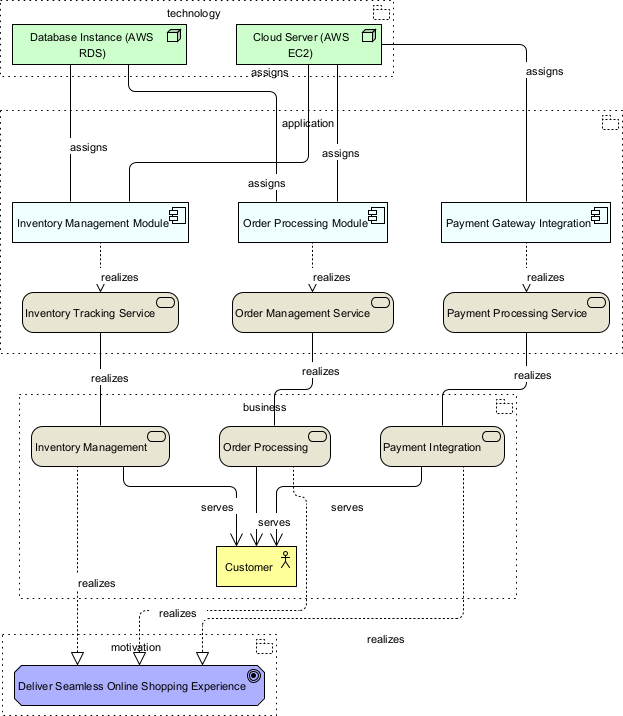
Explore the full potential of these enhancements on our AI Diagram Generation landing page.
Ready to build better models faster?
The AI Ecosystem: Four Pillars of Support
Our enhanced diagramming capabilities are part of a broader commitment to AI integration. Visual Paradigm provides a multi-faceted AI coverage designed to support every phase of your digital transformation journey:
- Visual Paradigm Desktop AI Diagram Generation: Our core engine for creating ArchiMate, UML, and more, now with improved logic and relevance.
- Visual Paradigm AI Chatbot: An interactive assistant to help you navigate modeling standards and software features in real-time.
- Visual Paradigm OpenDocs: A powerful knowledge management platform that leverages AI to help you organize and query your project documentation.
- AI Apps: A suite of nimble, web-based tools for rapid task execution.
By focusing on the quality of output in Visual Paradigm Desktop, we ensure that your architectural repository remains a source of truth that is both professional and precise.
Learn more about Visual Paradigm’s AI Ecosystem: https://guides.visual-paradigm.com/best-ai-diagram-generator-visual-paradigm-ecosystem/