


Good news for database architects, software engineers, and data modelers! We are thrilled to announce a major enhancement to the Visual Paradigm AI Diagramming Chatbot. Our conversational AI now officially supports DBML (Database Markup Language) generation, making schema creation, visualization, and editing faster and more intuitive than ever before.
Whether you are designing a complex enterprise system from scratch or rapid-prototyping a relational database for a new application, our newly upgraded AI DBML generator turns your natural language descriptions into clean, syntactically precise DBML code in seconds.
Try the AI DBML Generator Tool Now
Why DBML & AI Diagramming Matter for Modern Developers
Designing database schemas manually often involves tedious syntax wrangling, painstaking foreign key mappings, and continuous adjustments as project requirements evolve. DBML (Database Markup Language) has quickly become an industry-standard open-text format because it is human-readable, lightweight, and engineered specifically for defining relational database structures.
By bringing an AI DBML generation tool into our flagship AI Diagramming Chatbot, Visual Paradigm bridges the gap between conceptual software architecture and production-ready database definitions. Instead of manually writing tables, data types, primary keys, and references, you simply describe your domain logic in plain language. The AI does the heavy lifting, delivering syntactically complete DBML code designed to eliminate manual syntax errors and save hours of prep work.
How the AI DBML Generator Works
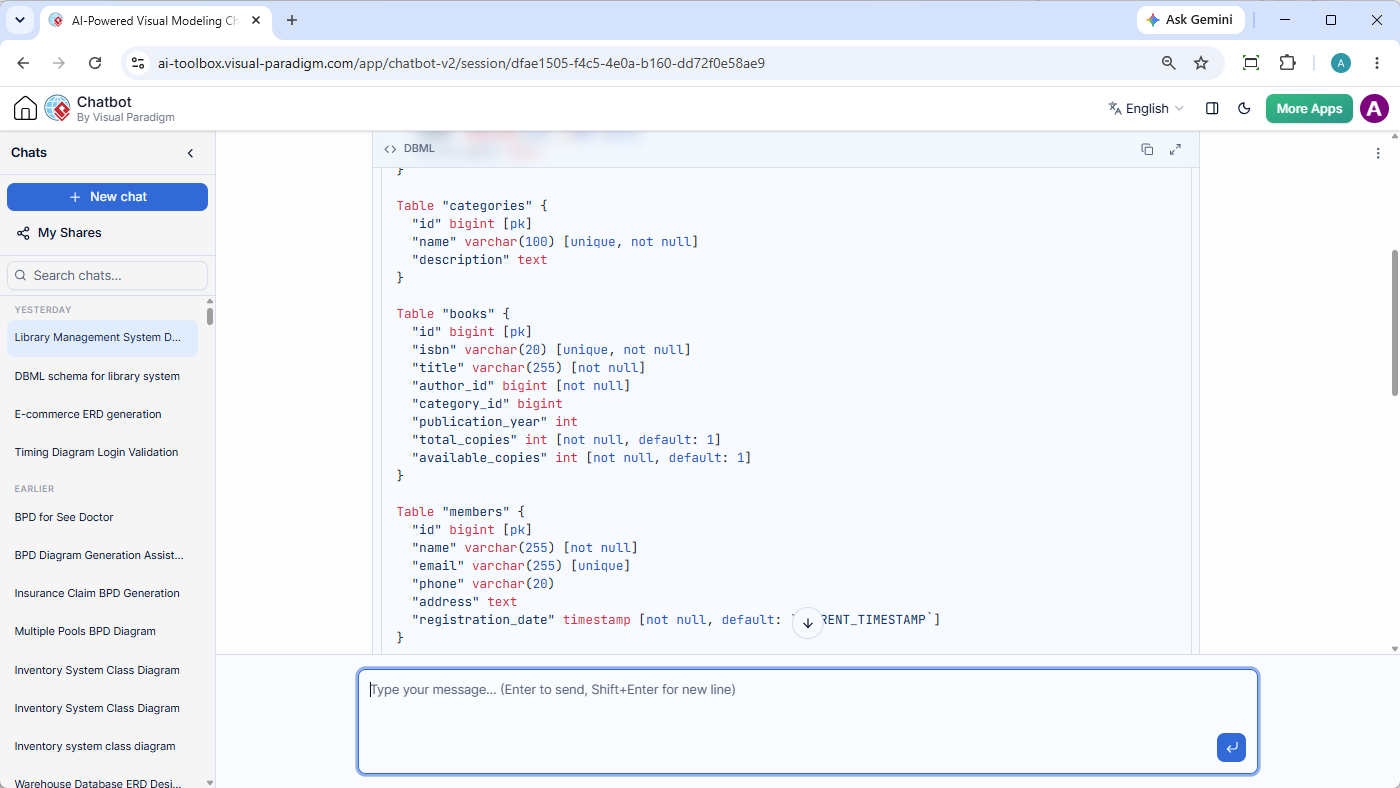
Using the upgraded chatbot is as straightforward as having a conversation. To generate DBML code for your domain model, simply enter a descriptive prompt into the chat window.
Example Prompt:
“Generate DBML for a library management system..”
Generated DBML Code Sample:
Based on the prompt above, the chatbot analyzes the entities, attributes, and relationships required for a library domain and outputs structured DBML instantly:
Table "authors" {
  "id" bigint [pk]
  "name" varchar(255) [not null]
  "birth_date" date
}

Table "categories" {
  "id" bigint [pk]
  "name" varchar(100) [unique, not null]
  "description" text
}

Table "books" {
  "id" bigint [pk]
  "isbn" varchar(20) [unique, not null]
  "title" varchar(255) [not null]
  "author_id" bigint [not null]
  "category_id" bigint
  "publication_year" int
  "total_copies" int [not null, default: 1]
  "available_copies" int [not null, default: 1]
}

Table "members" {
  "id" bigint [pk]
  "name" varchar(255) [not null]
  "email" varchar(255) [unique]
  "phone" varchar(20)
  "address" text
  "registration_date" timestamp [not null, default: `CURRENT_TIMESTAMP`]
}

Table "borrowings" {
  "id" bigint [pk]
  "book_id" bigint [not null]
  "member_id" bigint [not null]
  "borrow_date" timestamp [not null, default: `CURRENT_TIMESTAMP`]
  "due_date" date [not null]
  "return_date" date
  "status" varchar(20) [not null, default: 'borrowed']
}

Table "fines" {
  "id" bigint [pk]
  "borrowing_id" bigint [not null]
  "amount" decimal(10,2) [not null]
  "paid" boolean [not null, default: false]
  "issue_date" date [not null]
}

Ref:"authors"."id" < "books"."author_id"
Ref:"categories"."id" < "books"."category_id"
Ref:"books"."id" < "borrowings"."book_id"
Ref:"members"."id" < "borrowings"."member_id"
Ref:"borrowings"."id" < "fines"."borrowing_id"Beyond Code Generation: Explain, Export, and Refine
The Visual Paradigm AI Diagramming Chatbot goes beyond basic text output. It provides a complete end-to-end workflow to analyze, share, and edit your schema outputs:
- AI Diagram Explanation: Need to present your design to team members or stakeholders? You can ask the AI chatbot to explain the generated DBML schema, breaking down table relationships, constraints, and structural logic in simple terms.
- Flexible Export Options: Export your visualized database diagrams as crisp high-resolution PNG images or scalable SVG graphics for inclusion in documentation, presentations, or technical spec sheets.
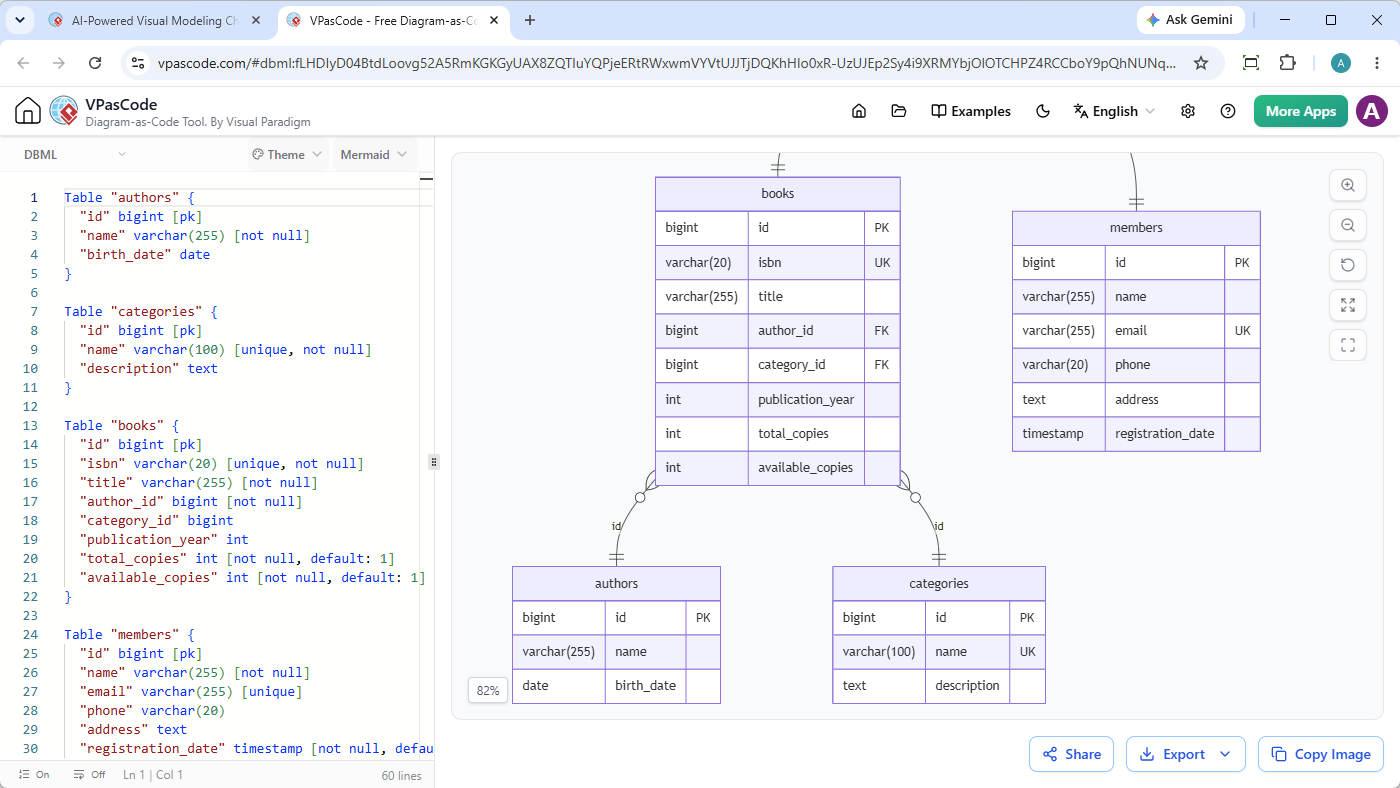
- Instantaneous Fine-Tuning with VPasCode: Need to make a precise code adjustment, adjust a data type, or add a custom foreign key? Simply click “Open VPasCode”. This launches your generated script directly in Visual Paradigm’s VPasCode (Diagram-as-Code editor), allowing you to modify your DBML source code and see your visual schema update instantaneously in real-time.
Unlocking the Power of the Visual Paradigm AI Ecosystem
This DBML support update seamlessly connects with the broader Visual Paradigm AI Ecosystem. Designed for professional workflows, our platform empowers teams with zero-friction collaboration tools:
- High-Precision Domain AI: Powered by specialized training models to yield syntactically precise diagrams and text outputs with near-zero error rates.
- Interactive Artifacts Pane: Track every DBML snippet, ERD, or report generated during your session using a unified dynamic table of contents.
- Cross-Platform Integration: Move seamlessly between our web-based tools, and OpenDocs knowledge management hub.
Get Started with the AI DBML Generator Tool Today
Whether you need a quick conceptual database model or a comprehensive starting script for your production environment, our AI DBML generation tool is ready to help you build faster and smarter.
Experience the future of diagramming as code and AI schema generation today!
Launch the Visual Paradigm AI Diagramming Chatbot & Generate DBML Now
Related posts:
 Enhanced AI Activity Diagram Generation: Major Updates to Visual Paradigm AI Chatbot
 New Feature: Import AI-Generated Activity Diagrams Directly into Visual Paradigm Desktop
 Streamline Root-Cause Analysis and Execution with the New Solution Selection Matrix
 Introducing the All-New AI BPMN Generator: From Conversational Ideation to Professional Process Modeling