
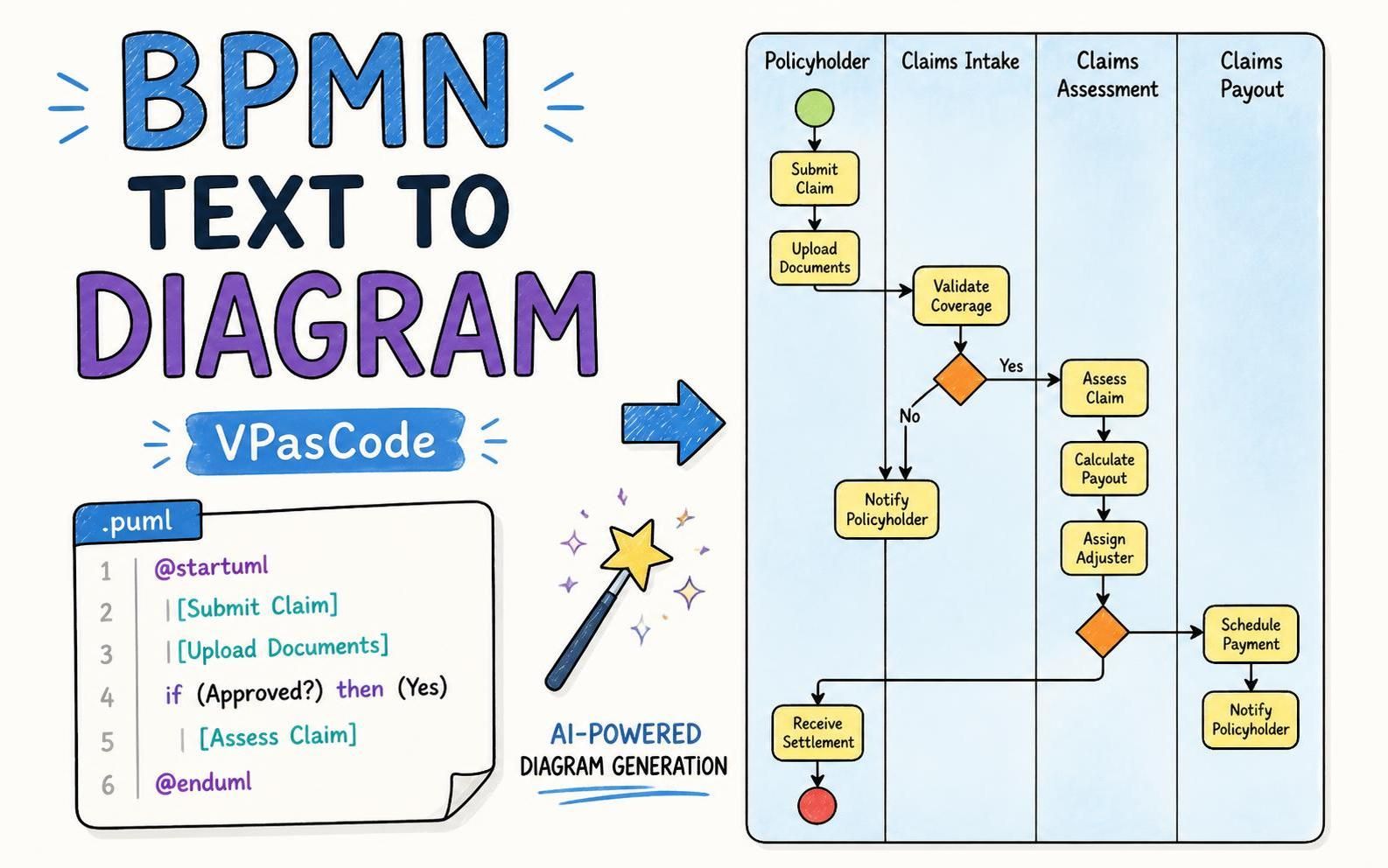
Visual Paradigm is pleased to announce a major enhancement to VPasCode: support for editing BPMN business process diagrams as text using a simple, human-friendly syntax based on PlantUML activity diagrams.With this new capability, VPasCode becomes a practical BPMN diagram as code editor for developers, business analysts, solution architects, and technical teams. You can write a BPMN process in text, see the diagram rendered in real time, use AI to generate a process from a natural-language description, and continue refining the result visually in Visual Paradigm Desktop.
Visual Paradigm is the first vendor to introduce a user-friendly diagram-as-code syntax specifically for BPMN. The new approach makes BPMN modeling more approachable for people who prefer working with text, source code, version control, and automated documentation.
Try the VPasCode editor and start creating BPMN diagrams as code.
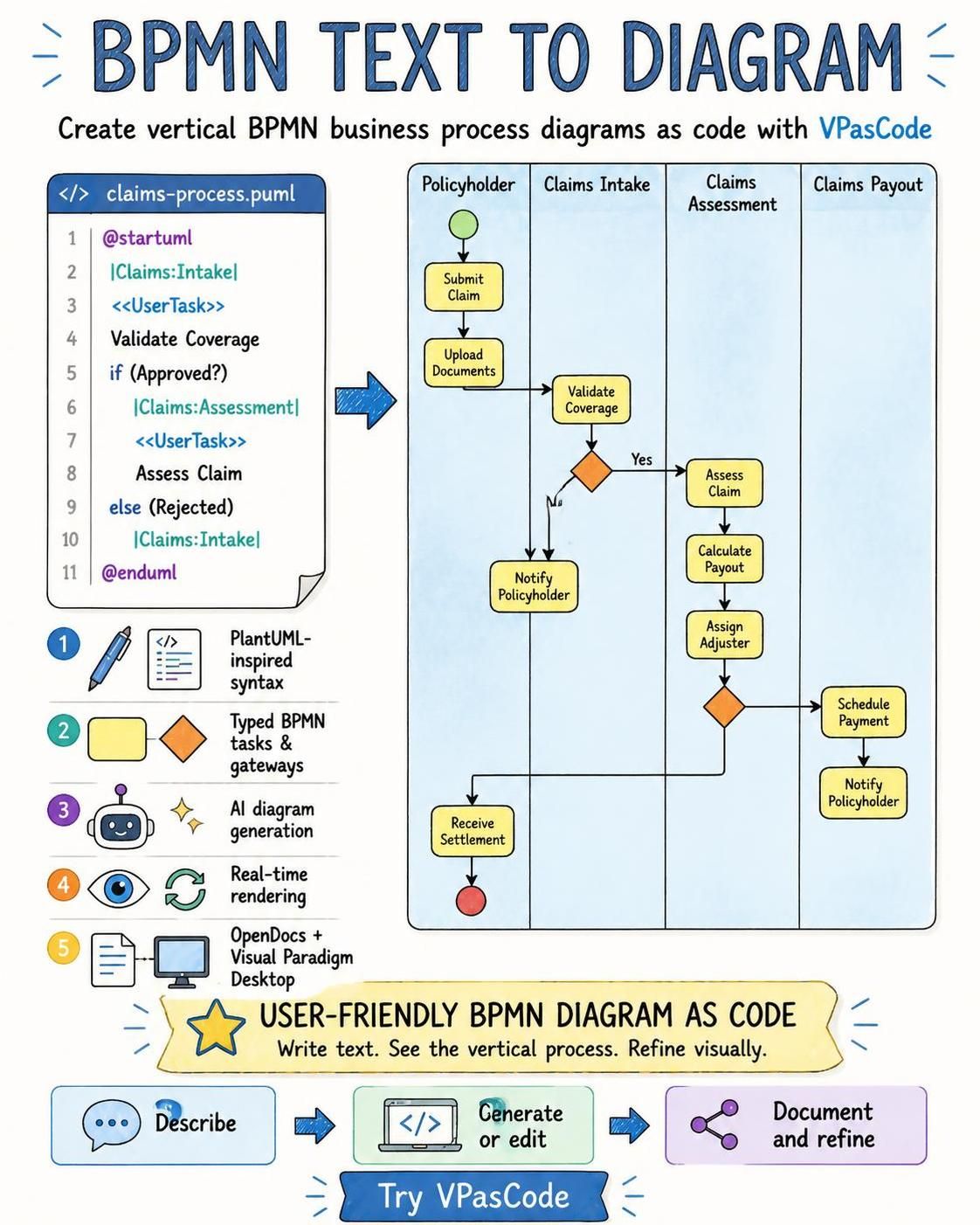
Why create BPMN diagrams as code?
BPMN is widely used to describe business processes, workflows, service orchestration, approvals, claims handling, order fulfillment, and many other operational scenarios. Traditionally, BPMN diagrams are created with a visual modeling tool by placing events, activities, gateways, and connectors on a canvas.
Visual modeling is valuable, but it is not always the fastest way to create or maintain a process diagram. A text-based approach can be especially useful when you need to:
- Draft a process quickly from a written description.
- Maintain diagrams alongside source code and technical documentation.
- Review process changes through text-based diffs.
- Reuse common process patterns and templates.
- Generate diagrams automatically as part of a documentation workflow.
- Collaborate with developers and technical teams who are comfortable with code.
- Use AI to turn a plain-language process description into a BPMN diagram.
However, existing diagram-as-code options have not provided a convenient, human-readable way to describe BPMN. BPMN 2.0 XML is useful for machine interchange and execution-oriented workflows, but it can be cumbersome for people to write and edit manually. On the other hand, popular diagram-as-code tools such as PlantUML and Mermaid have not traditionally provided native BPMN modeling syntax.
VPasCode addresses this gap with a lightweight BPMN syntax that builds on the familiar structure of PlantUML activity diagrams. The result is a BPMN PlantUML tool that lets you express business processes in readable text while rendering them as BPMN business process diagrams.
What is VPasCode?
VPasCode is a free online diagram-as-code platform from Visual Paradigm. It transforms text-based diagram definitions and structured data into visual diagrams through a convenient online editor and real-time renderer.
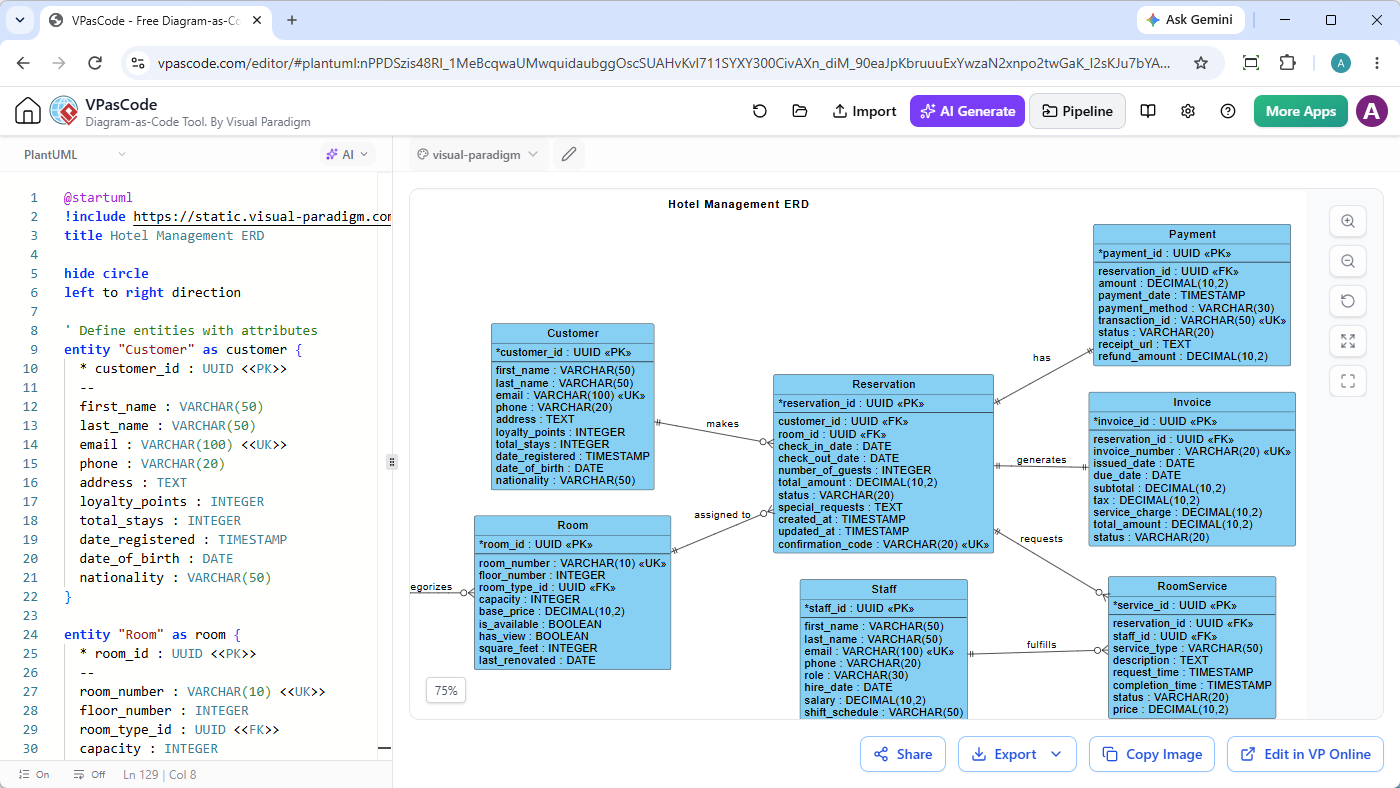
VPasCode supports a broad range of diagram and visualization formats, including PlantUML, Mermaid, Graphviz, D2, Markmap, ECharts, JSON, YAML, XML, CSV, database schema languages, and several programming languages. You can paste or write a diagram script in the editor, and VPasCode can detect the format and render the result automatically.
Its core editor features include:
- Automatic format detection.
- Real-time diagram rendering.
- Online text-based editing.
- Diagram sharing through URLs and QR codes.
- Export to SVG, PNG, and PDF.
- AI-assisted diagram generation and code modification.
- AI-assisted syntax error fixing.
- Natural-language translation of diagram labels.
- Integration with Visual Paradigm OpenDocs.
The BPMN enhancement extends this existing diagram-as-code workflow to business process modeling.
A human-friendly BPMN PlantUML syntax
The new BPMN syntax is based on PlantUML activity diagram syntax. This means that anyone familiar with PlantUML activities, decisions, partitions, and control flow can quickly understand the structure of a BPMN diagram.
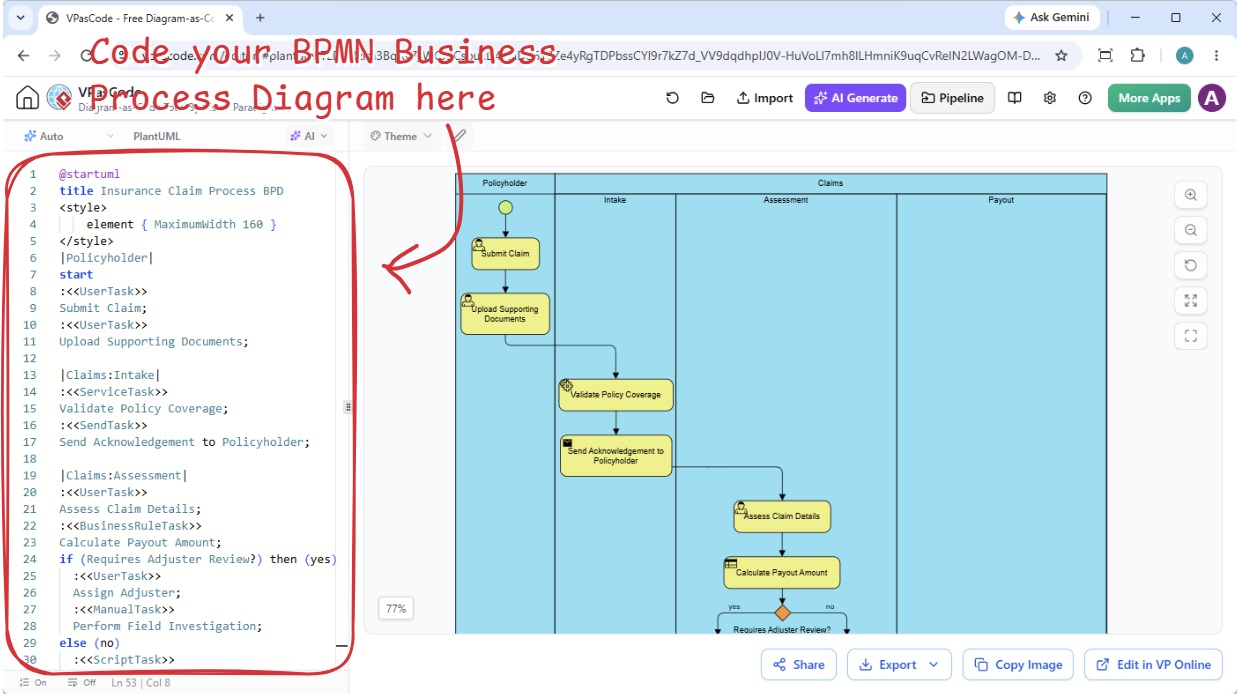
Instead of editing a large BPMN 2.0 XML document, you can describe a process using short, readable statements. VPasCode then renders the text as a BPMN business process diagram.
Here is an example of an insurance claim process:
@startuml
title Insurance Claim Process BPD
<style>
    element { MaximumWidth 160 }
</style>
|Policyholder|
start
:<<UserTask>>
Submit Claim;
:<<UserTask>>
Upload Supporting Documents;

|Claims:Intake|
:<<ServiceTask>>
Validate Policy Coverage;
:<<SendTask>>
Send Acknowledgement to Policyholder;

|Claims:Assessment|
:<<UserTask>>
Assess Claim Details;
:<<BusinessRuleTask>>
Calculate Payout Amount;
if (Requires Adjuster Review?) then (yes)
  :<<UserTask>>
  Assign Adjuster;
  :<<ManualTask>>
  Perform Field Investigation;
else (no)
  :<<ScriptTask>>
  Auto-Approve Claim;
endif
:<<UserTask>>
Approve Final Decision;

|Claims:Payout|
if (Claim Approved?) then (yes)
  :<<ServiceTask>>
  Schedule Payment;
  :<<ReceiveTask>>
  Receive Payment Confirmation;
else (no)
  :<<SendTask>>
  Notify Policyholder of Rejection;
endif
:<<SendTask>>
Send Settlement Notification;

|Policyholder|
:<<ReceiveTask>>
Receive Settlement;
stop
@endumlThe process starts with the policyholder submitting a claim and uploading supporting documents. The claims team validates the policy coverage, assesses the claim, decides whether an adjuster review is required, and either schedules payment or notifies the policyholder of a rejection.
Although the source is text, the rendered result is a BPMN-style business process diagram that communicates the workflow visually.
Define BPMN task types in text
In BPMN, activities can represent different kinds of work. A user task may require a person to complete an activity, while a service task may be performed by an automated service. VPasCode lets you identify the task type directly in the text using a simple type marker.
For example:
:<<UserTask>>
Submit Claim;
The first line identifies the BPMN activity as a UserTask. The next line provides the task name, Submit Claim.
The syntax supports the following BPMN task types:
UserTaskServiceTaskManualTaskScriptTaskBusinessRuleTaskSendTaskReceiveTask
This gives the process diagram more semantic meaning than a generic activity list. Readers can distinguish human work, automated services, manual activities, business-rule evaluation, message sending, and message reception directly from the rendered BPMN diagram.
Represent BPMN gateways with familiar activity diagram syntax
Business processes often contain decisions and alternative paths. In the VPasCode BPMN syntax, conditional branches can be written using PlantUML-style if and endif statements.
For example:
if (Requires Adjuster Review?) then (yes)
  :<<UserTask>>
  Assign Adjuster;
  :<<ManualTask>>
  Perform Field Investigation;
else (no)
  :<<ScriptTask>>
  Auto-Approve Claim;
endif
This describes an exclusive decision: if an adjuster review is required, the process follows the investigation path. Otherwise, the claim is automatically approved.
VPasCode supports the following gateway types:
- Exclusive gateway
- Parallel gateway
- Inclusive gateway
- Event-based gateway
- Complex gateway
Using text for gateways makes it easy to add, remove, or reorganize branches. You can also review process logic in a familiar top-to-bottom format before inspecting the visual rendering.
Model BPMN pools and lanes with parent-child names
Swimlanes help show who is responsible for each step in a business process. A process may include a pool for an organization, with lanes representing departments, teams, systems, or roles within that organization.
Because PlantUML activity diagrams do not natively provide nested pools and lanes, VPasCode represents parent-child swimlane relationships with a colon separator.
|Claims:Intake|In this example, Claims is the parent pool and Intake is the child lane. Similarly:
|Claims:Assessment|
|Claims:Payout|
This notation provides a compact way to describe organizational responsibility while preserving the familiar PlantUML partition syntax. It is particularly useful for processes involving multiple departments, teams, or functional areas.
Generate a BPMN diagram with AI
You do not have to write the entire BPMN script manually. VPasCode includes an AI diagram generation feature that can create a BPMN business process diagram from a plain-language prompt.
To generate a BPMN diagram:
- Open the VPasCode editor.
- Click AI Generate in the top bar.

- Enter a description of the process, such as A BPMN diagram for an insurance claim process.
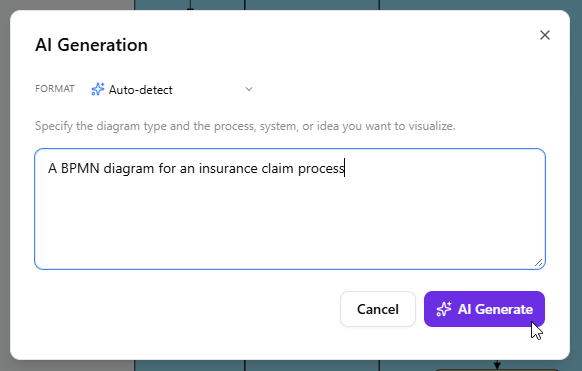
- Click the AI Generate button.
- Review the generated BPMN code and rendered diagram.
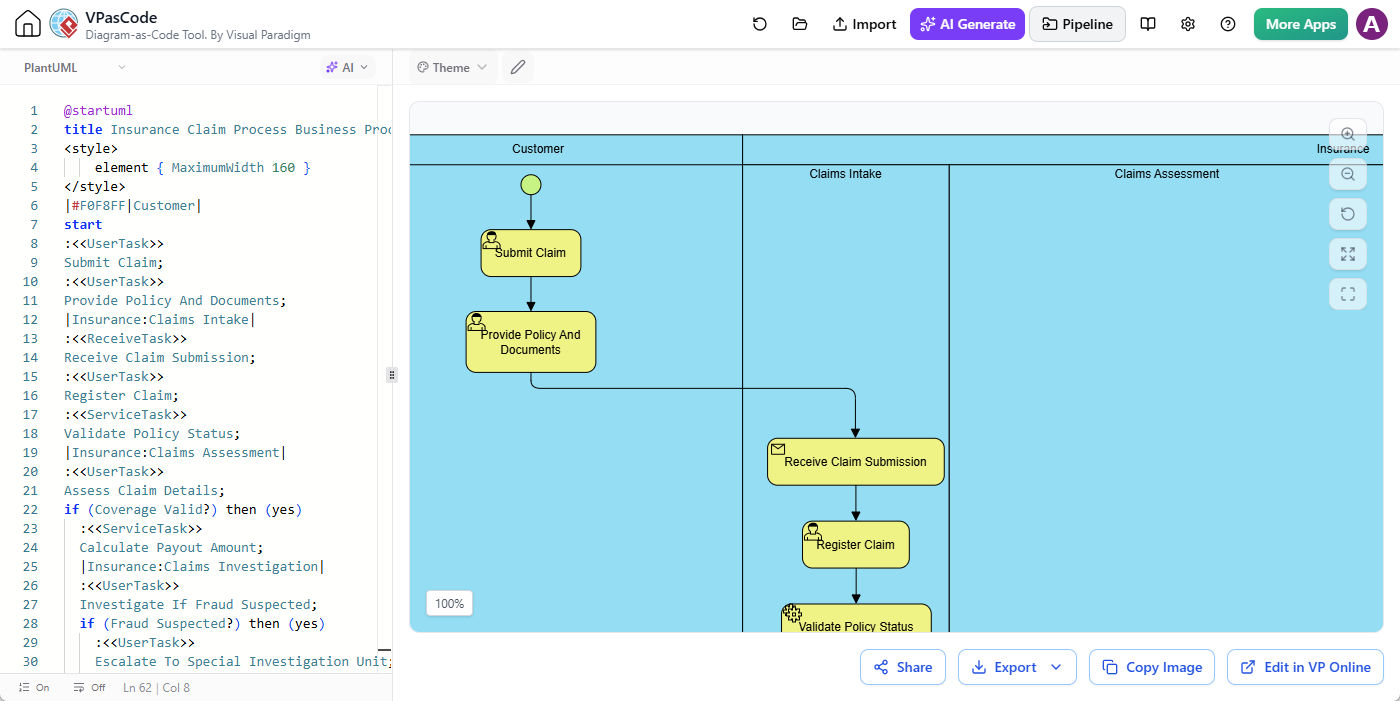
- Modify the text or ask AI to refine the process.
The AI-generated result can provide a useful starting point for workshops, requirements analysis, system design, technical documentation, and process improvement initiatives. You can then inspect the source, adjust task types, rename swimlanes, add decision branches, and refine the process structure.
VPasCode also provides AI-assisted code modification and error fixing. If you need to add an approval step, introduce a parallel branch, simplify a process, or repair a syntax issue, you can use natural-language instructions and review the proposed changes before applying them.
Why the new BPMN diagram-as-code workflow is useful
Faster process drafting
Text is often faster than dragging and positioning shapes during the early stages of process analysis. You can begin with the sequence of work, decisions, and responsibilities, then let VPasCode render the visual result automatically.
Readable source code
The syntax is designed to be understandable by humans. Task types, task names, branches, and swimlanes appear directly in the source, making the process easier to read and review.
Easier maintenance
Business processes change frequently. A text-based BPMN diagram can be updated by editing a task name, inserting a new activity, changing a condition, or adding a lane. You do not need to manually rearrange every element on a canvas after each change.
Better collaboration between business and technical teams
Business analysts can describe process logic in a structured format, while developers and architects can work with a syntax that feels familiar to them. The rendered diagram provides a visual communication layer for stakeholders who prefer diagrams over code.
Version-control-friendly diagrams
Because the diagram is represented as text, it can be stored with project files and documentation. Teams can compare revisions, review changes, and track the evolution of a process more easily than with a binary diagram file.
More efficient documentation
Text-based diagrams can become part of a repeatable documentation workflow. A process definition can be updated once and rendered into a diagram whenever documentation is regenerated.
Natural-language-to-BPMN generation
The AI feature helps turn an initial process description into a structured BPMN diagram. This can reduce the time required to create a first draft and help teams explore alternative process designs.
From BPMN text to diagram and back to visual refinement
VPasCode is designed to combine the speed of text-based modeling with the clarity and precision of visual modeling. You can begin with BPMN text to diagram generation in VPasCode, review the rendered BPD, and then continue refining the model using Visual Paradigm’s broader modeling environment.
When a process is ready for more intensive visual modeling, you can send the diagram to Visual Paradigm Desktop. This allows you to continue working with the process in a full desktop modeling environment and perform further visual refinement.
You can also send your diagram to OpenDocs when you are ready to create or expand technical documentation. This makes it possible to move from a lightweight BPMN diagram-as-code workflow to a more complete documentation process without recreating the diagram manually.
The workflow can therefore support different stages of a project:
- Describe the process in natural language.
- Generate an initial BPMN diagram with AI.
- Edit the BPMN source in VPasCode.
- Review the live rendered diagram.
- Share or export the diagram.
- Send it to OpenDocs for documentation.
- Send it to Visual Paradigm Desktop for intensive visual model refinement.
A BPMN PlantUML tool for modern modeling workflows
VPasCode is not intended to replace every form of visual BPMN modeling. Instead, it adds a complementary way to create and maintain business process diagrams. The new BPMN support is especially useful for teams that already use PlantUML-style text, developer-oriented workflows, AI-assisted modeling, or documentation generated from source files.
As a BPMN PlantUML tool, VPasCode combines several advantages:
- The concise structure of PlantUML activity diagrams.
- The semantic task and gateway types of BPMN.
- Readable text-based source code.
- Real-time BPMN rendering.
- AI-assisted BPMN generation and modification.
- Integration with documentation and desktop modeling tools.
This makes VPasCode a useful choice for anyone looking for a BPMN diagram as code editor or a practical way to create a BPD PlantUML diagram.
Who can benefit from VPasCode BPMN support?
The new feature can help a wide range of users:
- Business analysts: Quickly draft and communicate business processes.
- Developers: Keep process diagrams close to source code and technical documentation.
- Solution architects: Describe service interactions, responsibilities, and decision logic.
- Process owners: Document operational workflows in a structured and maintainable format.
- Technical writers: Generate diagrams for system and process documentation.
- Consultants: Create reusable process templates and workshop diagrams.
- Students and learners: Experiment with BPMN concepts without needing to manually position every shape.
Start creating BPMN diagrams as code
With its new BPMN support, VPasCode provides a simpler way to move from process ideas to visual business process diagrams. You can write BPMN using a clear PlantUML-inspired syntax, render the diagram in real time, generate a first draft with AI, and continue refining the result in Visual Paradigm Desktop or OpenDocs.
Visual Paradigm is proud to introduce the first user-friendly diagram-as-code syntax for BPMN. Whether you are documenting an insurance claim process, modeling an approval workflow, describing service orchestration, or exploring a new operating procedure, VPasCode makes BPMN text-based modeling accessible and practical.
Open VPasCode and create your first BPMN diagram as code.
Related posts:
 Meet the All-New AI Diagram Chatbot V2: The Next Generation of Intelligent Visual Modeling
 Enhance Your Workflow: Generate and Visualize Structured JSON with Visual Paradigm AI Chatbot
 Streamline Project Planning with the New AI Work Breakdown Structure Generator by Visual Paradigm
 New Diagram Support: UML Communication Diagrams in VPasCode