


Transforming complex ideas into clear, compelling visuals is a cornerstone of effective communication. To help you do this faster and more effectively, we are thrilled to introduce the 3-Aspects Infographic Designer, a powerful new AI 3 aspect infographic tool now available in Visual Paradigm. This innovative feature is designed to eliminate the manual effort of creating strategic visuals, allowing you to generate professional, data-rich infographics in seconds.
Addressing the Challenge of Manual Infographic Creation
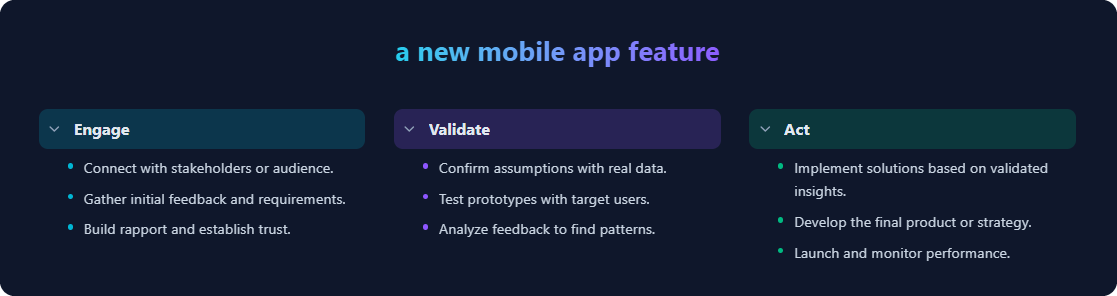
Crafting strategic analyses for frameworks like EVA (Engage, Validate, Act) or GAP (Goal, Action, Progress) has always been a multi-step process. It involved brainstorming content, structuring the points logically, and then spending significant time designing a presentation that was both clear and visually appealing. This manual workflow could be slow and often resulted in designs that lacked professional polish.

Introducing the 3-Aspects Infographic Designer: Your AI-Powered Visual Strategist
Our new AI 3 aspect infographic generator was built to solve this exact problem. It automates the entire process from content generation to design, empowering you to focus on strategy instead of layout. With just a topic and a chosen framework, you can instantly produce a complete and editable infographic.
Here’s how it streamlines your workflow:
- Instant Content Generation: Provide a topic, and our AI will generate a complete three-part analysis with relevant titles and concise bullet points tailored to dozens of strategic frameworks.
- Vast Layout Library: Choose from over 50 professionally designed, visually distinct layouts to find the perfect presentation for your data and audience.
- Full Customization: Every element of the generated infographic is fully editable. You can refine the AI-generated text, change colors, and adjust the layout to perfectly match your needs.
- Export and Share with Ease: Download your finished infographic as a high-resolution PNG or an interactive HTML file to easily share with your team or stakeholders.
How to Access and Use the New Infographic Designer
Getting started is simple. The tool is available for both our desktop and online users.
For Visual Paradigm Online Users:
- Simply visit the 3-Aspects Infographic Designer to get started. (Available for Combo Edition subscribers and above).
For Visual Paradigm Desktop Users:
- From the application menu, select Tools > App.
- Locate and open the 3-Aspects Infographic Designer from the list. (Available for Professional Edition users with active maintenance).
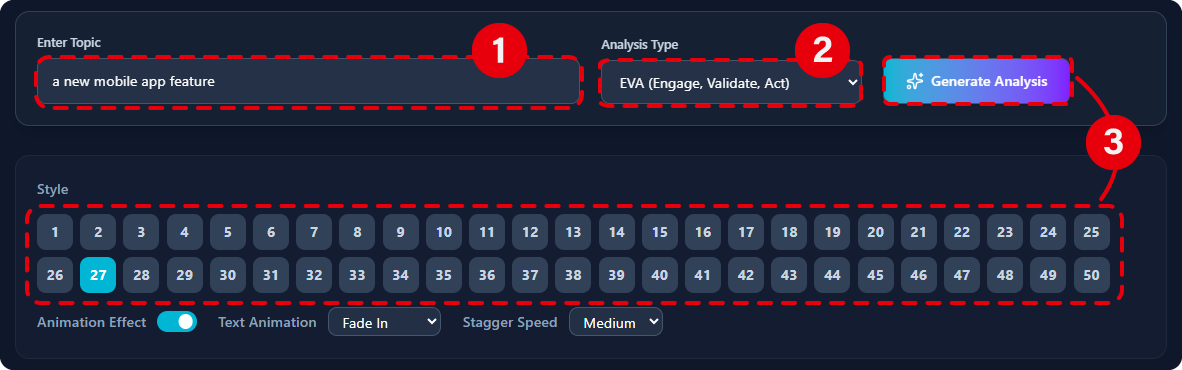
Once you’re in the app, the workflow is just three simple steps:
- Enter Your Topic: Type the subject you want to analyze.
- Select an Analysis Type: Choose from a comprehensive list of strategic frameworks.
- Generate & Customize: Click “Generate Analysis” and watch the AI build your infographic. Then, use the layout switcher to find your favorite design and edit as needed.
Ready to Transform Your Ideas into Compelling Infographics?
The 3-Aspects Infographic Designer is more than just a tool; it’s your new strategic partner. It saves you valuable time, ensures your presentations are always professional, and helps you communicate complex ideas with unparalleled clarity. Stop building from scratch and start generating insights.
To discover all the features and frameworks available, learn more about the 3-Aspects Infographic Designer on our official page.