


We are excited to unveil DBModeler AI, a revolutionary, browser-based environment designed to transform how you approach data modeling and database design. This powerful new feature solves the complexity and tedium of manual schema creation by instantly translating plain English descriptions into a robust, normalized database design. It is the most intuitive database schema generator available, drastically cutting down the time required to move from concept to a tested, reliable database structure.
Start Now Learn More
Addressing the Challenge of Manual and Non-Normalized Design
Historically, creating a well-structured, normalized database schema has been a multi-step, error-prone process. Users faced the challenge of translating business requirements into technical tables, columns, and relationships. This often involved jumping between multiple tools, manually drawing Entity-Relationship (ER) diagrams, and painstakingly checking for normalization rules—a process that was slow, prone to human error, and a major bottleneck for development teams.
Introducing DBModeler AI: Visual, Normalized, and Ready-to-Test
DBModeler AI was built with one goal: to provide an interactive database modeling solution that ensures speed, accuracy, and best practices from the start. It removes the friction of the initial setup, allowing developers and analysts to focus on the structure and integrity of the data itself.
This powerful new environment allows you to:
- Instantly Generate Schemas: Create a full set of diagrams (Domain Class & ER) and tables from a simple description, acting as a phenomenal ER diagram generator.
- Ensure Normalization: Leverage the integrated database normalization tool for step-by-step guidance to ensure your schema is optimized and reliable.
- Test Designs Live: Use the built-in in-browser SQL playground to run test queries against your generated schema with sample data, validating your design instantly.
- Visualize Complex Relationships: Benefit from schema visualization tools that automatically lay out intricate relationships for easy comprehension.
How to Access and Use the New Feature
DBModeler AI is available now for Visual Paradigm users with a Professional Edition license (or higher) and an active maintenance plan. As it is a browser-based application, you can access it from anywhere!
Follow this simple workflow to start designing a normalized database schema immediately:
- Open DBModeler AI in your web browser and log in with your Visual Paradigm account.
- Start a new project by entering a concise, plain English description of your application idea (e.g., “A system to manage gym memberships and classes”).
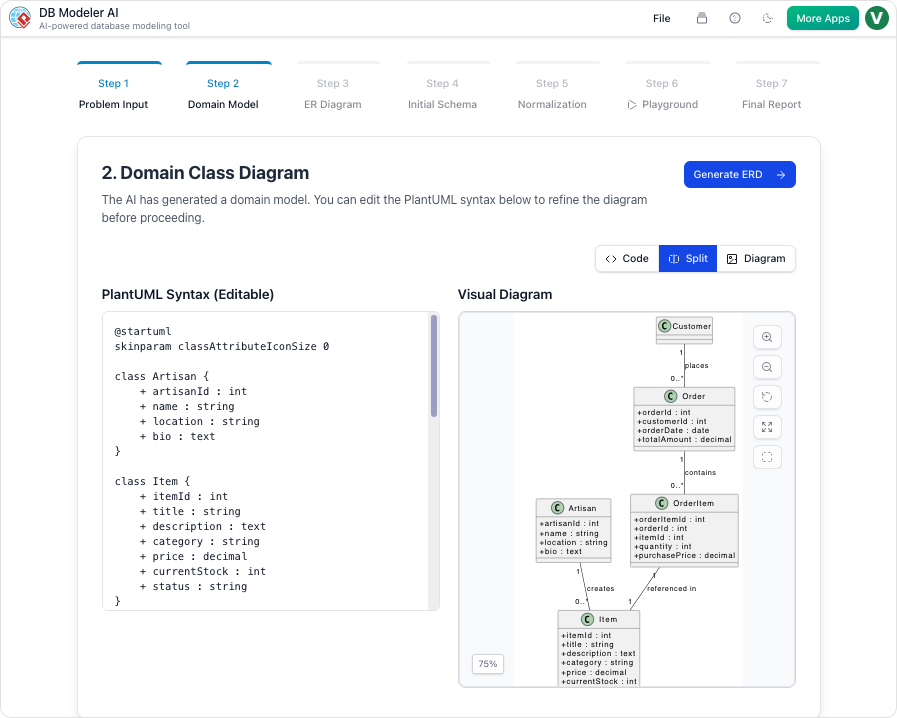
- Review the automatically generated Domain Class Diagram and Entity-Relationship Diagram to visually understand the structure.
- Interactively use the normalization tool to refine your database schema and confirm data integrity.
- Test your design using the live SQL playground.
- Export the final diagrams and generated SQL scripts (PDF/JSON) for implementation.
Ready to Design Your Next Database Schema?
DBModeler AI is more than just a database modeling software; it’s a comprehensive, intelligent visual database design environment built for speed and reliability. We are actively working on exciting future updates, including advanced schema export formats and deeper customization options. Dive in today and see how easy it is to generate a perfect database schema!