


We are thrilled to announce the launch of the AI-Powered C4 PlantUML Studio, a groundbreaking tool designed to revolutionize how you create and manage software architecture diagrams. If you’ve ever found yourself bogged down by the complexities of diagramming syntax, our new AI assistant, integrated within a powerful markdown editor environment for PlantUML, will transform your workflow, saving you time and enhancing clarity in your projects.
✨ Related Update: C4 Modeling Tool Added to Visual Paradigm Desktop. Learn More
Addressing the Challenge of Manual Diagramming
Creating C4 models to map out software architecture is essential for clear communication, but it has traditionally been a manual and often tedious process. Teams spend valuable hours writing and debugging complex PlantUML syntax, ensuring all relationships are correctly mapped, and keeping diagrams up-to-date with evolving systems. This manual effort can slow down development and lead to outdated or inconsistent documentation.
Introducing the AI-Powered C4 PlantUML Studio: Your Architectural Co-pilot
Visual Paradigm’s new AI-Powered C4 PlantUML Studio was built to eliminate this friction entirely. By simply describing your system in plain English, you can now generate comprehensive C4 models in seconds. This allows your team to focus on design and innovation rather than on the mechanics of diagram creation.
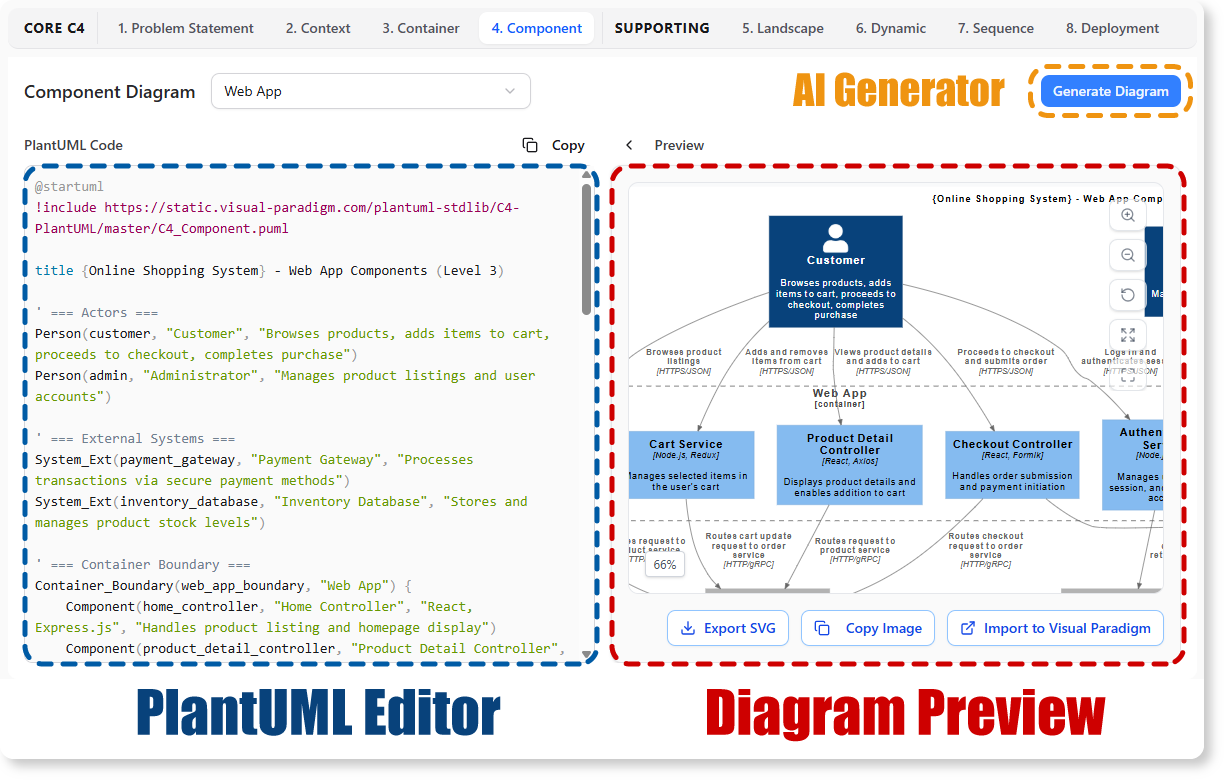
This powerful new feature allows you to:
- Generate Diagrams Instantly: Describe your system components, and let our AI build the Context, Container, Component, and Code diagrams for you.
- Edit with Ease: Refine your diagrams using the intuitive, side-by-side PlantUML editor, which provides a seamless experience much like a specialized markdown editor.
- Ensure Accuracy: Automatically maintain consistency and correct syntax across all levels of your C4 model.
- Accelerate Understanding: Onboard new team members and align stakeholders faster with clear, accurate, and easy-to-produce architectural views.
How to Access and Use the New Feature
Getting started is simple. Here’s how you can access the tool:
- For Visual Paradigm Online users (Combo Edition or higher): Simply navigate directly to the AI-Powered C4 PlantUML Studio.
- For Visual Paradigm (Desktop) users (Professional Edition or higher with active maintenance): Open your desktop application, select “Tools > App” from the application toolbar, and choose the “AI-Powered C4 PlantUML Studio” from the list.
Once inside, the workflow is straightforward:
- Describe the system you want to visualize in the initial prompt field.
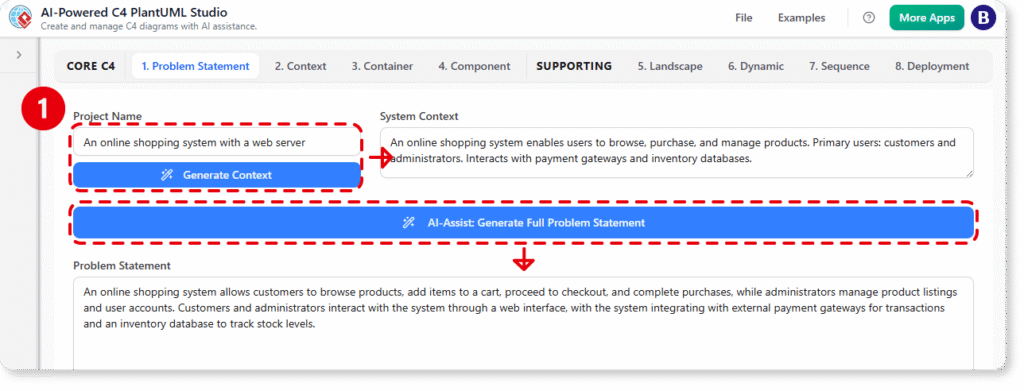
- Our AI assistant will generate the complete C4 model and the corresponding PlantUML code.

- Use the navigator to switch between different diagram levels (Context, Container, etc.).
- Refine the generated code in the editor to perfect your model. The diagram will update in real-time.
Ready to Visualize Your Architecture Instantly?
Stop wrestling with syntax and start designing at the speed of thought. The AI-Powered C4 PlantUML Studio brings a new level of efficiency to software architecture, enabling you and your team to produce clear, professional C4 diagrams with unprecedented ease.
For more detailed guidance, please refer to our support article: Learn more about the AI-Powered C4 PlantUML Studio.
✨ Related Update: C4 Modeling Tool Added to Visual Paradigm Desktop. Learn More