


We are thrilled to announce a significant expansion and the official launch of a revolutionary new capability in Visual Paradigm: the AI Diagram Generator. This powerful feature eliminates the most time-consuming part of system design—the initial manual drawing—by allowing you to instantly generate complex models from a simple text prompt. It’s designed to streamline your modeling workflow, allowing you to transition from a conceptual idea to a fully editable, accurately laid-out diagram in seconds.
 Download Visual Paradigm Desktop
Introducing the Visual Paradigm AI Diagram Generator: Modeling on Demand
We built the AI Diagram Generator to fundamentally change how you approach system modeling. The core purpose is to maximize your productivity by focusing your time on design decisions and refinement, not diagram creation. It serves as your intelligent assistant, instantly translating your intent into a professional, industry-standard diagram.
Now Supporting 13 Diagram Types
The AI Diagram Generator has expanded its capabilities to support a total of 13 diagram types. This robust selection covers core software design, data modeling, business process, and organizational structure:
- Use Case Diagram
- Class Diagram
- State Machine Diagram
- Sequence Diagram
- Requirement Diagram
- Object Diagram
- PERT Chart
- Decision Table (New!)
- Entity Relationship Diagram (ERD) (New!)
- Deployment Diagram (New!)
- Organization Chart (New!)
- EPC Diagram (New!)
- Process Overview Diagram (New!)
How to Access and Use the New Feature
Getting started with this powerful AI UML generator is quick and intuitive. The feature is available to all users with a Professional Edition license (or higher) and an active maintenance plan.
Follow these simple steps to generate your first diagram:
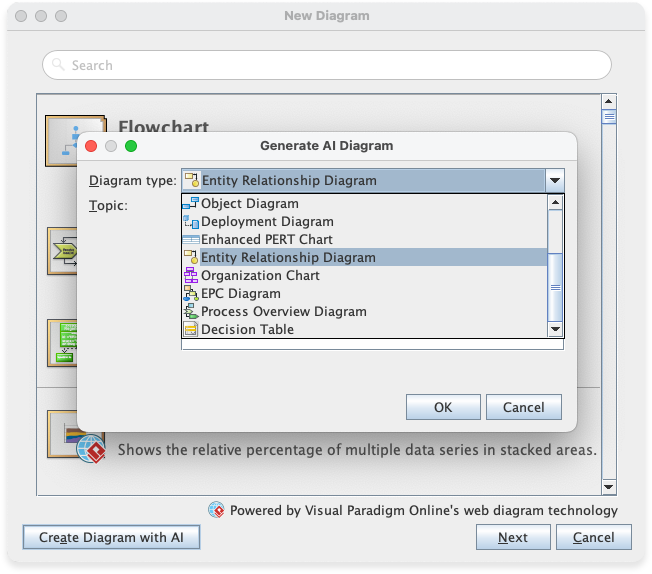
- From the Visual Paradigm main menu, navigate to Tools > AI Diagram.
- Select the desired diagram type from the available options (e.g., Entity Relationship Diagram).
- In the prompt field, clearly enter the topic or system name. For example, you might enter “Online Retail System” or “Hospital Management System.”
- Click OK.
The generator will process your request, create the diagram, and display it with a professional, clean layout, ready for you to continue your detailed design work.
Learn more about this feature release here
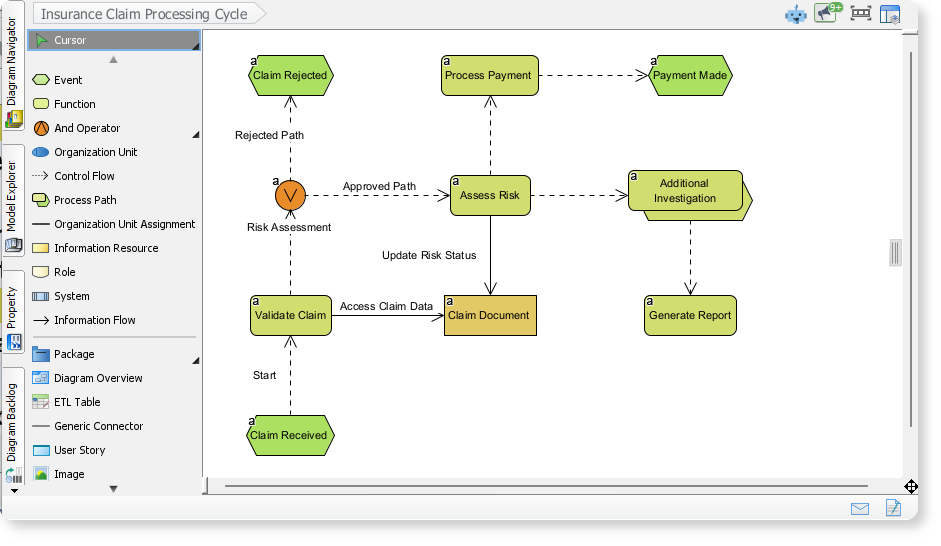
EPC Example: Insurance Claim Processing Cycle
Here is an Event-Driven Process Chain (EPC) created by VP AI Diagram Tool, modelling the complex workflow of an insurance claim. It highlights the sequence of functions (steps) and the events that connect them, detailing decision points, parallel flows, and the different outcomes, from the initial claim receipt to final payment or rejection.
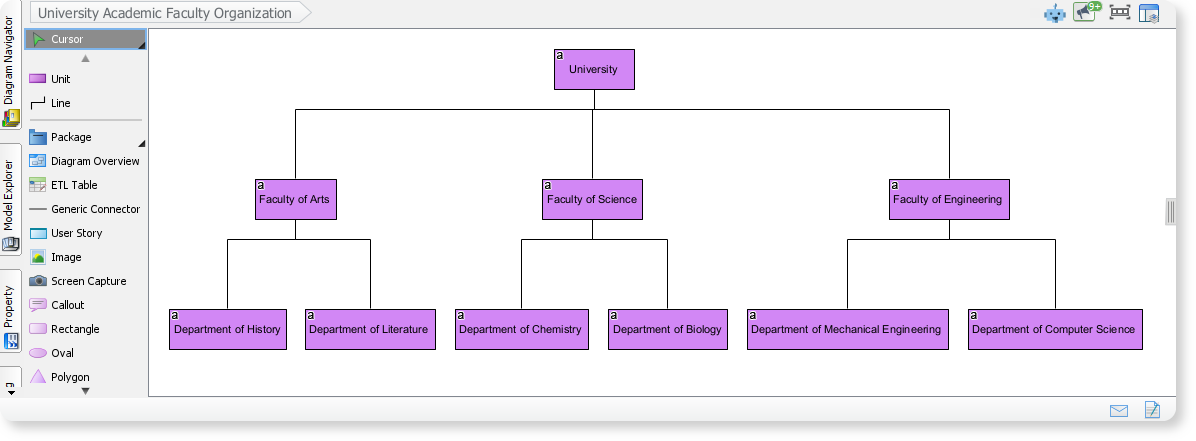
Organization Chart of University Academic Faculty Organization
This organization chart, created with the Visual Paradigm AI Diagram Tool, illustrates the hierarchical structure of a university. It presents key roles such as the faculty and department, providing a clear view of how responsibilities and reporting relationships are organized across the institution.
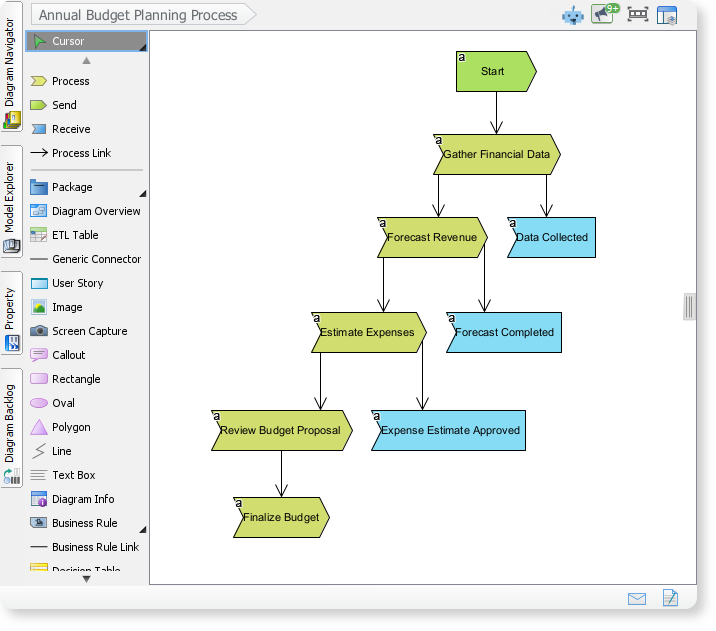
Process Overview Diagram of Annual Budget Planning Process
By Visual Paradigm AI Diagram Tool, we can easily generate diagram that outlines the key stages of an annual budget planning cycle. It shows the sequential flow from gathering financial data, forecasting revenue, and estimating expenses to producing key deliverables, giving a clear view of how each step contributes to the final outcome.
Ready to Transform Your Modeling Workflow?
The Visual Paradigm AI Diagram Generator represents a massive leap forward in modeling efficiency. It’s an indispensable tool for anyone who needs to quickly prototype, document, or analyze a system. With support for 13 diagram types, including the AI Sequence Diagram Generator and AI State Machine Diagram Generator, we are actively working to make your modeling process faster and smarter.
Stay tuned for more updates!