


We are excited to introduce the new User Story Editor, a powerful AI user story tool designed to supercharge your agile development process. This intelligent agile software helps you and your team transform high-level feature ideas into a well-defined backlog, complete with detailed user stories and comprehensive acceptance criteria, making your AI backlog management more efficient and effective than ever.

The Challenge of Building and Managing an Effective Backlog
A healthy product backlog is the heart of any successful agile project. However, the process of breaking down large epics into clear, actionable user stories—and then writing well-defined acceptance criteria for each—is a significant and time-consuming effort. This can lead to an inconsistent backlog, ambiguous requirements, and a development team that is unclear on what to build, ultimately slowing down the entire workflow.
Introducing the AI User Story Tool: Your Partner in Agile Requirements
We built this tool to automate the most tedious parts of backlog creation and refinement. Our AI acts as an expert product owner, helping you apply the “3Cs” of user stories (Card, Conversation, Confirmation) with unprecedented speed. It generates the “Card” (the user story itself) and the “Confirmation” (the acceptance criteria), providing a perfect, structured starting point for the “Conversation” with your team.
- AI-Powered Story Generation: Simply input a high-level feature idea or epic, and our AI will generate a list of relevant user stories, helping you break down complex functionality into manageable pieces for your backlog.
- Automatic Acceptance Criteria: For each generated user story, the AI automatically provides a detailed set of acceptance criteria. This crucial “Confirmation” step ensures that the conditions for a successful implementation are clearly defined from the start.
- Streamline Backlog Management: Drastically reduce the time it takes to populate and refine your product backlog. Go from a rough idea to a set of sprint-ready stories in minutes, not hours.

- Improve Development Clarity: By providing clear, consistent, and well-defined stories with acceptance criteria, you eliminate ambiguity and empower your development team to build the right features, faster.
- A Powerful agile tool for Modern Teams: Perfect for product owners, scrum masters, and agile teams looking to enhance their requirements gathering and backlog management process.
How to Build Your Agile Backlog with AI
Creating well-defined agile requirements is now simpler than ever. Here’s how to access the tool:
- For Visual Paradigm Online users: Navigate directly to the app at https://ai-toolbox.visual-paradigm.com/app/user-story-editor/.
- For Visual Paradigm Desktop users: Open your desktop application, go to the Tools > App menu, and select the User Story Editor.
Note on Availability: This advanced tool is available to Visual Paradigm Online users with a Combo Edition (or higher) subscription. For desktop users, it is available in the Professional Edition (or higher) with active software maintenance.
Once you’re in the app, follow this simple workflow:
- Input Feature Idea: Provide a high-level description of the feature or epic you want to break down into user stories.
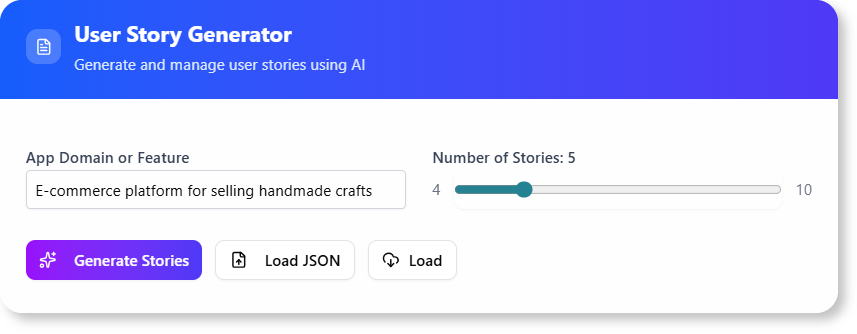
- Generate Stories and Criteria: The AI will process your input and generate a list of user stories, each accompanied by a comprehensive set of acceptance criteria.
- Review and Refine: Review the generated content. You can easily edit any part of the user stories or acceptance criteria to ensure they align perfectly with your project’s needs.
- Export and Integrate: Export your refined user stories for integration into your project management tools or for sprint planning.
Ready to Supercharge Your Agile Workflow?
Eliminate ambiguity and accelerate your development cycle. The AI User Story Tool provides the automated assistance you need to create high-quality user stories and acceptance criteria, leading to a healthier backlog, clearer requirements, and more efficient sprints. Build better software, faster, today.
Learn More:
Discover more about the User Story Editor and the 3Cs framework for writing effective user stories.