


Streamline System Analysis with Yourdon and DeMarco Data Flow Diagram Support
We are delighted to introduce a major enhancement to Visual Paradigm Desktop: dedicated support for the Yourdon and DeMarco Data Flow Diagram (DFD) notation. This powerful addition is designed to bring greater speed and standardization to your structured system analysis. By providing an optimized environment for Yourdon-DeMarco modeling, you can now effortlessly visualize processes, data flows, and external entities, leading to clearer, more precise system documentation.
Download Visual Paradigm Desktop
Addressing the Challenge of Non-Standardized Process Modeling
Prior to this update, users who needed to strictly follow the Yourdon-DeMarco methodology often encountered friction. While Visual Paradigm is highly flexible, constructing these specific DFDs using generic tools required extra manual effort and attention to detail to ensure notational accuracy.
- Compliance Difficulty: Achieving strict adherence to the Yourdon-DeMarco standard could be time-consuming, requiring users to manually verify that the correct symbols and syntax were used.
- Presentation Inefficiencies: Spending time on manual formatting, alignment, and layout took away from the core task of deep process analysis.
- Model Inconsistency: Lack of dedicated tools made it harder to maintain a uniform style across large or distributed models, potentially leading to miscommunication.
Introducing Yourdon and DeMarco Data Flow Diagrams: Effortless Structured Analysis
Our goal with this new feature is simple: to make structured system analysis *effortless*. The new Yourdon and DeMarco Data Flow Diagram support ensures that model rigor and ease-of-use go hand-in-hand. This feature was built to significantly reduce the time spent on diagram maintenance and increase the focus on system logic.
This specialized DFD support allows the user to:
- Drag-and-Drop Modeling: Effortlessly drop in standard Yourdon-DeMarco elements—processes, data stores, and external entities—to quickly build your system model.
- Refine Diagrams Easily: Use built-in snapping guides and precise formatting controls to ensure your diagrams are always clean and professional.
- Promote Reusability: Rely on Visual Paradigm’s core functionality to reuse modeling components across diagrams, ensuring consistency and saving time.
- Focus on Logic, Not Layout: Utilize smart alignment and layout tools to keep your complex, hierarchical DFDs clean and structured, letting you focus entirely on the system logic.
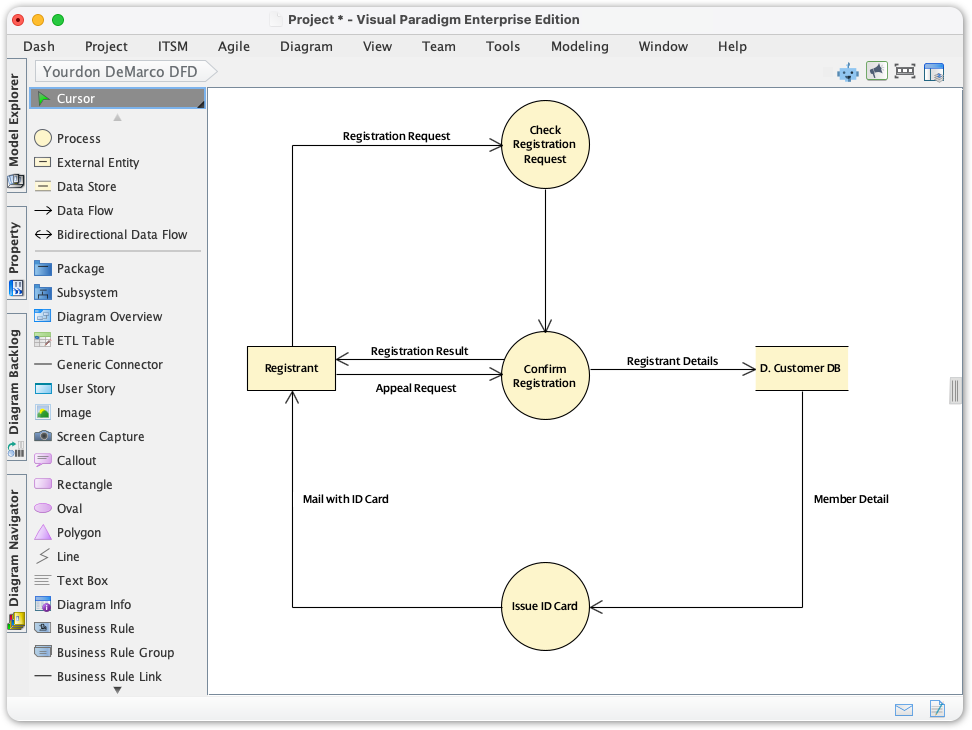
How to Access and Use the New Feature
Starting your next structured analysis project with the Yourdon and DeMarco DFD is straightforward. Follow these steps within Visual Paradigm Desktop:
- Click on the Diagram menu in the top toolbar.
- Select New.
- Type in Yourdon DeMarco.
Ready to Analyze and Document Your Systems?
The addition of the Yourdon and DeMarco Data Flow Diagram notation reaffirms our commitment to providing world-class tools for every stage of system development. You now have a dedicated, intuitive, and powerful way to visualize complex system processes. Dive into Visual Paradigm Desktop today and experience streamlined, standards-compliant structured analysis!