


Sprint demonstrations often feel chaotic, leaving stakeholders disengaged and valuable feedback lost. To solve this, we are thrilled to introduce the Agile Demonstration Session Planner, a new, completely free agile tool designed to bring structure, clarity, and impact to your sprint reviews. This guided planner ensures every demo is a productive, collaborative session that drives your project forward.
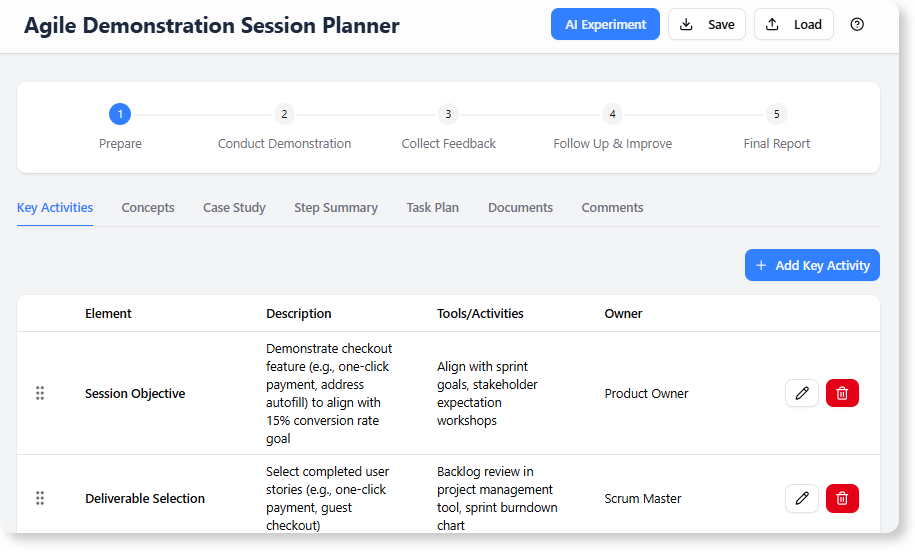
Addressing the Challenge of Unstructured Sprint Demos
Teams frequently struggle with preparing for sprint demos. The process can be a last-minute scramble, resulting in presentations that lack a clear narrative. This leads to stakeholder confusion, unfocused feedback, and a failure to capture the true value of the team’s hard work.
Without a structured approach, critical follow-up actions are often missed, and the demo becomes a status report rather than a strategic opportunity for alignment and improvement.
Introducing the Agile Demonstration Session Planner: Your Guide to Flawless Sprint Reviews
We built this planner to eliminate the guesswork and provide a repeatable framework for success. It guides your team through a comprehensive four-step process, ensuring all bases are covered—from preparation and execution to feedback collection and continuous improvement.
With this new free agile software, your team can:
- Plan with Precision: Follow a structured, four-step workflow (Prepare, Conduct, Collect Feedback, Follow Up) to build a comprehensive session plan.
- Leverage AI for Insights: After documenting your findings, use the integrated AI to generate summaries, identify key responsibilities, and automatically populate your task plan.
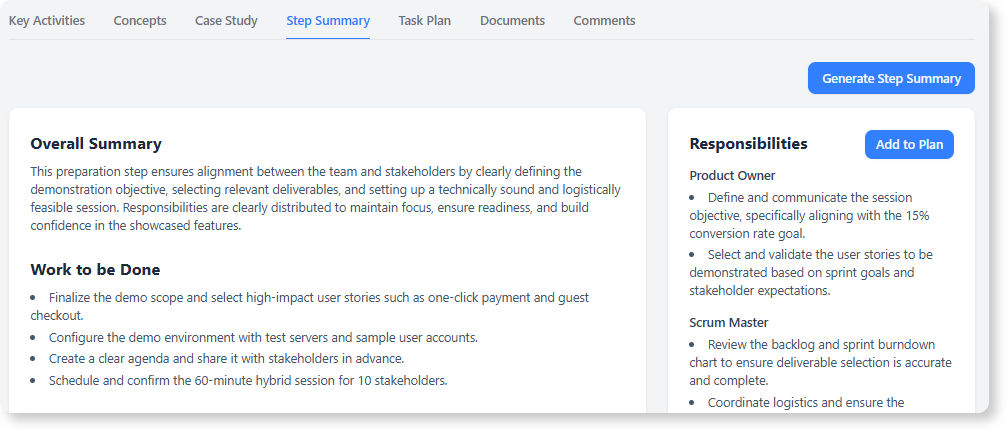
- Collaborate Seamlessly: Keep all relevant information in one place by capturing stakeholder comments and linking to essential documents directly within each step.
- Generate Professional Reports: Instantly create a polished, detailed report of your entire demonstration plan, perfect for sharing with attendees or for archival purposes.
How to Access and Use the New Planner
Getting started is simple. As this is a free agile tool, it is available to all Visual Paradigm users.
- For Visual Paradigm Online users: Simply navigate to the Agile Demonstration Session Planner to get started.
- For Visual Paradigm (Desktop) users: Select “Tools > App” from the main menu and choose the “Agile Demonstration Session Planner” from the list.
Once inside, the intuitive workflow guides you through filling out the “Findings” for each of the four steps. After that, use the AI summary feature to validate your plan and automatically create actionable tasks. When you’re done, the final report is just a click away.
Ready to Transform Your Sprint Demos?
Move beyond simple presentations and start running strategic sessions that align your team and impress stakeholders. The Agile Demonstration Session Planner provides the structure you need to ensure every sprint review is a valuable step towards delivering an exceptional product.
For a detailed guide on every feature, check out our support article on the Agile Demonstration Session Planner.