


Manually creating hierarchical diagrams can be a time-consuming and meticulous process. Today, we’re thrilled to change that by launching the AI Tree Diagram Maker, a powerful new tool designed to transform your text-based ideas into polished, professional diagrams in seconds. Now, you can generate a tree diagram with AI, allowing you to focus on your data, not on drawing and formatting.

Addressing the Challenge of Manual Diagramming
For project managers, developers, and strategists, building structures like Work Breakdown Structures (WBS), organizational charts, or mind maps has always involved significant manual effort. Dragging, dropping, and aligning countless nodes and connectors can slow down the ideation process and take valuable time away from more critical tasks.
This traditional method often becomes a bottleneck, especially when dealing with complex or rapidly evolving structures that require constant updates.
Introducing the AI Tree Diagram Maker: Your Smart Assistant for Hierarchies
We built the AI Tree Diagram Maker to eliminate this friction entirely. By leveraging the power of generative AI, this smart tool automates the creation process, allowing you to visualize complex information instantly. It’s not just a drawing tool; it’s a productivity engine.

With the new AI Tree Diagram Maker, you can:
- Convert Text to Diagrams Instantly: Simply provide a topic, and the AI will generate a complete, multi-level tree diagram for you.
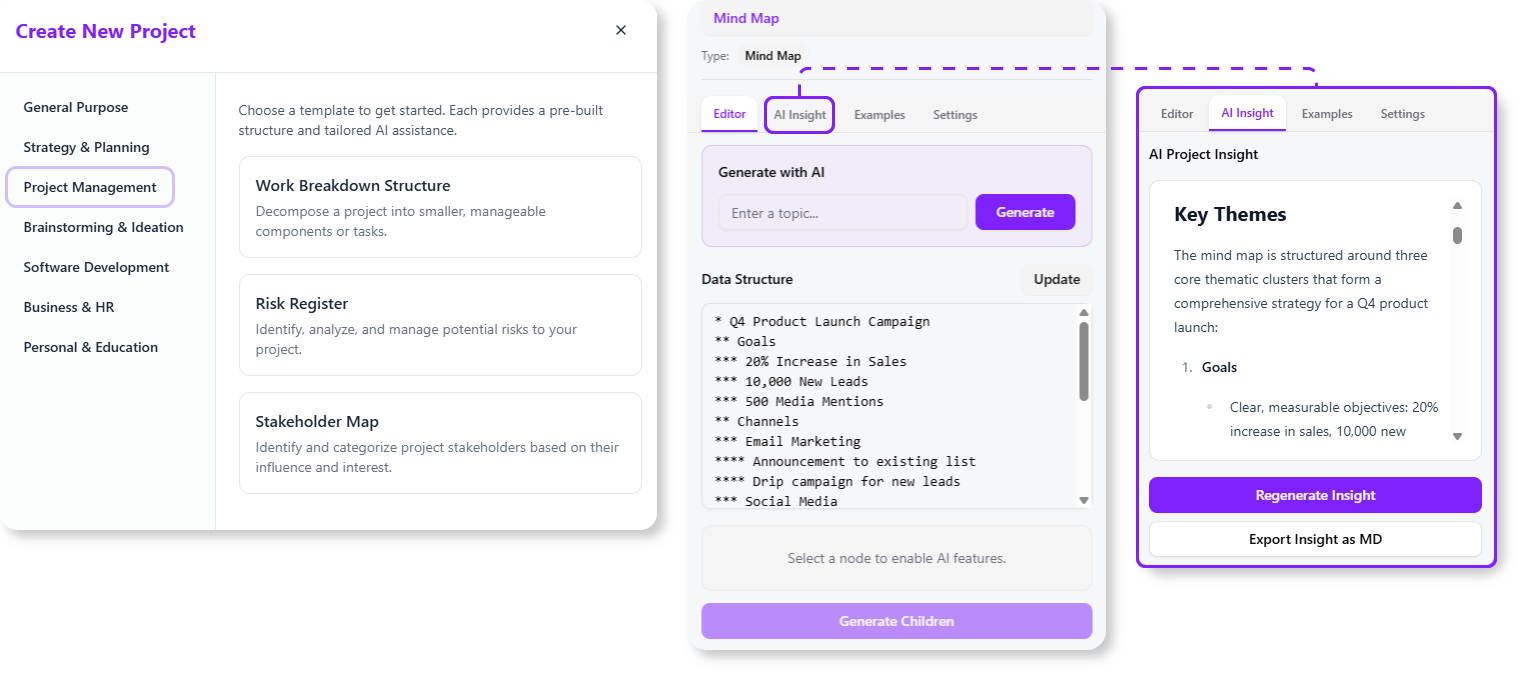
- Expand Ideas Effortlessly: Select any node in your diagram and use the “Generate Children” feature to let the AI brainstorm and add relevant sub-tasks or ideas.
- Gain Deeper Understanding: Utilize the “AI Insight” feature to get an expert analysis of your structure, identifying potential risks, bottlenecks, or areas for improvement.
- Choose Your Framework: Start with specialized templates for Work Breakdown Structures, Mind Maps, Requirements Management, Org Charts, and more.
- Customize and Refine: Easily edit the generated diagram through a simple text editor or a detailed property panel to match your exact needs.
How to Access and Use the New Feature
Getting started is simple. The AI Tree Diagram Maker is now available to our users. Here’s how you can access it:
- For Visual Paradigm Online Users: Simply navigate directly to the AI Tree Diagram Maker app to begin. This feature is available to all users with a Combo Edition subscription or higher.
- For Visual Paradigm (Desktop) Users: Open your desktop application, navigate to Tools > Apps from the main menu, and select the AI Tree Diagram Maker. This feature is available for users with a Professional Edition or higher and an active maintenance contract.
Once you’re in the app, the workflow is intuitive:
- Choose a template that fits your goal (e.g., Work Breakdown Structure).
- Enter your main topic in the AI generation field.
- Click “Generate” and watch the AI build your diagram.
- Fine-tune the results by editing the text or using the AI to expand specific branches.
Ready to Build Your Diagram in Seconds?
The AI Tree Diagram Maker is more than just a new feature—it’s a smarter, faster way to work. By automating the most tedious parts of diagramming, it frees you to focus on strategic thinking, planning, and collaboration. Stop drawing and start creating.
Essential Links and Next Steps
- Documentation: Learn more about the AI Tree Diagram Maker and its capabilities.