


Creating compelling presentations can be a time-consuming process, from structuring content to finessing visual details. That’s why we’re thrilled to launch our new AI Markdown Presentation Maker, a powerful tool designed to transform your ideas into animated, professional-grade presentations with unprecedented speed and simplicity. Say goodbye to manual slide creation and let AI do the heavy lifting for you.
Addressing the Challenge of Tedious Slide Creation
We know that building a presentation from scratch is often a major roadblock. You might spend hours outlining content, fighting with formatting, searching for the right design, and ensuring every slide is visually consistent. This manual effort not only consumes valuable time but can also stifle the creative process, turning a dynamic idea into a static, uninspired deck.
Introducing the Presentation Generator: Your Intelligent Design Partner
The AI Markdown Presentation Maker was built to eliminate these frustrations entirely. By integrating the power of AI with the simplicity of Markdown, we’ve created a seamless workflow that automates both content generation and slide design. It’s more than just a tool; it’s your personal presentation assistant.
With our new presentation generator, you can:
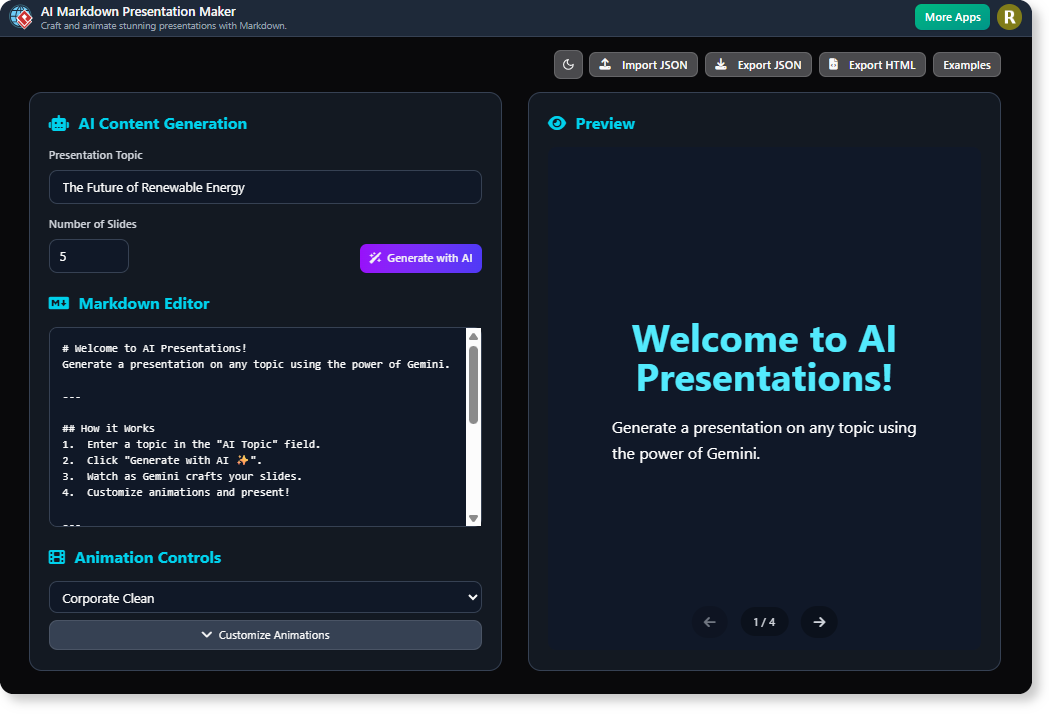
- Generate an Entire Presentation from One Topic: Simply provide a topic, and our AI will generate a complete, well-structured set of slides, including titles and informative content.
- Effortlessly Edit with Markdown: Enjoy a clean, intuitive editing experience using simple Markdown syntax. Focus on your message without getting bogged down by complex formatting tools.
- Customize Animations and Transitions: Choose from a wide array of animation profiles and fine-tune effects for headings, body text, and images to bring your presentation to life.
- Download a Standalone HTML File: Export your finished presentation as a single, self-contained HTML file that can be opened and presented anywhere, on any device, without needing special software.

How to Access and Use the New Feature
Getting started is quick and easy. Depending on how you use Visual Paradigm, follow the steps below:
For Visual Paradigm Online Users:
- Simply navigate to the AI Markdown Presentation Maker to get started.
For Visual Paradigm (Desktop) Users:
- From the application menu, select Tools > App.
- Find and open the AI Markdown Presentation Maker from the list.
Once you’re in the app, the workflow is simple:
- Enter your presentation topic in the “AI Topic” field.
- Click “Generate with AI ✨”.

- Refine the generated content in the Markdown editor.
- Select an animation profile or customize effects to your liking.
- Click “Update Preview” to see your changes and download the final HTML file.
Ready to Revolutionize Your Presentations?
Stop spending hours on manual slide design and start creating beautiful, animated presentations in minutes. Our AI Markdown Presentation Maker empowers you to communicate your ideas more effectively and efficiently, giving you back the time to focus on what truly matters: your message.
Learn More: Read our detailed guide on the AI Markdown Presentation Maker.
This feature is available to Visual Paradigm Online users with a Combo Edition (or higher) subscription, and to Visual Paradigm (Desktop) Professional Edition (or higher) users with active maintenance.